20

One recurrent problem I'm having with displays generated with TreeForm is that the expressions to be so displayed often at least one level with many (> 20) nodes at, which results in many overlapping labels that obscure each other.1

One simple way to mitigate the problem would be to display the same tree "sideways" (i.e., rotated 90 degrees, as would be the case if the display had been generated by a TreePlot command with the Left orientation parameter, for example). Of course, for this strategy to be at all useful, it is necessary that only the geometrical arrangement of the nodes and edges be rotated, not the labels. The latter should remain in the standard "horizontal"/left-to-right/text orientation.

I'm stymied by the fact that the output of TreeForm only looks like a Graphics object, but isn't really one. Is there a way to get Mathematica to return the Graphics object corresponding to the displayed image? Better yet would be to get the equivalent TreePlot command.

EDIT:

1 For example, the following shows the kind of tree I'm trying to work with:

g = Plot[{Sin[x], Sin[2 x], Sin[3 x]}, {x, 0, 2 Pi},
         PlotStyle -> {Red, Green, Blue}];
TreeForm[g /. x_ /; And @@ NumericQ /@ x :> x[[0]] /. x_[List] :> x]
Ian Ford
  • 521
  • 5
  • 3
kjo
  • 11,717
  • 1
  • 30
  • 89
  • What do you mean by "the output of TreeForm only looks like a Graphics object, but isn't really one."? It is made up of graphics primitives... Did you mean to say it looks like a Graph object, but isn't one? – rm -rf Sep 20 '13 at 19:06
  • @rm-rf: Maybe I'm not interpreting what I'm seeing correctly, but if I run TreeForm[x+y], and then run FullForm[%], what I get is Plus[x, y], and not Graphics[...]. This suggests that TreeForm does not really produce a Graphics object, but is merely a display directive... Again, I may not be interpreting what I'm seeing correctly... – kjo Sep 20 '13 at 19:22

5 Answers5

20

Here's a possible way, using TreeForm directly, and with VertexRenderingFunction. I think this is what you describe in your second paragraph. I hope this is useful to you

TreeForm[1 + Sin[x^2], 
  VertexRenderingFunction -> (Inset[Panel@Rotate[#2, -π/2], #1] &)] //
    Rotate[#, π/2] &

enter image description here

Mr.Wizard
  • 271,378
  • 34
  • 587
  • 1,371
Pinguin Dirk
  • 6,519
  • 1
  • 26
  • 36
20

ExpressionTreePlot (update, thanks to @Belisarius)

The GraphUtilities` package contains a function that will do the trick:

Needs["GraphUtilities`"]
ExpressionTreePlot[1+Sin[x^2], Left]

ExpressionTreePlot screenshot

ExprTreePlot (my original response)

If you do not mind using an undocumented function, then Network`GraphPlot`ExprTreePlot can do the job:

Network`GraphPlot`ExprTreePlot[1+Sin[x^2], Left]

ExprTreePlot screenshot

The arguments to this function are:

ExprTreePlot[expr_, orientation_:Top, maxlevel_:Infinity, format_:StandardForm, options___]

Of course, all the usual caveats apply: there is no official support, the feature may be removed from future versions, etc. But it gives us convenient access to all the usual choices for root node placement:

Table[
  Network`GraphPlot`ExprTreePlot[1+Sin[x^2], orientation]
, {orientation , {Left, Right, Top, Bottom, Center}}
] // GraphicsColumn[#, ImageSize -> {200, Automatic}, Frame -> All]&

ExprTreePlot screenshot

Recovering the TreePlot

As an alternative, we could extract the TreePlot generated by TreeForm. The complication is that TreeForm is an inert wrapper. The generation of the TreePlot happens when the front-end creates the box form. The good news is that we can use MakeBoxes to extract the TreePlot in held form:

Block[{TreePlot}
, t_TreePlot := Throw @ Hold @ t
; Catch @ MakeBoxes @ TreeForm[1+Sin[x^2]]
]

(*
Hold[TreePlot[
{{"Plus","0","         2\n1 + Sin[x ]"}->{"1","1","1"},...},
Top,
{"Plus","0","         2\n1 + Sin[x ]"},
AlignmentPoint->Center,
AspectRatio->Automatic,
...]]
*)

Beware that the recovered TreePlot expression may use undocumented constructs that generate (harmless) warnings. Such warnings are normally muffled by the front-end's box generation process.

WReach
  • 68,832
  • 4
  • 164
  • 269
  • I've added a section on how to recover the TreePlot. – WReach Sep 21 '13 at 03:46
  • I've simplified the code used to recover the TreePlot. – WReach Apr 11 '14 at 14:41
  • I think it's documented here http://reference.wolfram.com/mathematica/GraphUtilities/tutorial/GraphUtilities.html – Dr. belisarius Apr 14 '14 at 12:12
  • @belisarius Thanks for the pointer... I've updated my response. – WReach Apr 14 '14 at 14:13
  • @WReach, as of M10, ExpressionTreePlot is deprecated: http://reference.wolfram.com/language/GraphUtilities/ref/ExpressionTreePlot.html – alancalvitti Jun 26 '14 at 14:05
  • @alancalvitti Thanks for the pointer. The docs say that the functionality has been moved to the core system, but I see no sign of it in the WolframCloud. I'll try to remember to check V10 when it comes out and update my response accordingly. – WReach Jun 27 '14 at 01:23
16

Similar to Pinguin Dirk answer but with the standard style

RotatedTreeForm[x_] := 
  Rotate[TreeForm[x, 
    VertexRenderingFunction -> (Rotate[
        Inset[Framed[Style[#2, "StandardForm", "Output", 
           FontSize -> Scaled[0.1]], Background -> LightYellow, 
          FrameStyle -> GrayLevel[0.5]], #1], -\[Pi]/2] &)], \[Pi]/2];

Cos[Exp[x]] // RotatedTreeForm

enter image description here

ybeltukov
  • 43,673
  • 5
  • 108
  • 212
5

Version 12.3 added the experimental function ExpressionTree to convert an expression to a Tree object. Version 13 added the TreeLayout option that can be used to specify the root position. In version 14, the tree is automatically reflected so that the children are always ordered left-to-right or top-to-bottom, as appropriate. Version 13.1 added the TreeElementLabelFunction option which can be used to apply a function to the data to generate the label; e.g. Shallow. And version 13.2 added the MaxDisplayedChildren option to limit the number of children to display.

Here's a simple example of ExpressionTree:

ExpressionTree[1 + Sin[x^2], TreeLayout -> Left]

ExpressionTree of one plus sine of x squared with root position Left

Here's a more complicated example using these options to manage the complexity:

g = Plot[{Sin[x], Sin[2 x], Sin[3 x]}, {x, 0, 2 Pi}, PlotStyle -> {Red, Green, Blue}];

ExpressionTree[g, TreeLayout -> Left, TreeElementLabelFunction -> All -> (data |-> Shallow[data, 2]), MaxDisplayedChildren -> All -> 3, ImageSize -> Large]

ExpressionTree of a complicated Plot

Ian Ford
  • 521
  • 5
  • 3
4

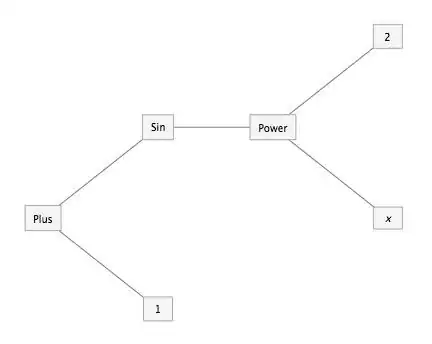
Using the undocumented function SparseArray`ExpressionToTree

expr = 1 + Sin[x^2];
ett = SparseArray`ExpressionToTree[expr];
(* {{Plus,0,1+Sin[x^2]}->{1,1,1},
   {Plus,0,1+Sin[x^2]}->{Sin,2,Sin[x^2]},
   {Sin,2,Sin[x^2]}->{Power,3,x^2},
   {Power,3,x^2}->{x,4,x},
   {Power,3,x^2}->{2,5,2}}*)

edges = ett[[All, All, 1]];
(* {Plus->1,Plus->Sin,Sin->Power,Power->x,Power->2} *)

Graph[edges, 
  VertexLabels -> Placed["Name", {Center, Center}],
  VertexSize -> {"Scaled", .12}, VertexLabelStyle -> 20,
  VertexShapeFunction -> "Rectangle",
  GraphLayout -> {"LayeredEmbedding", "RootVertex" -> edges[[1, 1]],"Orientation" -> Left},
  ImagePadding -> 20, ImageSize -> 600]

enter image description here

Note: This works in Version 9.0.1.0.

kglr
  • 394,356
  • 18
  • 477
  • 896