I have about 1,000,000,000 points, which are the longitudes and latitudes of some places in a city, formatted like this: $(106.1231233,41.43234234)$. I also have about 20,000 points which are the longitudes and latitudes of some special places in this city. For every item in the 1,000,000,000 point data set, I have to compute which point in the 20,000 point data set is the nearest. If I were to compute on a brute-force, one by one basis, it might not complete during my lifetime. Is there an algorithm which can make this job less time-consuming? Can anyone help me?
Asked
Active
Viewed 533 times
5


1 Answers
5
Edit:
After reading about geodetic conversions, I decided to do a major rewrite. Earlier versions can be found by clicking on the "edited…" link. No claims are made about speed.
My intuitions about Geodesy are rudimentary, so I relied on ideas encountered at Latitude and Stack Exchange. I also
benefited from advice given by @Rahul Narain. Kuba also pointed me to an efficiency shortcut that Belisarius had recently used.
(*Generate a random longitude in decimal degrees *)
rx:=RandomReal[{106.1000000000,106.2000000000},WorkingPrecision->10]

(*Generate a random latitude in decimal degrees *)
ry:=RandomReal[{41.4000000000,41.5000000000},WorkingPrecision->10]

(*radius of earth in km *)
r=6371;

(* 15 city points and 5 landmarks in Cartesian (XYZ) format *)
citypoints={r Cos[#2 Degree] Cos[# Degree],r  Cos[#2 Degree]Sin[# Degree],r Sin[#2 Degree]}&@@@Array[{rx,ry}&,15];
landmarks={r Cos[#2 Degree] Cos[# Degree],r  Cos[#2 Degree]Sin[# Degree],r Sin[#2 Degree]}&@@@Array[{rx,ry}&,5];

(* precomputed function for landmarks, to be used in Nearest *)
near=Nearest[landmarks];

(* each city point and its closest landmark *)
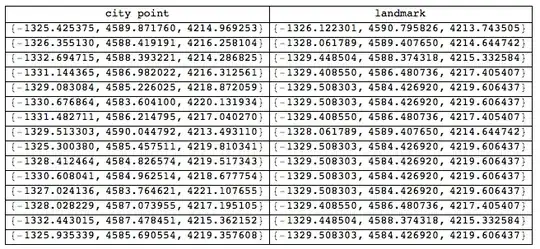
Grid[Prepend[{#,Nearest[landmarks,#][[1]]}&/@citypoints,{"city point","landmark"}],Dividers-> All]
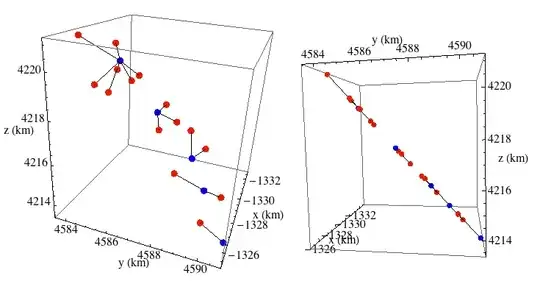
Plot the city points and landmarks. The origin is the center of the earth. x, y, z given in km. The picture in the right pane shows that the points appear to lie on a plane. Of course, we know they lie on a sphere (or ellipsoid), but the curvature of the earth is imperceptible at this scale and point of view. (Remember: all the points lie in a single city.)
(* city points in red, landmarks in blue.  Lines connect each city point to the closest
landmark *)
Graphics3D[{Red,PointSize[.03], Point@citypoints,Blue,Point@landmarks,
Black,Line[{#,Nearest[landmarks,#][[1]]}&/@citypoints]},AxesLabel->{"x","y","z"},BoxRatios->{1,-1,-1},Axes-> True,ViewPoint->{2,.5,.5}]


-
1It will definitelly be faster if you precalculate
NearestFunction:near = Nearest[landmarks]; ({#, near[#]} & /@ citypoints). Belisarius showed this lately – Kuba Oct 25 '13 at 09:49 -
2You'll have to use
NearestwithGeoDistanceas the distance metric, not Euclidean. This will slow things down tremendously! – rm -rf Oct 25 '13 at 10:44 -
Presuming the long/lat, minutes, and seconds are converted to a single decimal, why won't euclidean work? Besides, isn't this a one-off computation? – DavidC Oct 25 '13 at 11:34
-
We are talking about 10^9 points here. I don't think the most obvious approaches will be useful here ... – Dr. belisarius Oct 25 '13 at 12:30
-
1@DavidCarraher Because 1 minute E from (0,0) is not the same distance as 1 minute N from (0,0). This difference only gets worse the closer you get to the poles.
GeoDistancewill tell you that, whereasEuclideanDistancewill consider them both equally distant. – rm -rf Oct 25 '13 at 15:37 -
1Since the points represent "some places in a city" and so are likely to be quite close together relative to the size of the Earth, it might be enough to scale the longitudes by $\cos\phi_m$, where $\phi_m$ is the mean latitude, and then continue to use Euclidean distances, no? https://en.wikipedia.org/wiki/Geographical_distance#Spherical_Earth_projected_to_a_plane – Oct 25 '13 at 17:14
-
-
@Rahul. Yes, good advice. (Although I used different conversion formulas from decimal degrees to XYZ). Fortunately, Nearest can also handle distances in 3-space. – DavidC Oct 27 '13 at 13:51
-
This is a nice approach, but your conversion formulas are incorrect, as you can see by the fact that
ParametricPlot3D[{r Cos[#2 Degree], r Cos[# Degree], r Sin[#]} & @@ {lon, lat}, {lon, -180, 180}, {lat, -90, 90}]is not a sphere. The formulas should be{r Cos[#1 Degree] Cos[#2 Degree], r Cos[#1 Degree] Sin[#2 Degree], r Sin[#1 Degree]} &instead. Also you might want to useBoxRatios -> Automaticin the plot so that distances are shown without distortion. – Oct 27 '13 at 17:47 -
@RahulNarain. Thanks. That was due to sloppiness as well as misunderstanding the full meaning of the conversion formula. I did test the current formula using your criterion and it did produce a sphere, so I'm fairly certain that it now works. – DavidC Oct 27 '13 at 20:03
Nearest. – DavidC Oct 25 '13 at 09:34Nearest. If it is about algorithms and data structures, then I'd say it's off topic here and there are answers on StackOverflow here. – Szabolcs Oct 25 '13 at 16:26Nearest[<reference set>]. Depending on specifics of locations, you may need to make adjustments to account for the fact that (long,lat) is not a Euclidean grid and moreover there is a singularity (crossover) for longitude. – Daniel Lichtblau Oct 25 '13 at 16:42