I'd like to automatically generate a graph where vertices correspond to (and have the coordinates of) points in an $A \times B$ integer lattice, and a graph is generated by connected vertices within a real-valued cutoff distance $r$. Is there a (relatively) automated manner of doing this in Mathematica v9? How can we display this graph properly, respecting the vertex coordinates?
Asked
Active
Viewed 1,462 times
5

-
What is a "random geometric graph"? – Dr. belisarius Nov 08 '13 at 13:16
-
@belisarius That was a foolish mistake. I meant that the rules for connecting vertices should be the same as in a random geometric graph (connect vertices if the distance between them is $\leq r$). – user10456 Nov 08 '13 at 13:45
3 Answers
4
Make an integer lattice:
pts = Tuples[Range[10], 2]; (* maybe you want Tuples[{A,B}] *)
distances =
  With[{tr = N@Transpose[pts]},
   Function[point, Sqrt[Total[(point - tr)^2]]] /@ pts];
Construct the graph:
threshold = 2;
SimpleGraph[AdjacencyGraph@UnitStep[threshold - distances], VertexCoordinates -> pts]
SimpleGraph is used to get rid of self loops.


2
By using Graph primitives.
g = GridGraph[{8, 9}];
vc = PropertyValue[{g, #}, VertexCoordinates] & /@ VertexList[g];
g1 = EdgeDelete[g, EdgeList[g]];
g2 = Fold[SetProperty[{#1, #2[[1]]}, VertexCoordinates -> #2[[2]]] &,
                                                               g1, Transpose[{VertexList[g], vc}]]
cutoff = N@Sqrt[2];
f = Nearest[vc -> Automatic];
allEdgeSet = f[#, {Infinity, cutoff}] & /@ vc;
formattedEdges = Thread[UndirectedEdge[#[[2 ;;]], #[[1]]]] & /@ allEdgeSet;
randomEdges = DeleteDuplicates[Sort /@ Flatten[RandomSample[#, 2] & /@ formattedEdges]];
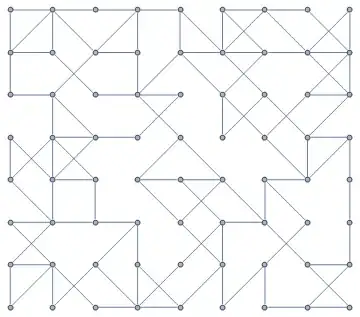
EdgeAdd[g2, randomEdges]

Dr. belisarius
- 115,881
- 13
- 203
- 453
-
What version of Mathematica are you using? For some reason, copy pasting this code, and using a fresh kernel,
GridGraphis colored red and doesn't seem to work? – user10456 Nov 08 '13 at 14:25 -
@user10456 Mathematica v9. GridGraph was introduced in version 8 – Dr. belisarius Nov 08 '13 at 14:43
-
I owe you an apology, I left in a line asking the Combinatorica package to load. Removing it fixed the problem. – user10456 Nov 08 '13 at 14:44
-
@user10456 Yep, that's a common problem. "Combinatorica clashes" :) – Dr. belisarius Nov 08 '13 at 14:45
2
General solution
I propose a general multidimensional solution with possibility to set periodic boundary conditions (I use a similar function in my own problem).
lattice[L_List, r_: 1] :=
 With[{d = Length[L], LL = Reverse@FoldList[Times, 1, Reverse@Abs@L][[1 ;; -2]]},
  With[{δ = Pick[#, UnitStep[# - 1] UnitStep[r^2 - #] &@Total[#^2, {2}], 1] &@
    Tuples[Range[-#, #] &@Ceiling[r], d]},
   Module[{Id = Join @@ Table[Transpose[{#, # + δ[[i]]}, {2, 3, 1}], {i, Length[δ]}] &@
     Transpose@Tuples[Range /@ Abs[L]] - 1},
    Do[If[L[[i]] > 0,
      Id = Pick[Id, UnitStep[#] UnitStep[L[[i]] - 1 - #] &@Id[[All, 2, i]], 1],
      Id[[All, All, i]] = Mod[Id[[All, All, i]], -L[[i]]]], {i, d}];
    SparseArray[1 + Id.LL -> ConstantArray[1, Length[Id]]]
   ]]]
It returns the adjacency matrix for lattice with dimensions L (e.g. {10,5}).
Examples
1D lattice with 10 vertices
AdjacencyGraph@lattice[{10}]

1D lattice with 10 vertices with periodic boundary conditions (denoted by negative lengths)
AdjacencyGraph@lattice[{-10}]

1D lattice with 10 vertices with periodic boundary conditions and r = 2 (default value is 1)

$a\times b$ 2D lattice (OP's question)
a = 10;
b = 5;
r = 1.5;
AdjacencyGraph[lattice[{a, b}, r],
 VertexCoordinates -> Join @@ Outer[List, Range[a], Range[b]]]

2D lattice with one periodic boundary
AdjacencyGraph@lattice[{10, -10}]
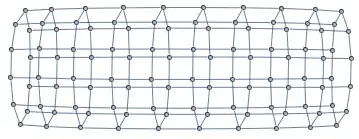
AdjacencyGraph@lattice[{2, 2, 2, 2}]

Notes
You can delete UnitStep[# - 1] to produce self-loops

It is fast for very big lattices ($1\,000\,000\times1\,000\,000$ adjacency matrix!)
lattice[{1000, 1000}]; // AbsoluteTiming
{2.718346, Null}
Szabolcs's approach with pairwise distances inapplicable for such lattices.
lattice uses packed array for big lattices. You can check it by On["Packing"].
