Update: Try to reproduce this behaviour with CellGrouping set to manual. To do that:
- either evaluate
SetOptions[$FrontEnd, CellGrouping -> Manual], - or hit CTRL+SHIFT+O to bring up the Option Inspector window, Lookup (among Global preferences) the option
CellGroupingand set it toManual.
Please test whether the phenomen is reproducible for you with the changed setting. You can reset cell grouping to its default behaviour by:
SetOptions[$FrontEnd, CellGrouping -> Automatic]
Strangest bug ever. Copy the following piece of code to the same notebook two times, below each other, as two identical cells. Be sure to run a fresh kernel.
DynamicModule[{x}, Print[1]; Dynamic@x, Initialization :> Print[2]]
Now evaluate the second cell. Fine, it returns and prints stuff.
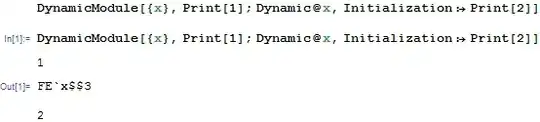
And now, without quitting the kernel, evaluate the first cell. It crashes Mathematica. Every time, and only when the first cell is evaluated. If (after a restart) I only evaluate the first cell, Mathematica crashes again.
How come that the outcome of evaluating two identical cells depends on whether the cell is the last one or not?
Furthermore, this one causes a crash on its own:
DynamicModule[{x}, Dynamic@x, Initialization :> Print[2]]
Mathematica 9.0.1.0 Windows 7 (64-bit), no packages, problem persists after full reboot, suggestion bar is turned off.

Initializationcode is only evaluated after the return value of theDynamicModuleis displayed (see here). – István Zachar Dec 06 '13 at 15:35Are you saying (looking at your figure) that none of the Print statements get printed on your machine?They do get printed, I just happened to have changed my preferences to send Print output to the console window. They did go there, I saw the prints on the console. – Nasser Dec 06 '13 at 20:44DynamicModule. Now the second one does crash. – Öskå Dec 11 '13 at 10:57