4

Update: This behaviour happens only if cell grouping is set to Manual (similar to another problem).


When an output cell is generated by e.g. dynamical object, the output is printed faded out. This behaviour was introduced in v10 with multiple undo to indicate if an output cell is decoupled from its input cell due to manually editing the input cell. This, however, is an unwanted behaviour for some cases; consider this example:

SetOptions[$FrontEndSession, CellGrouping -> Manual];
g = Graphics[{Red, Disk[], Green, Rectangle[{0, 0}, {2, 2}],
              Blue, Disk@{2, 2}}, ImageSize -> 100];
Print@g;
Button["Print", Print@g]
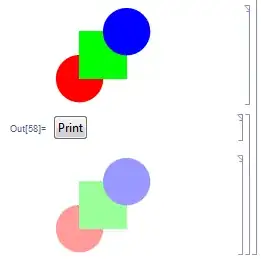
faded output cell

When the button is pushed, it generates the bottom output cell that has a faded look by default. A large amount of text (instead of graphics) is hard to read when faded.

How to print output from within a dynamical expression so that it does not look faded? Needless to say, I need the resulting cell to be an output cell (for example, it is removed when the Delete All Output menuitem is selected). Is there an option that controls this behaviour?

(Version is 10.0.2.0, Windows 7 (64-bit))

István Zachar
  • 47,032
  • 20
  • 143
  • 291
  • Cannot reproudcue this issue on 10.0.2 (Win7 64). Which version / system are you using? – Yves Klett Jan 06 '15 at 09:21
  • 1
    @Yves same as yours. My FrontEnd has always produced some strange glitches unreproducable by many... Also, Find&Replace window crashes all the time. BTW, do you have the default behaviour of editing an input cell and thus fading out its output? – István Zachar Jan 06 '15 at 09:41
  • Just a guess, but perhaps your gfx (drivers?) are buggy? – Yves Klett Jan 06 '15 at 09:46
  • @YvesKlett Could you please test/confirm whether CellGrouping->Manual triggers the behaviour at your end? – István Zachar Apr 03 '15 at 09:50
  • Why do you use CellGrouping->Manual? What are you trying to achieve that you can't achieve other ways? I've seriously considered deprecating manual cell grouping (since it's easy to manually group cells under automatic grouping), and I'd like to understand what you find interesting about it. – John Fultz Apr 06 '15 at 14:11
  • @John Years ago when I started to use it the mainstream approach was not to group cells at all (at that time, it wasn't even possible to collapse an input-output-pair to show the output only). By manual grouping I could group the way I liked. Ultimately, I've put the option into my autoload init.m. Also, when I've set it to Automatic globally and opened a notebook with previously set and saved cell grouping, it was gone and had to either regroup cells, or close and open the nb after resetting FE-level grouping to manual (e.g. after version upgrades where my settings were not kept).... – István Zachar Apr 06 '15 at 17:38
  • ... Later on at some point, the behaviour has been changed, but I don't know when. Perhaps version 7?8? It indeed groups now as one would expect when set to Automatic, and it does not mess up my files as it happened with previous version. Was this change documented? Or am I completely missing something here? – István Zachar Apr 06 '15 at 17:39
  • @IstvánZachar since v6 grouping constructs can now be applied without setting CellGrouping->Manual. What the Cell->Cell Grouping->Group Together menu command does is to apply a style which causes automatic grouping to work in exactly the way you want. And then the Group Normally menu command just clears that style information. While this is not strictly as powerful as manual grouping, it is sufficiently flexible to handle pretty much every real-world concern. And because it's done via styles, it's much less fragile than manual grouping, which is the source of lots of bugs. – John Fultz Apr 13 '15 at 18:03
  • @John, I am ashamed that all the way since v6 I have not realized this at all. I guess my setting of Manual was a frozen bad habit. Thanks for the help, setting was removed from my init.m! – István Zachar Apr 14 '15 at 07:38

1 Answers1

12

The dimming is controlled by the option PrivateCellOptions->{"EvaluationUnmatchedStyle"}. It must be applied at the cell level, but this is easy to do in your example by using CellPrint with the "Print" style to match what Print does.

CellPrint @ ExpressionCell[
  g, "Print", PrivateCellOptions -> {"EvaluationUnmatchedStyle" -> {}}
]

To disable it on a global level you can do:

CurrentValue[$FrontEnd, {PrivateCellOptions, "EvaluationUnmatchedStyle"}] = {};
Kuba
  • 136,707
  • 13
  • 279
  • 740
John Fultz
  • 12,581
  • 58
  • 73