Is it possible to visualize/edit a big matrix as a table ? I often end up exporting/copying big tables to Excel for seeing them, but I would prefer to stay in Mathematica and have a similar view as in Excel. Note that I'm looking for a non commercial solution. Thanks
Asked
Active
Viewed 3,186 times

6 Answers
41
In order to provide a user-friendly way to edit a matrix, I usually do the following:
a = RandomReal[Range[0, 1], {5, 5}];
Grid[Array[InputField[Dynamic[a[[#1, #2]]], FieldSize -> 5] &, {5, 5}]]
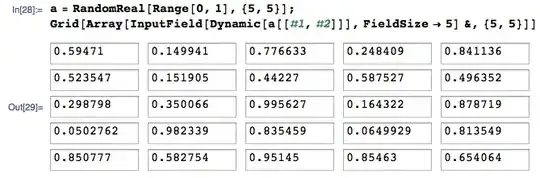
Because Dynamic is used in there, the matrix stored in variable a is automatically modified if you changed any of the numbers in the input fields.
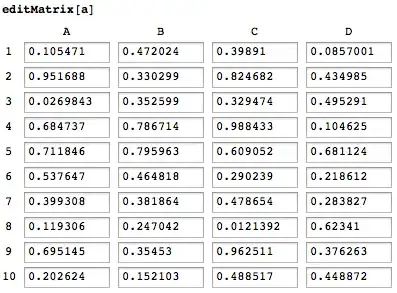
And taking into account all comments below (with thanks to celtschk, Heike and tkott), I wrote the following function:
editMatrix[m_?ArrayQ] := Module[{cells},
  label[i_?IntegerQ] := If[i > 26, label[Quotient[i, 27]], ""] <> FromCharacterCode[65 + Mod[(i - 1), 26]];
  cells = MapIndexed[InputField[Dynamic[a[[Sequence @@ #2]]], FieldSize -> 6] &, m, {2}];
  PrependTo[cells, label /@ Range[Length[m]]];
  cells = MapThread[Prepend, {cells, Join[{""}, Range[Dimensions[m][[2]]]]}];
  Pane[Grid[cells], Scrollbars -> True, ImageSize -> {Full, 500}]
]
Now rows and columns are numbered Excel-style, and it has scrollbars:

F'x
- 10,817
- 3
- 52
- 92
29
Based on the approach of F'x this is a version aimed rather at large arrays. It should perform reasonably well independent of the array size and lets one edit the given variable directly. Performance suffers only from the maximal number of rows and columns to be shown, which can be controlled with the second argument. I did choose to use the "usual" syntax for controllers with a Dynamic wrapper, which basically just serves as a Hold in the function definition pattern. With the Interpretation-wrapper it will evaluate to just the array it shows. There are a lot of possible improvements, so everyone is welcome to make such improvements. Here is the code:
editMatrix[Dynamic[m_], maxfields_: {10, 10}] :=
  With[{maxrows = Min[maxfields[[1]], Length[m]],
    maxcols =
     If[(Depth[m] - 1) == 2, Min[maxfields[[2]], Length[m[[1]]]], 1]},
    Interpretation[
    Panel[DynamicModule[{rowoffset = 0, coloffset = 0},
      Grid[{{If[Length@m > maxrows,
          VerticalSlider[
           Dynamic[rowoffset], {Length[m] - maxrows, 0, 1}]],
         Grid[Table[
           With[{x = i, y = j},
            Switch[{i, j}, {0, 0}, Spacer[0], {0, _},
             Dynamic[y + coloffset], {_, 0},
             Dynamic[x + rowoffset], _,
             If[(Depth[m] - 1) == 2,
              InputField[Dynamic[m[[x + rowoffset, y + coloffset]
   ]
             ],
               FieldSize -> 5],
              InputField[Dynamic[m[[x + rowoffset]]], FieldSize -> 5]
   ]
      ]
            ],
         {i, 0, maxrows}, {j, 0, maxcols}]]}, {Spacer[0],
         If[Length@First@m > maxcols,
          Slider[Dynamic[coloffset], {0, Length[m[[1]]] - maxcols,
            1}]
    ]}}]
      ]
    ],
    m]
];
You can test it with, e.g.:
a = RandomReal[1, {1000, 300}];

editMatrix[Dynamic[a], {10, 6}]

This will confirm that a will actually be changed when editing the corresponding InputField:
Dynamic[a[[1, 1]]]

István Zachar
- 47,032
- 20
- 143
- 291

Albert Retey
- 23,585
- 60
- 104
-
-
-
-
I've added column vector editing capability to the function. For row vectors, just (obviously) transpose it. – CHM Jun 24 '12 at 20:28
28
Maybe the undocumented TableView is helpful:
TableView[RandomReal[{0, 1}, {100, 100}]]
See this post.
Or, as suggested in the comments, perhaps TableForm.
-
-
-
4It did not take long to crash Mma 8.0.4 by editing the contents of the tableview. Very slow too. Looking forward to an official release of this expression, though! – JxB Apr 03 '12 at 14:35
-
1However, there are plenty of additional data manipulations that can be done with
TableView. If you right-click on the table, you can sort, add or delete either columns or rows, etc. – VLC Apr 03 '12 at 14:36 -
To easily copy a number matrix to Excel I use this ExcelForm[l_] := TableForm[Map[AccountingForm[#, NumberSigns -> {"-", ""}] &, l, {-1}]]; – faysou Apr 03 '12 at 14:55
-
-
@R.M I really need to start remember thing the syntax for checking commands of type X... Thanks :) – tkott Apr 03 '12 at 17:28
-
TableView in v9 still has it's issues but I like it 213 times more for visualizing big matrices. Late +1 – Rojo Dec 14 '12 at 02:01
11
Here's a slight variation of Albert's answer in order to
- not need Dynamic in the function's first argument
- have letters like in Excel for the columns' labels
- the vertical slider is on the right
- a name of the variable is displayed on top of the panel
- smaller space between cells
- using OptionsPattern
- celtschk's improvement for not displaying slider if not needed.
The perspective of not needing Excel anymore for just viewing big tables is really appealing ...
integerToLetters[n_]:=
Module[{x},
   x=IntegerDigits[n-1,26];
   x[[;;-2]]-=1;
   StringJoin@@(x/.Thread[Range[0,25]->CharacterRange["A","Z"]])
];

SetAttributes[GetSymbolName, HoldFirst];
GetSymbolName[symbol_] := ToString@HoldForm@symbol;

SetAttributes[editMatrix,HoldFirst];
Options[editMatrix]={"MaxFields"->{10,5},"ExcelColumnLabel"->True};
editMatrix[m_, OptionsPattern[]] :=
With[
    {
        maxrows = Min[OptionValue["MaxFields"][[1]], Length[m]],
        maxcols = Min[OptionValue["MaxFields"][[2]], Length[m[[1]]]],
        excelColumnLabel=OptionValue["ExcelColumnLabel"]
    }
    ,
    Interpretation[
        Panel[
            DynamicModule[{rowoffset = 0, coloffset = 0},
                Grid[
                    {
                        {Style[GetSymbolName[m],Bold]}
                        ,
                        {
                            Grid[
                                Table[
                                    With[ {x = i, y = j},
                                        Switch[{i, j},
                                            {0, 0},
                                                Spacer[0],
                                            {0, _},
                                                Dynamic[If[excelColumnLabel,integerToLetters[y + coloffset],y + coloffset]],
                                            {_, 0},
                                                Dynamic[x + rowoffset],
                                            _,
                                                InputField[Dynamic[m[[x + rowoffset, y + coloffset]]], FieldSize -> 7]
                                        ]
                                    ]
                                    ,
                                    {i, 0, maxrows}, {j, 0, maxcols}
                                ]
                                ,
                                Spacings -> {0, 0}
                            ]
                            ,
                            If[Length@m>maxrows,VerticalSlider[Dynamic[rowoffset], {Length[m] - maxrows, 0, 1}]]
                        }
                        ,
                        {If[Length@First@m>maxcols,Slider[Dynamic[coloffset], {0, Length[m[[1]]] - maxcols, 1}]]}
                    }
                ]
            ]
        ]
        ,
        m
    ]
];
Example
metal = RandomReal[1, {1000, 300}];
editMatrix[metal]

faysou
- 10,999
- 3
- 50
- 125
-
Works very quick!!! And expression capacity is already there (you can enter whatever in your cells and it works nice). Now to replace excel let's add capacity for Column/Row references to cells :P. – FJRA Apr 19 '12 at 13:42
-
1A correct version of the integerToLetters function is in the accepted answer here http://mathematica.stackexchange.com/q/27485/66 – faysou Dec 16 '13 at 17:12
7
Whereas TableView looks great, it seems very unstable. I edited a cell and pressed return (by accident more or less), and that caused a crash (on Mac).
So I would second the suggestion to use TableForm because it also allows editing if you take the output of
TableForm[RandomReal[{0, 1}, {30, 30}]]
by selecting its cell bracket and copying it. Then start a new cell by typing
a =
and paste the last output into it. Now you have the data in an input cell but still in the form of a grid. The cells can be edited by placing the cursor in them. The display is very bare-bones, but you can customize it to some extent with the TableSpacing option.

Jens
- 97,245
- 7
- 213
- 499
7
I am not keen on manually editing in big arrays, but if you just want to view one, perhaps this function grid is useful. It takes all options of Grid, and produces an adequately sized output cell that is easily scrolled:
  grid[m_?ArrayQ, opts : OptionsPattern[]] :=
   CellPrint[
     ExpressionCell[Grid[m, FilterRules[{opts}, Options[Grid]]],
       CellFrame -> True, Background -> LightBlue,
    PageWidth -> Infinity]];

wilbert van meerwijk
- 321
- 1
- 7
editMatrix[m_?ArrayQ] := Grid[Array[InputField[Dynamic[m[[#1, #2]]], FieldSize -> 6] &, Dimensions@m]]– tkott Apr 03 '12 at 14:02Grid[MapIndexed[InputField[Dynamic[a[[Sequence@@#2]]],FieldSize->5]&,a,{2}]]– celtschk Apr 03 '12 at 14:59InputFieldfor every matrix entry, even if only very view of them are shown. You could solve that issue by always showing an array of e.g. at most 10x10InputFields and use sliders to change the indices which are actually shown. I have done things like that and found that working fast and reliable. – Albert Retey Apr 04 '12 at 09:38editMatrixfunction after your edit, you changedmbya, which is wrong. Something else, to make it work properly, you need to addAttributes[editMatrix] = {HoldAll}. It's a very nice solution! – FJRA Apr 19 '12 at 13:36m[[Sequence @@ #2]]]instead ofa[[Sequence @@ #2]]]? – chris Nov 25 '12 at 15:28