using the KML to CSV converter converted the file South_Depots.kml from the site http://railroads.unl.edu/resources/ to CVS file.
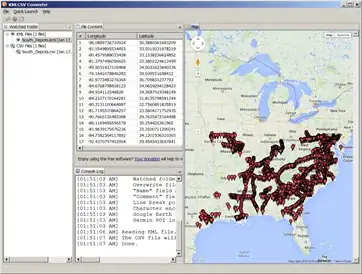
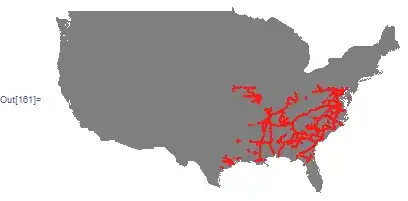
Then inside Mathematica, loaded the data and first drew on the US map
SetDirectory[NotebookDirectory[]];
FileNames["*.csv"]

trainCoord = Import["South_Depots.csv"];
trainCoord = trainCoord[[All, {1, 2}]]; (*only need first 2 columns *)
trainCoord[[All, {1, 2}]] = trainCoord[[All, {2, 1}]]; (*swap coordinates*)
trainCoordGeo = Map[GeoGridPosition[GeoPosition[#], "Mercator"][[1]] &,
    {trainCoord}, {2}][[1]];  (*make it GEO*)

UScoords = CountryData["UnitedStates", "Coordinates"];
UScoordsGeo = Map[GeoGridPosition[GeoPosition[#], "Mercator"][[1]] &,
  {UScoords}, {2}][[1]]; (*make it GEO*)


 Graphics[
 {
  {Gray, Polygon[UScoordsGeo]},
  {Red, PointSize[.005], Point[trainCoordGeo]}
  }]
To convert the data to Mathematica graph data, one way is
SetDirectory[NotebookDirectory[]];
trainCoord = Import["South_Depots.csv"];
trainCoord = trainCoord[[All, {1, 2}]];
Needs["GraphUtilities`"];
g = Rule @@@ trainCoord[[1 ;; 20]];
coords = GraphCoordinates[g]

now that you have the CVS data, you can do any other graph operations you want on it inside Mathematica.
reference : how-do-i-plot-coordinates-latitude-and-longitude-pairs-on-a-geographic-map
Update: I just saw Rasher comment above that M supports reading KML. Yes, I just tried it
trainCoord = Import["South_Depots.kml"];
This can be another option to read the data. It seems to be graphic data.


