6

TraditionalForm[] does a great job generally speaking, with complex equations like the following,

TraditionalForm[
   Defer[
     1/Pi = 
     2*Sum[((-1)^k*(6*k)!*(13591409 + 545140134*k))/((3*k)!*k!^3*640320^(3*k + 3/2)), {k, 0, 44}]
   ]
]

(which is to say…)

pretty equation

However, if I put this same equation in a Grid[] or Table[] or Column[], it gets "squished," as in the following
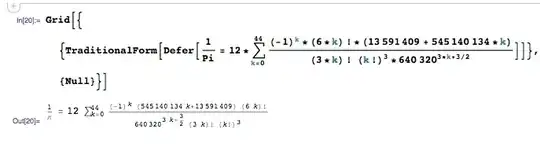
squished

How can I prevent this from happening? I particularly want to prevent it from swinging the upper bound of the summation to the right of the sigma.

Sjoerd C. de Vries
  • 65,815
  • 14
  • 188
  • 323
Michael Stern
  • 4,695
  • 1
  • 21
  • 37
  • In LaTeX, these are called display style and inline style. I don't know (couldn't find) how to control it in Mathematica, but I thought it might be helpful to mention these terms. – Szabolcs Jan 20 '14 at 19:47

3 Answers3

6

Answer inspired by this :

Style[Grid[{{TraditionalForm[
     Defer[1/Pi = 
       2*Sum[((-1)^k*(6*k)!*(13591409 + 545140134*k))/((3*k)!*
            k!^3*640320^(3*k + 3/2)), {k, 0, 44}]]]}}], 
 UnderoverscriptBoxOptions -> {LimitsPositioning -> False}]

gives :

enter image description here

EDIT

Rojo's solution (see comments) is better because it doesn't reduce the sigma :

Grid[{{ TraditionalForm[Defer[1/Pi = 
       2*Sum[((-1)^k*(6*k)!*(13591409 + 545140134*k))/((3*k)!*
            k!^3*640320^(3*k + 3/2)), {k, 0, 44}]]] }}, 
  AllowScriptLevelChange -> False]

enter image description here

andre314
  • 18,474
  • 1
  • 36
  • 69
4

The key option here is LimitsPositioning.

This is an option of UnderoverscriptBox and related boxes which determines how under and overscripts of "∑", "∏", "⋂", "⋃", "⊎", "⋀", "⋁", "lim", "max", "min", "⊕", "⊖", "⊗", "⊙" behave when displayed in a display formula or an inlined equation.

You can set them in Mathematica typesetting (box) language, but it can also be set in the Option Inspector (Shift+Ctrl+O). You need to set LimitsPositioning -> False in

Formatting Options > Expression Formatting > Specific Box Options > UnderoverscriptBoxOptions. 

You can do that either for the selected notebook or as a (semi) permanent Frontend setting.

Programmatically, this can be realized as follows:

SetOptions[$FrontEndSession, UnderoverscriptBoxOptions -> {LimitsPositioning -> False}]

(global setting, for the duration of your session)

SetOptions[$FrontEnd, UnderoverscriptBoxOptions -> {LimitsPositioning -> False}]

(global, permanent setting)

Sjoerd C. de Vries
  • 65,815
  • 14
  • 188
  • 323
  • What I'm struggling to understand is why we seem to need a Grid around the expression for it to react to "LimitsPositioning". Without the Grid I can't get it to react to "True". Any ideas? – Rojo Jan 20 '14 at 20:00
  • There must be more to it than LimitsPositioning. The size of the operator ($\sum$) is also reduced. It behaves the same way as LaTeX, and we're looking for the equivalent of \displaystyle ... – Szabolcs Jan 20 '14 at 20:02
  • @rojo The inline style is only applied in cramped spaces, so if you're not in such a condition the setting of the option doesn't make a difference. – Sjoerd C. de Vries Jan 20 '14 at 20:11
  • @Szabolcs Isn't that the AllowScriptLevelChange option that's controlling that? It's in GridBoxOptions and other box option settings. – Sjoerd C. de Vries Jan 20 '14 at 20:18
  • @SjoerdC.deVries Yes, that's it, thank you! (Also to Rojo.) If you give that option to Grid, it's not even necessary to use LimitsPositioning -> False any more. – Szabolcs Jan 20 '14 at 20:30
0

Not sure if I am really getting at the question here, but:

expr = Defer[
  1/Pi = 2*Sum[((-1)^k*(6*k)!*(13591409 + 545140134*k))/((3*k)!*
        k!^3*640320^(3*k + 3/2)), {k, 0, 44}]]

Grid[{{TraditionalForm@expr}}, ItemStyle-> Directive["DisplayFormula",
       FontFamily-> "Times", FontColor-> Black]]

enter image description here

chuy
  • 11,205
  • 28
  • 48