I encountered 2 problema with displaying formula in text format.
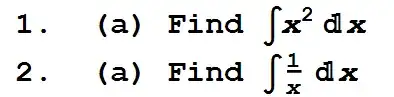
- The variables in the formula is italic, I want to change them to normal.
- And the fraction size is too small, I want to make it to full size.
Should I edit the stylesheet? What exactly should I do?


DefaultInlineFormatType->StandardForm, FractionBoxOptions->{AllowScriptLevelChange->False}. Next, you might want to set the font for"InlineCell"by entering the style name InlineCell and setting its font. (Assuming your text is in a Text cell.) – Michael E2 Mar 22 '14 at 12:52