11

I'm trying to achieve something similar to Bret Victor's brilliant Scrubbing Calculator in Mathematica.

By using Manipulate I'd like to change the values of the variables such that if I modify one the others adapt to ensure the equation is always true.

In the example below I'd like to be able to move spaces and have boxes change accordingly.

Manipulate[4 spaces + 3 boxes = 640, {spaces, 0, 640}, {boxes, 0, 640}]
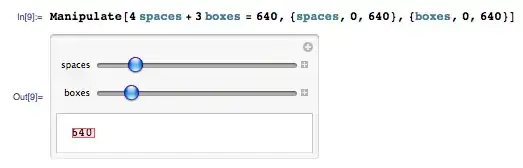
The simplest case

Solving for the two variables explicitly I can achieve the desired effect but doing so kind of voids the idea of an intuitive calculator.

Manipulate[{Dynamic[spaces = 160 - (3 boxes)/4], 
  Dynamic[boxes = -(4/3) (spaces - 160)]}, {boxes, 0, 640}, {spaces, 
  0, 640}]
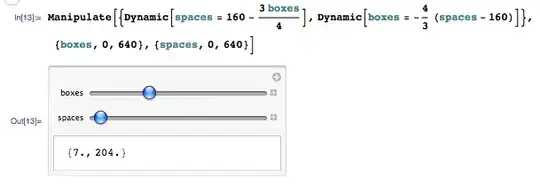
The hard way

Now, kind Mathematicans, my question is this:

Is there a way of doing this the first, more intuitive, way?

István Zachar
  • 47,032
  • 20
  • 143
  • 291
Teo Sartori
  • 473
  • 3
  • 7

1 Answers1

2

Well, I have needed before to link variables within a manipulate object, and I always get complicated dynamic things, for your example if you want to add constraints to your variables, you could come up with something like this:

Module[{spaces, boxes, lastboxes, lastspaces, condition, solvebox, 
  solvespace},
 condition[s_, b_] := 4 s + 3 b == 640;
 solvebox[s_] := b /. First[Solve[condition[s, b], b]];
 solvespace[b_] := s /. First[Solve[condition[s, b], s]];
 lastboxes = 100;
 lastspaces = solvespace[lastboxes];
 Manipulate[{spaces, boxes}, 
  Control[{{boxes, lastboxes, "Boxes"}, 0, 640}], 
  Control[{{spaces, lastspaces, "Spaces"}, 0, 640}], 
  Dynamic[If[! condition[spaces, boxes], 
    If[lastboxes === boxes, 
      With[{newbox = solvebox[spaces]}, 
       If[newbox < 0, spaces = solvespace[boxes], lastboxes = boxes; 
        boxes = solvebox[spaces]]], 
      With[{newspaces = solvespace[boxes]}, 
       If[newspaces < 0, boxes = lastboxes, lastboxes = boxes; 
        spaces = newspaces]]];]; ""], ControlPlacement -> Left, 
  Deployed -> True]
 ]

That Dynamic after Control objects comes pretty good to do that stuff, but does your code become bigger.

FJRA
  • 3,972
  • 22
  • 31
  • Thank you for your answer. This does indeed achieve the same result, but doesn't quite manage to do so in a simpler, more intuitive way. It is quite possible that what I'm asking is not possible in Mathematica. – Teo Sartori Apr 14 '12 at 08:41