This question is related to "Locking a value when Manipulating variables" and several other questions on linked controls, but differs enough that new ideas and techniques are required, I believe.
I would like to make an interactive demonstration using Manipulate[] in which the number of variables and corresponding (slider) Controls and--most importantly--their functional relations, are dynamically set by a user-specified integer k in the Manipulate display. Each of the k Controls governs a scalar probability variable (0 < P[[i]] < 1), and the sum of all k probabilities is equal to 1.0. (The variables represent true probabilities of dependent events.)
If there were just two variables P[[1]] and P[[2]] (or here P1 and P2 for simplicity) then
Manipulate[
   P2 = 1. - P1;
   {P1, P2},
{{P1, .5, "P1"}, 0, 1},
{{P1, 1, "P2", (P2 = 1. - #) &}, 1, 0 }]
would work. Note especially that you can adjust either slider Control and the other slider Control moves appropriately, i.e., to always guarantee that the sum obeys P1 + P2 = 1.0.
A related approach to the two-variable case is given in the Mathematica online tutorial IntroductionToDynamic.
The problem gets more difficult for k > 2, however. One can dynamically set the number of variables and their controls by k, but implementing the appropriate dynamic constraints automatically (given a set k) has proven rather difficult. First note that if one variable is dynamically changed by the user, the settings of the other k-1 variables is not unique; there are an infinite number of configurations of the other variables that ensures the full sum is equal to 1.0. The constraint I desire will eliminate such ambiguity by the following: When the user clicks on one control (P1, say) and slides and releases it, each of the other variables changes so as to preserve their ratios that existed when the P1 control was clicked.
An example: Suppose k = 3 and the current variables are {.7, .2, .1}. The user clicks on the P1 slider and adjusts its value to P1 = .85. The other two variables must remain in their initial .2/.1 ratio as well as ensure that the sum of all variables is 1.0. In this case, the variables will be {.85, .1, .05}. Suppose instead the user had clicked on P2 control and changed it from P2 = 0.2 to P2 = .3. Then the P1 and P3 variables must remain in the ratio of .7/.1 and ensure the full sum of variables is 1.0. In this second case the variables will thus be {0.6125, .3, 0.0875}.
The generalization to arbitrary k is simple mathematically, but has proven tricky to automatically implement within Manipulate[].
(A footnote: When the Manipulate[] function is initialized or k changed by the user, each variable should be initialized to the same value, P1 = P2 = ... = 1/k in the iteration brackets.)


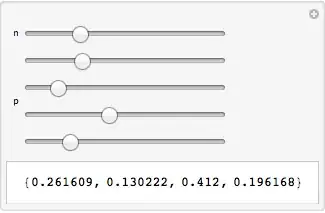

Dynamic[Column[Table[With[{i = i}, Control[{{p, ConstantArray[1./3, 3], Dynamic["P" <> ToString[i]]}, Manipulator[Dynamic[p[[i]], (p = update[p, #, i]) &], {$MachineEpsilon, 1 - $MachineEpsilon}] &}]], {i, n}]]]Alignment with other controls is missing. It seems theDynamicinDynamic["P" <> ToString[i]]is necessary, even though nothing changes. I've other ways, but each has its own slight awkwardness. – Michael E2 Dec 10 '14 at 02:47