3
data = { {2, 60}, {4.5, 62}, {6.5, 64}, {8, 65}, {9, 65}, {10, 
  65}, {11, 65}, {12, 67}, {13, 67}, {14, 67}, {16, 67}, {17, 
  67}, {18, 67}, {19, 65}, {20, 64}, {21, 70}, {22, 75}, {23, 
  80}, {24, 80}, {25, 82}, {26, 82}, {27, 79}, {30, 80}}

ListPlot[data, Joined -> True, 
AxesLabel -> {"T(Celcius)", "Volume Collected"}]

I want to partition the data into three pieces, and the plot produced should have the points joined with a line that corresponds to the color of the point.

olliepower
  • 2,254
  • 2
  • 21
  • 34

4 Answers4

7

You could use ColorFunction option . The following colors plot by paritioning of x-axis. You could choose your own function:

ListPlot[data, Joined -> True, 
 ColorFunction -> 
  Function[{x, y}, 
   Which[0 < x < 10, Red, 10 <= x < 20, Green, x >= 20, Blue]], 
 ColorFunctionScaling -> False, Mesh -> 10, MeshStyle -> None]

enter image description here

An alternative for partitioning x-values using MeshShading:

ListPlot[data, Joined -> True, Mesh -> {{10, 20}}, 
 MeshShading -> {Red, Green, Blue}]
ubpdqn
  • 60,617
  • 3
  • 59
  • 148
4

You haven't said how to partition the data but to automate on the basis of the length of the list you can do this:

segment = Ceiling[Length[data]/3];

ListPlot[Partition[data, segment+1, segment, 1, {}], Joined -> True, 
 AxesLabel -> {"T(Celcius)", "Volume Collected"}]

enter image description here

Mike Honeychurch
  • 37,541
  • 3
  • 85
  • 158
2
ListPlot[Evaluate[
  Cases[data, {a_ /; #[[1]] <= a <= #[[2]], __}] & /@ 
   Partition[{0, 10, 20, 30}, 2, 1]], Joined -> True, 
 PlotStyle -> Directive[Thick], 
 AxesLabel -> {"T(Celcius)", "Volume Collected"}]

enter image description here

Zviovich
  • 9,308
  • 1
  • 30
  • 52
1
data = {{2, 60}, {4.5, 62}, {6.5, 64}, {8, 65}, {9, 65}, {10, 
    65}, {11, 65}, {12, 67}, {13, 67}, {14, 67}, {16, 67}, {17, 
    67}, {18, 67}, {19, 65}, {20, 64}, {21, 70}, {22, 75}, {23, 
    80}, {24, 80}, {25, 82}, {26, 82}, {27, 79}, {30, 80}};

I will present a few variations and hopefully the readers can decide what works best for their needs.

Using built in ColorData:

This is a starting point. It colors the line using the specified gradient scheme from start to finish.

ListLinePlot[data, 
 ColorFunction -> Function[{x, y}, ColorData["Rainbow"][x]]]
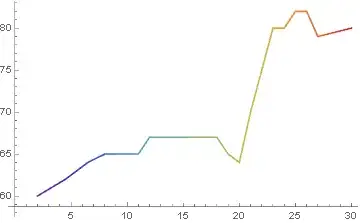
enter image description here


User defined color function with continuous change:

To color continuously in three user-defined colors from start to finish:

cf1[x_] := Blend[{Red, Blue, Green}, x];
ListLinePlot[data, ColorFunction -> (cf1[#1] &)]

enter image description here


User defined color function with arbitrary boundaries:

To color in discrete steps, define a ColorFunction using If. Here the cut off points are arbitrarily chosen as 8 and 15 for color boundaries.

cf2[x_] := If[x <= 8, Red, If[8 < x < 15, Blue, Darker@Green]]

ListLinePlot[data , ColorFunction -> (cf2[#1] &) , ColorFunctionScaling -> False , GridLines -> {{8, 15}, None} , GridLinesStyle -> {{Gray, Dashed}, None} ]

enter image description here


Instead of a mere color change, if data has to be partitioned and presented as such, it needs to be overlapped by one data point for it to appear continuous. e.g.

dnewOverlap = Partition[data, UpTo[9], 8]
ListLinePlot[dnewOverlap]

or

ListLinePlot[dnewOverlap, PlotStyle -> {Red, Blue, Darker@Green}]

enter image description here

Interested readers can add the option Mesh -> All to all plots to see the results.

Syed
  • 52,495
  • 4
  • 30
  • 85