19

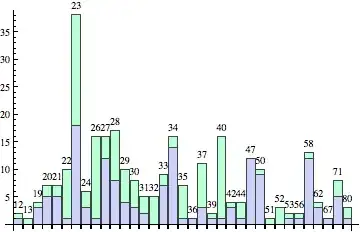
I want to chart data using a BarChart, the labels on the x-axis are numbers. Unfortunately they are so close to each other it really looks strange and more like one huge number. How can I add a spacing between the labels?

The relevant piece of code:

datalist = {{12, 1, 1}, {13, 0, 1}, {19, 3, 1}, {20, 5, 2}, {21, 5, 2}, 
{22, 1, 9}, {23, 18, 20}, {24, 3, 3}, {26, 1, 15}, {27, 12, 4}, {28, 8, 9}, 
{29, 4, 6}, {30, 3, 5}, {31, 2, 3}, {32, 0, 5}, {33, 7, 2}, {34, 14, 2},
{35, 1, 6}, {36, 1, 0}, {37, 3, 8}, {39, 1, 1}, {40, 1, 15}, {42, 3, 1},
{44, 1, 3}, {47, 12, 0}, {50, 9, 1}, {51, 0, 1}, {52, 0, 3}, {53, 1, 1},
{56, 1, 1}, {58, 12, 1}, {62, 3, 1}, {67, 1, 0}, {71, 5, 3}, {80, 1, 2}};

BarChart[datalist[[All, {2, 3}]], ChartLayout -> "Stacked", 
    ChartLabels -> { Transpose[datalist][[1]], None}]

enter image description here

Brett Champion
  • 20,779
  • 2
  • 64
  • 121
ritschwumm
  • 193
  • 5

4 Answers4

18

Here's one approach, which modifies the labels slightly to shift some of the labels down a bit.

BarChart[datalist[[All, {2, 3}]], ChartLayout -> "Stacked", 
   ChartLabels -> {
      MapIndexed[If[OddQ[First[#2]], #, Column[{"", #}]] &, Transpose[datalist][[1]]], 
      None
      }]

enter image description here

Brett Champion
  • 20,779
  • 2
  • 64
  • 121
13

Or Use ImageSize and BarSpacing

datalist = {{12, 1, 1}, {13, 0, 1}, {19, 3, 1}, {20, 5, 2}, {21, 5, 
   2}, {22, 1, 9}, {23, 18, 20}, {24, 3, 3}, {26, 1, 15}, {27, 12, 
   4}, {28, 8, 9}, {29, 4, 6}, {30, 3, 5}, {31, 2, 3}, {32, 0, 
   5}, {33, 7, 2}, {34, 14, 2}, {35, 1, 6}, {36, 1, 0}, {37, 3, 
   8}, {39, 1, 1}, {40, 1, 15}, {42, 3, 1}, {44, 1, 3}, {47, 12, 
   0}, {50, 9, 1}, {51, 0, 1}, {52, 0, 3}, {53, 1, 1}, {56, 1, 
   1}, {58, 12, 1}, {62, 3, 1}, {67, 1, 0}, {71, 5, 3}, {80, 1, 
   2}}; BarChart[datalist[[All, {2, 3}]], ChartLayout -> "Stacked", 
 ChartLabels -> {Transpose[datalist][[1]], None}, 
 ImageSize -> Scaled[1], BarSpacing -> .5]

enter image description here

Lou
  • 3,822
  • 23
  • 26
9

An alternative is to rotate the labels by 90 degrees:

BarChart[datalist[[All, {2, 3}]], ChartLayout -> "Stacked", 
   ChartLabels -> {
      Map[Rotate[Text[#], π/2] &, Transpose[datalist][[1]]],  
      None
   }
]

enter image description here

Or, if you prefer some extra spacing, here's another one which adapts Brett's method:

BarChart[datalist[[All, {2, 3}]],
   ChartLayout -> "Stacked", 
   ChartLabels -> {
    MapIndexed[
     With[{rottext =  Rotate[Text[#], π/2], odd = OddQ[First@#2]},
        If[odd, rottext, Column[{"", rottext}]]
     ] &, 
     Transpose[datalist][[1]]
    ], 
    None
 }]

enter image description here

rcollyer
  • 33,976
  • 7
  • 92
  • 191
5

Personally I prefer Brett's solution, but I wanted to show a few alternative ways to move the chart labels vertically so they are away from each other.

BarChart[datalist[[All, {2, 3}]], ChartLayout -> "Stacked", 
  ChartLabels -> {Placed[datalist[[All, 1]], Above], None}]

enter image description here

This version works much better if the labels are regularly spaced numbers. I prefer AdjustmentBox to Column because it allows more control.

BarChart[datalist[[All, {2, 3}]], ChartLayout -> "Stacked", 
 ChartLabels -> {Placed[datalist[[All, 1]], Axis, 
    DisplayForm@AdjustmentBox[#, BoxBaselineShift -> 2 Mod[#, 3]] &], 
   None}]

enter image description here

Depending on your operating system and font, you can get some help from the FontTracking option:

BarChart[datalist[[All, {2, 3}]], ChartLayout -> "Stacked", 
 ChartLabels -> {Placed[datalist[[All, 1]], Axis, 
    Style[#, FontTracking -> "Narrow"] &], None}]

enter image description here

Verbeia
  • 34,233
  • 9
  • 109
  • 224