1

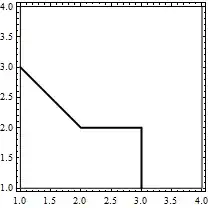
I have some data that I am plotting with ListContourPlot and I would like my contours to be closed at the edge (closing around the high value region).

A simple example:

ListContourPlot[{{3, 2, 1, 0}, {2, 1, 1, 0}, {1, 0, 0, 0}, {0, 0, 0, 0}},
                 Contours -> {1}, ContourShading -> None, ContourStyle -> Thick]

![plot of unclosed contours](http://i.imgur.com/B8eMa5d.png)

I know you can add e.g. BoundaryStyle -> Black, but it closes the whole region:
enter image description here

Note that I have tried the answer here, but that method changes the plotting method from plotting a matrix to plotting {x,y,f(x,y)} values, which has some undesirable results on my (much more complicated than the above example) data.

Jay
  • 399
  • 3
  • 9
  • So your desired result is something like: ListContourPlot[{{3, 2, 1, 0}, {2, 1, 1, 0}, {1, 0, 0, 0}, {0, 0, 0, 0}}, Contours -> {1}, ContourShading -> None] /. Line[x_] :> Line[Join[{{1, 1}}, x, {{1, 1}}]] ? – Kuba Mar 21 '14 at 20:24
  • Yes it is, but generalised – Jay Mar 21 '14 at 20:34
  • I'm not sure what you mean, in the above example the lower leftmost point has a value of 3 - it is the 'summit'. I want to close the contour around this summit, even though it is on the edge of the matrix. – Jay Mar 21 '14 at 20:48
  • Ok, I see your point. Let me provide an answer and we will se if it fits your needs. – Kuba Mar 21 '14 at 20:57

1 Answers1

1

You can pad your array of points with value much below the lowest one, like that:

data = {{3, 2, 1, 0}, {2, 1, 1, 0}, {1, 0, 0, 0}, {0, 0, 0, 0}};
data = ArrayPad[data, 1, -10^6]

ListContourPlot[data, Contours -> {1}, ContourShading -> None, ContourStyle -> Thick,
                      DataRange -> {{0, 5}, {0, 5}}]

enter image description here

I've also added DataRange so it fits primordial data set.

Kuba
  • 136,707
  • 13
  • 279
  • 740