9

Here is another problem with Mathematica plots and PDF. I have Mathematica 9.0.1 on Mac OS X. I want to export my plots to PDF to include them in a LaTeX document.

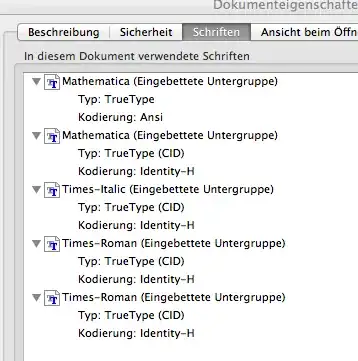
If I export the plot with the command Export["test.pdf",plot] I get inconsistent results. The PDF exported from OSX looks good in Preview, but the font is missing if I open it on Adobe Acrobat on Windows, and it is replaced by Adobe Serif MM. Here is pdffonts output:

name                                 type              emb sub uni object ID
------------------------------------ ----------------- --- --- --- ---------
Mathematica1                         Type 1            yes no  no       8  0
Times                                TrueType          no  no  no      11  0

Finally, if I open the file exported in OSX with Preview and save it again, it looks good on both platforms. Here is the pdffonts output of the new file:

name                                 type              emb sub uni object ID
------------------------------------ ----------------- --- --- --- ---------
AQZZRA+Mathematica1                  Type 1            yes yes yes     10  0
HPLGMT+Times-Roman                   TrueType          yes yes no       8  0

Is there a way I can get Mathematica to produce the same output as Preview? If not, is there a command line tool that can re-save the PDF file so that the fonts are embedded correctly?

Pincopallino
  • 771
  • 4
  • 11
  • Make Mathematica use standard fonts: see here. – Chris Degnen Apr 13 '14 at 01:20
  • Or replace text by outlines, see here. – Jens Apr 13 '14 at 03:01
  • @ChrisDegnen I can't see any effect when changing the suggested option. Besides, the problem here is not with Mathematica custom font, but the basic font Times which is not embedded in the PDF. – Pincopallino Apr 13 '14 at 10:16
  • @Jens your workaround works great, but perhaps the best solution is to Export to EPS and then use eps2pdf (or the Latex package epstopdf). This way I found that the fonts are embedded correctly in the PDF files and hence in the final PDF – Pincopallino Apr 13 '14 at 10:30

1 Answers1

3

You can use, i.e. specify FontFamily for your choice of font, if the font is installed on your system the font will be embedded:

?? FontFamily

FontFamily is an option for Style and Cell that specifies the font family in which text should be rendered.  >>

Attributes[FontFamily]={Protected}

.

SetDirectory@NotebookDirectory[];

.

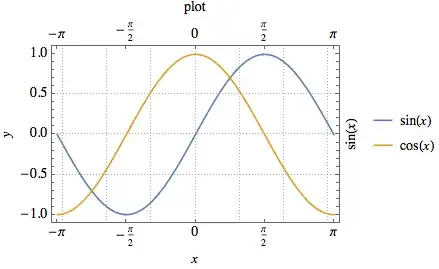
plot = Plot[
  {Sin[x], Cos[x]}
  , {x, -\[Pi], \[Pi]}
  , FrameLabel -> {{y, Sin[x]}, {x, "plot"}}
  , LabelStyle -> {FontFamily -> "Times", 14, GrayLevel[0]}
  , PlotTheme -> "Detailed"
  , FrameTicks -> {Range[-\[Pi], \[Pi], \[Pi]/2], Automatic}
  ]

enter image description here

Export["test.pdf", plot]

enter image description here

Edit

As @Verbeia justly remarks, I should answer the question in full, with V9 one can use

plot = Plot[{Sin[x], Cos[x]}
  , {x, -\[Pi], \[Pi]}
  , Frame -> True
  , FrameLabel -> {{y, Sin[x]}, {x, "This is a Plot"}}
  , LabelStyle -> {FontFamily -> "Times", 14, GrayLevel[0]}
  , FrameTicks -> {Range[-\[Pi], \[Pi], \[Pi]/2], Automatic}]

The most standard fonts are correctly embedded. One advantage is to use fonts that have a matured character level of mathematic characters.

enter image description here

enter image description here

  • This looks like it was done on version 10. The PDF export process changed a lot in that version, so I can't be sure that this answer is relevant to the poster, who is using v9. – Verbeia Oct 21 '14 at 23:28