You can also use LinearModelFit:
lm = LinearModelFit[data2, {1, x}, x]
You can 'normalize' output:
Normal@lm
This yields:
-3.72168 + 0.663665 x
You can look at underlying properties:
lm["Properties"]
yielding:
{"AdjustedRSquared", "AIC", "AICc", "ANOVATable", \
"ANOVATableDegreesOfFreedom", "ANOVATableEntries", \
"ANOVATableFStatistics", "ANOVATableMeanSquares", \
"ANOVATablePValues", "ANOVATableSumsOfSquares", "BasisFunctions", \
"BetaDifferences", "BestFit", "BestFitParameters", "BIC", \
"CatcherMatrix", "CoefficientOfVariation", "CookDistances", \
"CorrelationMatrix", "CovarianceMatrix", "CovarianceRatios", "Data", \
"DesignMatrix", "DurbinWatsonD", "EigenstructureTable", \
"EigenstructureTableEigenvalues", "EigenstructureTableEntries", \
"EigenstructureTableIndexes", "EigenstructureTablePartitions", \
"EstimatedVariance", "FitDifferences", "FitResiduals", "Function", \
"FVarianceRatios", "HatDiagonal", "MeanPredictionBands", \
"MeanPredictionConfidenceIntervals", \
"MeanPredictionConfidenceIntervalTable", \
"MeanPredictionConfidenceIntervalTableEntries", \
"MeanPredictionErrors", "ParameterConfidenceIntervals", \
"ParameterConfidenceIntervalTable", \
"ParameterConfidenceIntervalTableEntries", \
"ParameterConfidenceRegion", "ParameterErrors", "ParameterPValues", \
"ParameterTable", "ParameterTableEntries", "ParameterTStatistics", \
"PartialSumOfSquares", "PredictedResponse", "Properties", "Response", \
"RSquared", "SequentialSumOfSquares", "SingleDeletionVariances", \
"SinglePredictionBands", "SinglePredictionConfidenceIntervals", \
"SinglePredictionConfidenceIntervalTable", \
"SinglePredictionConfidenceIntervalTableEntries", \
"SinglePredictionErrors", "StandardizedResiduals", \
"StudentizedResiduals", "VarianceInflationFactors"}
and use for example:
Column[{lm["ParameterTable"],
  lm["AdjustedRSquared"],
  lm["ANOVATable"]}, Frame -> All]
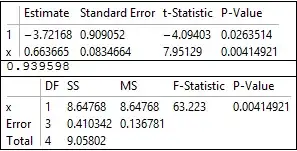
or 95% confidence bands for mean prediction:
p[x_] := lm["MeanPredictionBands", ConfidenceLevel -> 0.95]
Show[ListPlot[data2], Plot[Evaluate@{lm[x], p[x]}, {x, 1, 14}]]

Finally, for 'fun' you can confirm least squares result with some linear algebra:
mat = {ConstantArray[1, 5], data2[[All, 1]]};
N@Inverse[mat.Transpose@mat].mat.data2[[All, 2]]
which yields: {-3.72168, 0.663665}...as per found fit.
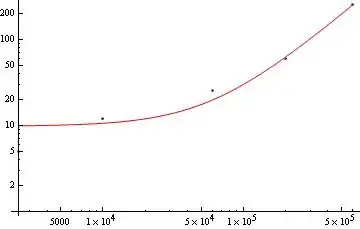
If you wish to back transform and ultimately show power relation:
tf[u_] := Exp[(Normal@lm /. x -> Log[u])]
lin = Show[ListPlot[Exp[data2]],
  Plot[Evaluate@tf[x], {x, 2500, 600000}]]
lglg = Show[ListLogLogPlot[Exp[data2]],
  LogLogPlot[Evaluate@tf[x], {x, 2500, 600000}]]
tf[x]


and the power relation:
0.0241932 x^0.663665



Solveis an easy way:Solve[Log[y]==(*your answer from A*)/.x->Log[u],y]– Z-Y.L May 07 '14 at 02:23