13

Bug introduced in 10.0.0 and persisting through 10.1.0 or later


In the Version 10 interface, at least by default, there is no longer a common menu bar in a separate window, and menus appear to be localized to individual Notebook windows. If I select a Palette and attempt to use the menu in an adjacent Notebook, specifically Generate Notebook from Palette, the Palette loses focus and that menu item is disabled.

  1. Can I restore the common menu bar from earlier versions?

  2. If not what is the fastest and simplest way to apply these commands?

  3. When is the Generate Notebook from Palette item not disabled? I have been unable to use it.

Michael E2
  • 235,386
  • 17
  • 334
  • 747
Mr.Wizard
  • 271,378
  • 34
  • 587
  • 1,371
  • 2
    Should this be tagged windows? On OS X, no window has a menu. All menus located in top of screen menu bar. – m_goldberg Jul 11 '14 at 22:56
  • @m_goldberg I didn't realize. I'll add the tag. – Mr.Wizard Jul 11 '14 at 22:59
  • You don't need the focus on the palette to use the option inspector. You can choose the specific notebook from the dropdown. We need an easier way out of this, hummm – Rojo Jul 11 '14 at 23:19
  • @Rojo Which dropdown? I've always just used window focus to control application so perhaps it's right in front of me, but I don't see it. – Mr.Wizard Jul 11 '14 at 23:20
  • 1
    The same dropdown where you can choose global, selection, selected notebook, ..... Anyway, this would force you to save the palette WITH the menu bar on. That's not good – Rojo Jul 11 '14 at 23:22
  • @Rojo Blimey, it's right in front of me, just as I feared. Thanks. That's at least one part of the problem addressed! – Mr.Wizard Jul 11 '14 at 23:24
  • I see you never had to bring back to center windows that had been moved 3 monitors away from sight :P – Rojo Jul 11 '14 at 23:29
  • @Rojo If you want me learn to use more than one monitor there's going to need to be another "donation party." – Mr.Wizard Jul 11 '14 at 23:35
  • 2
    Haha. Btw, there's also selecting the palette and using ctrl+shift+o shortcut – Rojo Jul 11 '14 at 23:37
  • 1
    BTW I like the new window/menu setup. It has several advantages: You can now switch between windows using the windows taskbar buttons, and the menu is never covered by another Mathematica window. You can still have a menu-free window by pressing F12. – Sjoerd C. de Vries Jul 12 '14 at 00:55
  • Are you sure this was possible before? Linux always (?) had the menu bar in every notebook windows. OS X has a global menu bar (like Mathematica used to on Windows), but it is not possible to select palettes without also selecting a normal notebook windows. E.g. File -> Save As will always save normal notebook window, never a palette. – Szabolcs Jul 12 '14 at 01:51
  • @Szabolcs How exactly are/were you working with Palettes? No, I'm not sure but I'll confirm or disprove the behavior later when I'm able. – Mr.Wizard Jul 12 '14 at 03:07
  • @Szabolcs In version 7 the Save and Save As... items are also disabled on Palettes; one must close the Palette to initiate the save dialog, which is the same in version 10. However in v7 the Generate Notebook from Palette item does work as expected while in v10 I cannot find a way to use it. I edited this Question to focus on that particular problem. – Mr.Wizard Jul 12 '14 at 08:59
  • I just checked v9 on Linux, which also doesn't have a global menu. The Generate Notebook From Palette item is simply missing from the Palettes menu. After clicking around for a while I discovered that right clicking a palette brings up a context menu that has Generate Notebook. This context menu is not available on OS X, only on Linux. Does this work in v10 / Windows? – Szabolcs Jul 12 '14 at 15:20
  • @Szabolcs Thanks for checking. There does not appear to be such a menu in v10/Windows. – Mr.Wizard Jul 12 '14 at 23:10
  • 2
    This question has not been resolved after more than a month. It seems to me that it deserves to be tagged as bug, at least in windows. Don't you agree? – magma Aug 17 '14 at 22:49
  • @Kuba I missed your answer. I am a little busy now but I'll review it when I have time. Thanks for answering! – Mr.Wizard May 08 '15 at 06:57
  • I removed the [tag:version-10] tag, but I could not test on V10.2 because I have access only to a Mac. – Michael E2 Aug 07 '15 at 13:43
  • Can't test this, it's Windows specific. – Szabolcs Aug 09 '16 at 09:40

1 Answers1

4

Token

That this menu item is doing is:

FrontEndExecute[FrontEndToken[InputNotebook[],"GenerateNotebook"]]

Keep in mind you have to add there FrontEnd` context.

  • You can use it in other palette after previously setting focus on different one.

  • Or you can put it in joker.m from 68871

  • Or use as a manual function for any NotebookObject in place of InputNotebook.


ContextMenu

The most handy way to get similar functionality back is to customize "Palettes" stylesheet, open it

CopyFile @@ (
  FileNameJoin[{#, "SystemFiles", "FrontEnd", "StyleSheets", 
      "Palette.nb"}] & /@ {$InstallationDirectory, $UserBaseDirectory}
  )

SetOptions[NotebookOpen @ %, {Editable -> True, Saveable -> True}] 

and add

Cell[StyleData["All"], ContextMenu -> 
          FEPrivate`FrontEndResource["ContextMenus", "Palette"]]

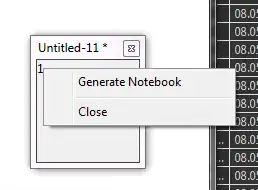
now you can try to click on part of palette that has a content:

CreatePalette[1, WindowSize -> 100]

enter image description here

Kuba
  • 136,707
  • 13
  • 279
  • 740
  • This is greatly helpful. Thank you. I did not know what this token did. I am not Accepting this however as the underlying problem remains and remains unexplained. – Mr.Wizard May 08 '15 at 08:46
  • 1
    @Mr.Wizard sure, ps, you can edit Palletes stylesheet to add for "All" cells ContextMenu -> FEPrivate`FrontEndResource["ContextMenus", "Palette"]. – Kuba May 08 '15 at 08:49