I am trying to make a new Palette with some buttons on it called, for example, "Arial", "Bookman" etc. plus some other buttons specifying sizes(12,14,..) and some prefered Colors for the fonts. I think this is a faster method than creating new styles and using them. Could you please help me with a simple code to start with?
Asked
Active
Viewed 192 times
4

3 Answers
5
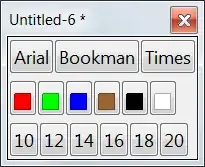
Here you go:
button[tok_][par_] := Button[par, FrontEndTokenExecute[tok, par]]

Row /@ {
    button["FontFamily"] /@ {"Arial", "Bookman", "Times"},
    button["FontColor"] /@ {Red, Green, Blue, Brown, Black, White},
    button["FontSize"] /@ Range[10, 20, 2]
  } // Column // CreatePalette

Mr.Wizard
- 271,378
- 34
- 587
- 1,371
2
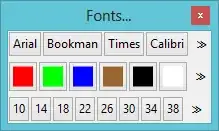
Few modifications of @Mr.Wizard's elegant answer to (1) make it work in Version 9, (2) add additional buttons to invoke font-related dialogs, and (3) eliminate the Save dialog when the palette is closed:
button[tok_][] :=Button["  \[GreaterGreater] ", FrontEndTokenExecute[tok],
                       Appearance -> "Frameless"]
button[tok_][par_] := Button[par, FrontEndTokenExecute[tok, Setting@par]]


Row /@ {Append[button["FontFamily"] /@ {"Arial", "Bookman", "Times", "Calibri"},
              button["FontPanel"][]],
    Append[button["FontColor"] /@ ColorSetter /@ {Red, Green, Blue, Brown, Black, White},
           button["FontColorDialog"][]],
    Append[button["FontSize"] /@ Range[10, 40, 4], button["FontSizeDialog"][]]} //
  Column // CreatePalette[#, WindowTitle -> "Fonts...", Saveable -> False] &

kglr
- 394,356
- 18
- 477
- 896
-
+1 for the
>>menus. IsSettingthe change needed for v9? Also it is IMHO desirable to have the Save dialog as that lets you save the palette for future use; this way you have to run this creation code every time. – Mr.Wizard Jan 15 '15 at 12:54
0
You can try something like this which will create a floating palette and the buttons will be applied to the entire text cell.
CreatePalette[
  {
   Button["Arial",
    SetOptions[NotebookSelection[InputNotebook[]],
     FontFamily -> "Arial"]
    ],
   Button["Courier",
    SetOptions[NotebookSelection[InputNotebook[]],
     FontFamily -> "Courier New"]
    ],
   Button["Size 12",
    SetOptions[NotebookSelection[InputNotebook[]],
     FontSize -> 12]
    ],
   Button["Size 14",
    SetOptions[NotebookSelection[InputNotebook[]],
     FontSize -> 14]
    ],
   Button["Blue",
    SetOptions[NotebookSelection[InputNotebook[]],
     FontColor -> Blue]
    ],
   Button["Black",
    SetOptions[NotebookSelection[InputNotebook[]],
     FontColor -> Black]
    ]
   },
  WindowTitle -> "Set Style"
  ];

Jack LaVigne
- 14,462
- 2
- 25
- 37
Writing Assistantpalette (available on thePalettesmenu)? – kglr Nov 12 '14 at 03:26