5

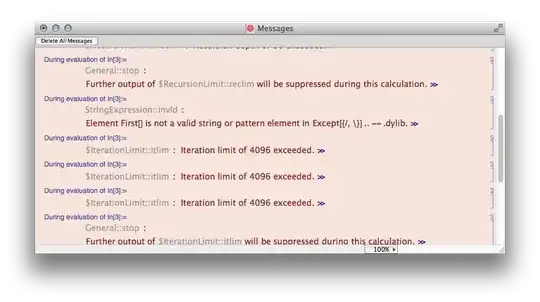
I have encountered what I shall presume is a bug: setting $RecursionLimit repeatably crashes the Mathematica 10 kernel:

$RecursionLimit = 50    (* kernel crash *)

Further, setting $RecursionLimit = 20 produces a malformed Suggestions Bar containing text code starting with:

Manipulate`Dump`eDynamicModule[ . . .

I am running version 10.0.0.0 on Windows 7. Please report behavior on your system.

Mr.Wizard
  • 271,378
  • 34
  • 587
  • 1,371
  • 1
    Not reproducing the crash on mac, seeing "interesting" things with the suggestions bar, though. – rcollyer Jul 14 '14 at 01:52
  • @rcollyer Would you try some other values, e.g. 40? – Mr.Wizard Jul 14 '14 at 01:54
  • Not a pretty result, but no crash. – rcollyer Jul 14 '14 at 01:55
  • I take it back. It does cause a problem, but only after using a different command in other cell. Right after issuing $RecursionLimit = 50 there is no problem as far as anything showing in console. (but the damage has allready been done internally I assume). $RecursionLimit = 20 causes no problems. – Nasser Jul 14 '14 at 01:56
  • I'll run by a couple of people internally in the morning. – rcollyer Jul 14 '14 at 01:59
  • I have to take back that $RecursionLimit = 20 causes no problems also ! It does. I found out when I do the above, now code code fails with iteration limit of 4096 exceeded. So it looks like just setting $RecursionLimit causes a problem. When I start the kernel again, the same code runs ok. Only after the above setting is one, it fails. – Nasser Jul 14 '14 at 02:08
  • @Mr.Wizard Not reproducible on Linux with V10. But here, I just have to wait to make the kernel crash :-) – halirutan Jul 14 '14 at 02:13
  • No issue for me on Mac 10.9.4 – Mike Honeychurch Jul 14 '14 at 03:58
  • No problem on Linux V10 either, but same as @halirutan, us Linux users just need to wait :) – Yi Wang Jul 14 '14 at 07:47
  • No issues for me with V10 on Win 8.1. However, I am seeing a different type of issue that indicate there are conflicts with other software or drivers depending on your individual PC configuration. I may try to post my specific issue later. – david Jul 14 '14 at 14:54
  • 1
    The issue happened both in 10.0 and 9.0.1: screenshot. – Silvia Jul 18 '14 at 06:33
  • @Silvia Shocking that this hasn't been corrected between those versions. However have you observed any crashes? – Mr.Wizard Jul 18 '14 at 06:36
  • @Mr.Wizard I haven't suffered any crash from this issue yet, but considering I even had a crash when past a small Input cell today, I'll not surprise if one happens here.. – Silvia Jul 18 '14 at 06:40

1 Answers1

6

Not an answer but I just wanted to observe that the $RecursionLimit info box (whatever that is called) has a formatting error on my Mac:

enter image description here

Update halirutan: When I set $RecursionLimit to say 30, then hover the symbol and click on the information $i$, I sometimes get more than only wrong formatting:

enter image description here

halirutan
  • 112,764
  • 7
  • 263
  • 474
Mike Honeychurch
  • 37,541
  • 3
  • 85
  • 158
  • 8
    heh, "Rebranding Term" – rm -rf Jul 14 '14 at 04:05
  • I see the same formatting error under Win7 x64. – Alexey Popkov Jul 14 '14 at 06:09
  • 2
    Same formatting error under Linux. This is how they search and replace hahaha – Yi Wang Jul 14 '14 at 15:11
  • This rebranding error is actually everywhere in the hover message, when originally Mathematica is mentioned. For example, do the same for $Version or $OperatingSystem and find a similar (slightly different) error. I think the problem is StyleBox support in hover message is broken. – Yi Wang Jul 14 '14 at 15:14