2

In many of the inbuilt mathematica function, variables appear aqua like in:
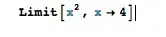
enter image description here

However, when creating your own function, variables no longer have that green coloring and are instead colored like an undefined variable
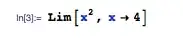
enter image description here

Is there any way to define functions so that variables used in arguments like in the manner above can get the aqua syntax coloring?

acl
  • 19,834
  • 3
  • 66
  • 91
1110101001
  • 1,979
  • 13
  • 24

1 Answers1

3

You can use SyntaxInformation. In this case,

SyntaxInformation[Lim] = {"ArgumentsPattern" -> {_, _, OptionsPattern[]}, 
   "LocalVariables" -> {"Limit", {2}}}

does what you want.

acl
  • 19,834
  • 3
  • 66
  • 91
  • I also have another function ImplicitPlot[p_, q_, r_] := ContourPlot[p, q, r] and I tried doing something similar: SyntaxInformation[ImplicitPlot] := {"ArgumentsPattern" -> {_, _, _, OptionsPattern[]}, "LocalVariables" -> {"Plot", {2, 3}}} but it's not working for this one... any idea why? – 1110101001 Jul 16 '14 at 01:01
  • 1
    I'll take a look in a few hours if nobody else does so by then. Away from mathematica right now. – acl Jul 16 '14 at 01:02
  • Do SyntaxInformation[implicitPlot] ={"ArgumentsPattern" -> {_, _, _, OptionsPattern[]}, "LocalVariables" -> {"Plot", {2, 3}}} and does work. Make sure you use Set (=) and not SetDelayed := ! I searched for an explanation of the difference and found this which, to my surprise, I wrote myself. – acl Jul 16 '14 at 09:58