14

In this plot the Disk[] markers are not colored according to the style of the line to which they belong:

SeedRandom[12]
data = Accumulate /@ RandomReal[3, {4, 10}] {1, 2, 3, 4};

ListLinePlot[data,
  PlotMarkers -> Graphics[Disk[], ImageSize -> 13],
  PlotLegends -> Automatic
]
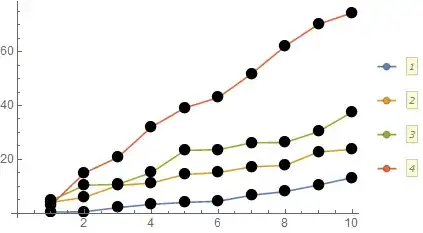
enter image description here

Curiously, note that they are colored in the legend. How can I make the lines match the legend?

Mr.Wizard
  • 271,378
  • 34
  • 587
  • 1,371

2 Answers2

18

Though I was expecting to need something fancy I stumbled upon a simple solution:

ListLinePlot[data,
  PlotMarkers -> Graphics[{Disk[]}, ImageSize -> 13],
  PlotLegends -> Automatic
]

enter image description here

The only change is enclosing Disk[] in { }.

Looking at the InputForm we see that expressions involving Disk have been changed to e.g.:

Graphics[{
  Hue[0.67, 0.6, 0.6], Directive[PointSize[0.019444444444444445], 
  RGBColor[0.368417, 0.506779, 0.709798], AbsoluteThickness[1.6]], 
  Disk[{0, 0}]
}, ImageSize -> 13]

Apparently when a List appears as the first argument of Graphics the plot routine prepends the style information.

As far as I know this behavior is undocumented.

Michael E2
  • 235,386
  • 17
  • 334
  • 747
Mr.Wizard
  • 271,378
  • 34
  • 587
  • 1,371
  • You used a degenerate case (single element, i.e., cycle of one) of the documented: "With PlotMarkers -> {Subscript[g, 1],[Ellipsis],Subscript[g, n]} the Subscript[g, i] are used cyclically for successive dataset lists." (from PlotMarkers documentation) However, using Automatic markers enables distinguishing the different lines even when seen in black and white. ListLinePlot[data, PlotMarkers -> {Automatic, 16}, PlotLegends -> Automatic] – Bob Hanlon Jul 31 '14 at 17:45
  • @BobHanlon I don't know if I understand your point but if I do I do not agree with it. I am using the form: "g markers consisting of copies of expression g" There is nothing "degenerate" about it that I can see. – Mr.Wizard Jul 31 '14 at 18:04
  • My interpretation is that the list you added inside of the Graphics constitutes the cycle list (length of one) used for the markers. But I could easily be wrong. – Bob Hanlon Jul 31 '14 at 18:23
  • I almost sure this issue already was discussed on this site or on stackoverflow.com several years ago. So this is an old stumbling point. Thank you for bringing attention to this again. Now I understand why I always "unintentionally" wrap the first argument of Graphics by List... ;) – Alexey Popkov Jul 31 '14 at 18:42
  • 1
    @BobHanlon The same behavior is observed in non-degenerated cases (in your sense): ListLinePlot[data,PlotMarkers->{Graphics[Disk[],ImageSize->13],Graphics[Disk[],ImageSize->13]}]. So your interpretation is wrong. Personally I think it is just an ordinary example of gedanken functionality in Mathematica: the developer simply forgot to handle the case when the first argument of Graphics is not wrapped by List. – Alexey Popkov Jul 31 '14 at 18:53
  • @Alexey Please link the old post if you should find or recall it. – Mr.Wizard Jul 31 '14 at 19:16
  • 1
    not duplicate but related: http://mathematica.stackexchange.com/questions/5400/why-doesnt-plotmarker-option-none-return-no-plotmarkers – Mike Honeychurch Jul 31 '14 at 22:54
  • @Mike The second half of that question really seems to be a duplicate. I'm not sure how to handle this. The prime focus of that question seems to be something else, but I also don't like to spread things across multiple questions. The more simplistic interpretation of this is also a duplicate of your question but I think it allows another interpretation that is different. (That to which my answer applies.) Do you think I should close this question or post a similar answer in reply to yours? – Mr.Wizard Jul 31 '14 at 23:09
  • I thought the two questions were sufficiently different. Just added the link in my comment as a reference for anyone having problems with plot markers. My 2 cents is that I'd keep this as a separate question – Mike Honeychurch Jul 31 '14 at 23:35
2
SeedRandom[12];
data = Accumulate /@ RandomReal[3, {4, 10}] {1, 2, 3, 4};

It works in V 13.3:

ListLinePlot[data,
 PlotMarkers -> Graphics[Disk[], ImageSize -> 13],
 PlotLegends -> Automatic]

enter image description here

But in this case I would use

ListLinePlot[data,
 PlotMarkers -> Style["\[FilledCircle]", 16],
 PlotLegends -> Automatic]

enter image description here

A (complete?) list of available PlotMarkers

Shapes, Icons, and Related Characters

eldo
  • 67,911
  • 5
  • 60
  • 168