3

I want to draw a normalized tangent arrow, so I use the Normalize command as follows:

tangent = 
  Table[{{t, Sin[t]}, {t, Sin[t]} + Normalize @ {1, Cos[t]}}, {t, -π, π, π/2}];
Plot[Sin[x], {x, -2 π, 2 π}, 
  PlotRange -> 2, Epilog -> {Red, Arrowheads[0.02], Arrow /@ tangent}]

and I get this plot:

enter image description here

Seems good, but if take a close look at the length of the arrows, you'll see that the length is not normalized at all. I've tried the Show and Graphics command instead of Epilog, but got the same plot.

Can someone tell me what I missed here?

m_goldberg
  • 107,779
  • 16
  • 103
  • 257
luyuwuli
  • 2,814
  • 19
  • 25
  • 3
    Your plot is distorted by the default aspect ratio of 1/GoldenRatio. Add AspectRatio -> Automatic to your plot options – m_goldberg Aug 04 '14 at 03:56

1 Answers1

5

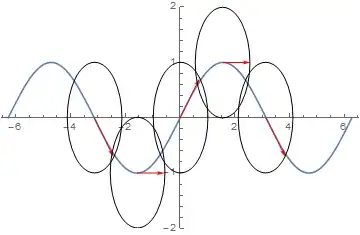
This issue here is aspect ratio: Using the following slight adaptation of your code:

tangent = 
  Table[{{t, Sin[t]}, {t, Sin[t]} + 
     Normalize@{1, Cos[t]}}, {t, -\[Pi], \[Pi], \[Pi]/2}];
Plot[Sin[x], {x, -2 \[Pi], 2 \[Pi]}, PlotRange -> 2, 
 Epilog -> {{Red, Arrowheads[0.02], Arrow /@ tangent}, 
   Circle[{#, Sin[#]}] & /@ Range[-\[Pi], \[Pi], \[Pi]/2]}]

enter image description here

However, specifying aspect ratio:

tangent = 
  Table[{{t, Sin[t]}, {t, Sin[t]} + 
     Normalize@{1, Cos[t]}}, {t, -\[Pi], \[Pi], \[Pi]/2}];
Plot[Sin[x], {x, -2 \[Pi], 2 \[Pi]}, PlotRange -> 2, 
 Epilog -> {{Red, Arrowheads[0.02], Arrow /@ tangent}, 
   Circle[{#, Sin[#]}] & /@ Range[-\[Pi], \[Pi], \[Pi]/2]}, 
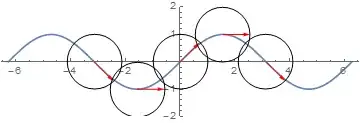
 AspectRatio -> Automatic]

resolves matters: enter image description here

ubpdqn
  • 60,617
  • 3
  • 59
  • 148