7

I have two 2D arrays where some of the x-values are identical,

L={{1,1},{2,2},{3,3}};
J={{0,1},{2,2},{4,4}};

I want to add these lists in the following way

{{0,1}, {1,1},{2,4},{3,3},{4,4}};

In other words, that y-values of the data points that have the same x are added. How can I achieve this?


Please note that the arrays are not necessarily of the same length

Two arrays for test:

first = {{0.15, 0.000470185}, {0.16, 0.000521784}, {0.17, 0.000580663}, {0.18,
   0.000648083}, {0.19, 0.000725569}, {0.2, 0.000814968}, {0.21, 
  0.000918532}, {0.22, 0.00103901}, {0.23, 0.0011798}, {0.24, 
  0.00134508}, {0.25, 0.00154005}, {0.26, 0.00177121}, {0.27, 
  0.00204667}, {0.28, 0.00237667}, {0.29, 0.00277409}, {0.3, 
  0.00325523}, {0.31, 0.00384059}, {0.32, 0.00455591}, {0.33, 
  0.00543312}, {0.34, 0.00651098}, {0.35, 0.00783476}, {0.36, 
  0.00945361}, {0.37, 0.0114133}, {0.38, 0.0137402}, {0.39, 
  0.0164132}, {0.4, 0.0193217}, {0.41, 0.0222235}, {0.42, 
  0.0247384}, {0.43, 0.0264243}, {0.44, 0.0269371}, {0.45, 
  0.0261818}, {0.46, 0.024341}, {0.47, 0.0217652}, {0.48, 
  0.0188176}, {0.49, 0.0157753}, {0.5, 0.0128044}, {0.51, 
  0.00998009}, {0.52, 0.00731676}, {0.53, 0.00479353}, {0.54, 
  0.00237078}, {0.55, 0}}


second = {{-0.04, -0.0000547619}, {-0.03, -0.000405238}, {-0.02, -0.00207438}, \
{-0.01, -0.00878929}, {0, -0.0154401}, {0.01, -0.0178195}, {0.02, \
-0.0180879}, {0.03, -0.0173267}, {0.04, -0.0157714}, {0.05, \
-0.014605}, {0.06, -0.0131757}, {0.07, -0.0119764}, {0.08, \
-0.010695}, {0.09, -0.00946286}, {0.1, -0.00849357}, {0.11, \
-0.00708071}, {0.12, -0.00578286}, {0.13, -0.00468214}, {0.14, \
-0.00306119}, {0.15, -0.00146214}, {0.16, 0.00061881}, {0.17, 
  0.00194733}, {0.18, 0.00376762}, {0.19, 0.00509833}, {0.2, 
  0.00625381}, {0.21, 0.00762286}, {0.22, 0.00918905}, {0.23, 
  0.0105964}, {0.24, 0.0118067}, {0.25, 0.0134238}, {0.26, 
  0.0149774}, {0.27, 0.0163519}, {0.28, 0.017469}, {0.29, 
  0.0167517}, {0.3, 0.0102788}, {0.31, 0.00253876}, {0.32, 
  0.000314333}, {0.33, 0.000038881}, {0.34, 0.0000224524}}

first array is here: http://www.datafilehost.com/d/731a267e.

The second array I generate from this code:

factor = 11.0;
second = Table[{(38 - i)*0.01, 0}, {i, 0, 38}] - 0.04;
tempData = (1/10000) (factor/21) {
    0.41,
    0.71,
    5.74,
    46.36,
    187.70,
    305.90,
    319.0,
    298.60,
    273.50,
    245.13,
    215.60,
    193.50,
    167.80,
    139.20,
    114.20,
    93.10,
    68.80,
    35.56,
    11.30,
    -26.70,
    -55.90,
    -85.50,
    -105.60,
    -129.30,
    -155.10,
    -172.80,
    -195.30,
    -218.70,
    -240.60,
    -266.70,
    -288.00,
    -316.4,
    -330.3,
    -325.4,
    -281.95,
    -160.50,
    -37.88,
    -7.4,
    -1.0
    };

For[i = 1, i < Length[tempData] + 1, i++,
  second[[i, 2]] = tempData[[i]]];
second = second // Reverse;
BillyJean
  • 1,273
  • 7
  • 25

8 Answers8

8

You can also use the V10 function Merge:

List @@@ Normal @ Merge[Total][Rule @@@ Join[L, J]]

or

List @@@ Normal @ Merge[Rule @@@ Join[L, J], Total]

or (a variant of @Carlo's answer using GroupBy with a different syntax)

List @@@  Normal @ GroupBy[Join[L,J], First -> Last, Total]

to get

(* {{1, 1}, {2, 4}, {3, 3}, {0, 1}, {4, 4}}  *)

Update: Some timings using Wolfram Programming Cloud:

tstdata=RandomInteger[10,{2,100000,2}];

mergeLists[x_, y_] := Module[{f, g, l3}, f[{a_, b_}] /; NumericQ[g@a] := 
  (g[a] += b);
  f[{a_, b_}] := (g[a] := b);l3 = Join[x, y];f /@ l3;{#, g@#} & /@ Union[First /@ l3]]

(res1=mergeLists@@tstdata)//Timing //First
(* 1.889713 *)
(res2=Sort@With[{g = GatherBy[Join@@tstdata, First]},
            Thread@{DeleteDuplicates[Flatten@Map[First, g, {2}]],
            Plus @@@ Map[Last, g, {2}]}])//Timing//First
(* 0.423935 *)
(res2b=With[{g = GatherBy[Join@@tstdata, First]},
            Thread@{DeleteDuplicates[Flatten@Map[First, g, {2}]],
            Plus @@@ Map[Last, g, {2}]}])//Timing//First
(* 0.378943 *)
(res3=List @@@  Normal @ GroupBy[Join@@tstdata, First -> Last, Total])//Timing//First
(* 0.033994  *)
(res4=List@@@Normal[Total /@ GroupBy[Join@@tstdata, First -> Last]])//Timing//First
(* 0.033994 *)
(res5=List @@@ Normal @ Merge[Rule @@@ Join@@tstdata,Total])//Timing//First
(* 9.465561 *)
(res6=List @@@ Normal @ Merge[Total][Rule @@@ Join@@tstdata])//Timing//First
(* 9.496556 *)
Sort@res1==Sort@res2==Sort@res2b==Sort@res3==Sort@res4==Sort@res5==Sort@res6
(* True *)
kglr
  • 394,356
  • 18
  • 477
  • 896
5

Just showing some tricks:

l1 = {{1, 1}, {8, 2}, {3, 3}};
l2 = {{0, 1}, {8, 3}, {4, 4}};

mergeLists[x_, y_] := Module[{f, g, l3},

  f[{a_, b_}] /; NumericQ[g@a] := (g[a] += b);
  f[{a_, b_}] := (g[a] := b);

  l3 = Join[x, y];
  f /@ l3;
  {#, g@#} &/@ Union[First /@ l3]
  ]

(*{{0, 1}, {1, 1}, {3, 3}, {4, 4}, {8, 5}}*)
Dr. belisarius
  • 115,881
  • 13
  • 203
  • 453
4

Once again not very fancy but it does the job:

L = {{1, 1}, {2, 2}, {3, 3}};
J = {{0, 1}, {2, 2}, {4, 4}};
Sort@With[{g = GatherBy[Join[L, J], First]}, 
  Thread@{DeleteDuplicates[Flatten@Map[First, g, {2}]], 
          Plus @@@ Map[Last, g, {2}]}]
{{0, 1}, {1, 1}, {2, 4}, {3, 3}, {4, 4}}

With the data provided by the OP and res = Sort[With[{..., Join[first, second]...] one can have:

ListPlot[{res, first, second}, 
  PlotStyle -> {Directive[{PointSize@.02, Red}], Blue, Green},
  Filling -> Axis, Axes -> {False, True}]

Mathematica graphics

Öskå
  • 8,587
  • 4
  • 30
  • 49
4

A somewhat shorter way of achieving the same on V10:

merge = Total /@ GroupBy[Join[first, second], First -> Last]

This would return an Association, but you can still use it in ListPlot. If you don't want an Association

List @@@ Normal[merge]
Carlo
  • 1,171
  • 9
  • 12
3
L = {{1, 1}, {2, 2}, {3, 3}};
J = {{0, 1}, {2, 2}, {4, 4}};

Sort@Flatten[Transpose[{J, L}] /. {{a_, b_}, {a_, c_}} :> {{a, b + c}}, 1]

{{0, 1}, {1, 1}, {2, 4}, {3, 3}, {4, 4}}

eldo
  • 67,911
  • 5
  • 60
  • 168
2

Sow, Reap implementation

t = Join[L, J];
tags = DeleteDuplicates[t[[All, 1]]];
res = Reap[t /. {x_, y_} :> {Sow[y, x]}][[2]];
MapThread[{#1, Total@#2} &, {tags, res}]
(*{{1, 1}, {2, 4}, {3, 3}, {0, 1}, {4, 4}}*)
molekyla777
  • 2,888
  • 1
  • 14
  • 28
2

One-liner:

Sort@Join[L,J]//.{a___,{x_,y1_},{x_,y2_},b___}:>{a,{x,y1+y2},b}

Testing it on your 2 lists (took about 0.001 in AbsoluteTiming)

merge=Sort@Join[first,second]//.{a___,{x_,y1_},{x_,y2_},b___}:>{a,{x,y1+y2},b};
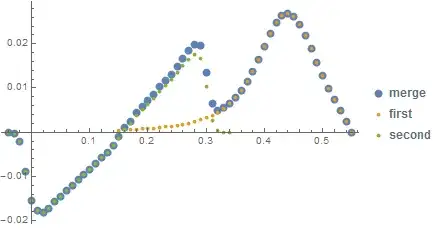
ListPlot[{merge,first,second},
PlotLegends->{"merge","first","second"},PlotStyle->AbsolutePointSize/@{8,4,4}]

Mathematica graphics

seismatica
  • 5,101
  • 1
  • 22
  • 33
1

Here is an optional approach with more details. First merge the lists then gather the first coordinates

t = Flatten[{l, j}, 1]; f = Union[First[[Transpose[t]]];

Next form a ragged array, collecting by the first element.

r = Cases[t, {#, _}] & /@ f;

Finally collapse the ragged array by summing

Total[#[[All, 2]]] & /@ r; rstl=Transpose[{f,s}];

I hope that you find this helpful.

John McGee
  • 2,538
  • 11
  • 15