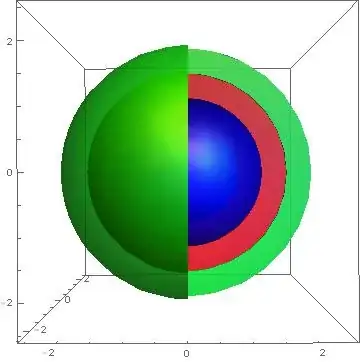
I wish to create a nice data representation of three nested spherical sections, with a cut away so they can be viewed. As a MWE, something like;
a = SphericalPlot3D[{1}, {θ, 0, Pi}, {ϕ, 0, 4 Pi/2},
   PlotStyle -> Directive[Blue, Opacity[0.7], Specularity[White, 20]],
    Mesh -> None, PlotPoints -> 40];

b = SphericalPlot3D[{2}, {θ, 0, Pi}, {ϕ, 0, 3 Pi/2},
   PlotStyle -> Directive[Red, Opacity[0.7], Specularity[White, 20]],
  Mesh -> {{0}, {0}, {0}}, PlotPoints -> 40];

c = SphericalPlot3D[{3}, {θ, 0, Pi}, {ϕ, 0, 3 Pi/2},
   PlotStyle ->
   Directive[Green, Opacity[0.7], Specularity[White, 20]],
  Mesh -> {{0}, {0}, {0}}, PlotPoints -> 40];

abc = Show[a, b, c, PlotRange -> Automatic]
This gives me the following image, after some rotation for clarity;
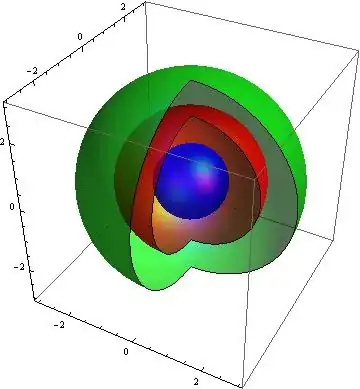
This is kind of the idea, but the problem is that this displays as spherical surfaces at r = 1, r = 2 and r = 3. In reality, there is a thick spherical shell (let's say a red one) for $1 \leq r \leq 2$ and a thick spherical shell (a green one) at $2 \leq r \leq 3$. The spherical core at $r \leq 1$ is solid blue. Is there a nice way to make this image? I was hoping I could somehow modify the $r$ term in the SphericalPlot3D function to do this.
I could also like to add a vertical line running through the sphere centre (z = 0) to make the image clearer. Any ideas?
Thanks