I want to plot f1[x] over 0 < x < L/2 and f2[x] over L/2 < x < L (i.e. so that f1[x] isn't displayed overL/2 < x < L, etc.). How do I do this?
Asked
Active
Viewed 3,000 times


4 Answers
10
As b.gatessucks commented, use Piecewise. For example:
f1[x_] := Sin[x]
f2[x_] := Cos[x]
L = 7;
pw = Piecewise[{{f1@#, 0 < # < L/2}, {f2@#, L/2 < # < L}}, Indeterminate] &;
Plot[pw[x], {x, 0, L}]

Generally you should not use capital letters for variable names (L) but I kept your notation in this case.

8
We needn't use Piecewise, alternatively one can use Condition (/;) and/or ConditionalExpression (new in version 8).
f1[x_] := Sin[x]
f2[x_] := Cos[x]
Here are respective definitions :
f[x_] /; 0 <= x <= Pi := f1[x]
f[x_] /; Pi < x <= 2 Pi := f2[x]
or a sligtly different way :
ff[x_] /; x <= L/2 := f1[x]
ff[x_] /; L/2 < x  := f2[x]
we can do a similar construction in a more flexible way assuming e.g. dependence of the function on the parameter L :
g[x_, L_] /; 0 <= x <= L    := ConditionalExpression[f1[x], 0 <= x <= L]
g[x_, L_] /; L <  x <= 2 Pi := ConditionalExpression[f2[x], L < x <= 2 Pi]
to plot these functions we can make use of e.g. Exclusions option, let's demonstrate how it works :
GraphicsRow[{ Plot[f[x], {x, 0, 2 Pi}, Exclusions -> {x == Pi}],
              Plot[f[x], {x, 0, 2 Pi}] }]
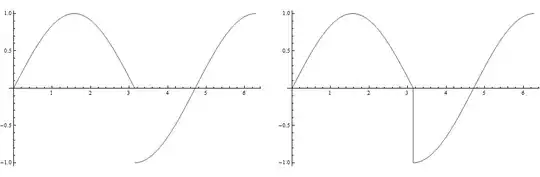
In case of ff function we can use RegionFunction option, to plot an appropriately restricted range, e.g.
L = 2 Pi;
GraphicsRow[{ Plot[ ff[x], {x, 0, L}, Exclusions -> {x == Pi}, PlotStyle -> Thick],
              Plot[ ff[x], {x, -Pi/2, 5/2 Pi}, Exclusions -> {x == Pi},
                    PlotStyle -> Thick, RegionFunction -> Function[{x, y}, L > x > 0]] }]

We show here something more customized :
Animate[ Plot[ g[x, L], {x, 0, 2 Pi}, PlotRange -> {{0, 2 Pi}, {-1.05, 1.05}},
              Exclusions -> {x == L}, PlotStyle -> Thickness[0.01],
              ColorFunction -> "DeepSeaColors", ImageSize -> {500, 500}],
         {L, 0, 2 Pi}]


Artes
- 57,212
- 12
- 157
- 245
7
Or without the use of piecewise:
gg1 = Plot[Cos[x], {x, \[Pi]/2 + $MachineEpsilon, \[Pi]}];
gg2 = Plot[Sin[x], {x, 0, \[Pi]/2}];

Show[gg2, gg1, PlotRange -> {{0, \[Pi]}, {-1, 1}}]

Here is a more integrated version with it bundled up into a function which takes a list of functions to plot and an arbitrary number of ranges:
Clear[DisjointRangePlot2D];
DisjointRangePlot2D[fs_List, xRanges_List] :=
 Module[{x},
  Show[MapThread[
    Plot[#1[x], Evaluate@Flatten@{x, #2}] &, {fs, xRanges}],
   PlotRange -> {{Min@First@(xRanges\[Transpose]),
      Max@Last@(xRanges\[Transpose])}, Automatic}]]
DisjointRangePlot2D[f_, xRanges_List] :=
 DisjointRangePlot2D[Table[f, {Length@xRanges}], xRanges]
A selected plot with a single function:
DisjointRangePlot2D[Sin, {{0, \[Pi]}, {2 \[Pi], 4 \[Pi]}, {7 \[Pi], 10 \[Pi]}}]

A plot with multiple functions and ranges:
DisjointRangePlot2D[{Sin, Cos, Cos}, {{0, \[Pi]}, {2 \[Pi], 4 \[Pi]}, {7\[Pi], 10 \[Pi]}}]

I did play with passing opts:OtpionsPattern[] to Plot or Show to give more control over the final output, but I didn't succeed in making that work.

image_doctor
- 10,234
- 23
- 40
-
This works in this case, but one should be aware that the option settings of the first plot are used, so this may lead to unintended results sometimes. – Sjoerd C. de Vries May 21 '12 at 10:48
5
Piecewise would work but displays a spurious line at 0 vertical coordinate:
f[x_] := Sin[x];
Plot[Piecewise[{{f[x], x < 2 Pi}}], {x, 0, 4 Pi}]
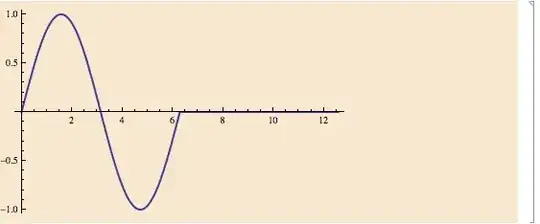
(note the horizontal line for $x>2\pi$).
One can avoid this by simply displaying a bigger range than has been plotted, as follows:
Show[
 Plot[f[x], {x, 0, 2 Pi}],
 PlotRange -> {{0, 4 Pi}, {-1, 1}}
 ]

There is now nothing at $x>2\pi$.

acl
- 19,834
- 3
- 66
- 91
-
-
-
It is not spurious either, because the default value if none of the conditions apply, is 0. – rm -rf May 21 '12 at 16:26
-
ConditionalExpressionis even more succinct than withPiecewise. – Alexey Popkov Jun 20 '12 at 14:58