10

I have a sequence of numbers ${x_1,x_2,\ldots,x_n}$.

I would like to plot the sequence using ListLinePlot but use a different color depending on if the values $x_i$ are within $a_i<x_i<b_i$.

For example, if $x_1$ is between $[0,1)$, blue, if it is between $[1,2)$, red, and [1,3), green, etc.

J. M.'s missing motivation
  • 124,525
  • 11
  • 401
  • 574
user13675
  • 947
  • 1
  • 6
  • 15

3 Answers3

11

Taking Rahul's extension of Michael's answer a step further, using MeshShading instead of ColorFunction:

data = RandomReal[{0, 3}, 100];
ListLinePlot[data, MeshFunctions -> {#2 &}, Mesh -> {{1, 2}},
 MeshShading -> {Blue, Red, Green}, MeshStyle -> None]
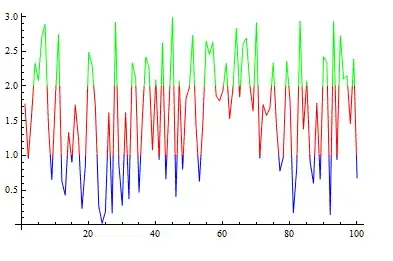
enter image description here

Update: Although my preferred method is using MeshShading, you can also get a similar result using a combination of Interpolation, Plot and a piecewise ColorFunction as follows:

ClearAll[pwColorF];
pwColorF[thresholds : {___}, colors : {___} : ColorData[1, "ColorList"]][a_] := 
 Module[{tc = Transpose[{colors[[;; Length@thresholds]],
                         Function[{x, y}, x < a <= y] @@@
                         Partition[Join @@ {{-Infinity}, Most@thresholds, {Infinity}}, 2, 1]}]},
        Piecewise[tc]]

intF = Interpolation[data, InterpolationOrder -> 1];

Plot[Quiet@intF[x], {x, 0, 100}, PlotStyle -> Thick, 
 ColorFunction -> (pwColorF[{1, 2, 3}, {Blue, Red, Green}][#2] &),
 ColorFunctionScaling -> False]

enter image description here

kglr
  • 394,356
  • 18
  • 477
  • 896
  • 1
    Ah, that's the actual right way to do this. I keep forgetting: ColorFunction is for smooth colours, MeshShading is for flat colours. Right? –  Sep 17 '14 at 23:17
  • 1
    @Rahul, i think you are right. ColorFunction assigns the colors to vertices of a single line with many vertices (i.e., it determines VertexColors) with blending when the two vertices of a line segment have different colors, while with MeshShading each line segment gets its own color. without any blending – kglr Sep 17 '14 at 23:45
10

A small extension of Michael E2's answer to better match how I understand the question:

data = RandomReal[{0, 3}, 100];
ListLinePlot[data, 
 ColorFunction -> (Switch[#2, y_ /; y < 1, Blue, y_ /; y < 2, Red, y_ /; y < 3, Green] &), 
 ColorFunctionScaling -> False, 
 MeshFunctions -> {#2 &}, Mesh -> {{0.9, 1.1, 1.9, 2.1}}, MeshStyle -> None]

enter image description here

7

Here's one way:

data = RandomReal[{0, 3}, 100];

ListLinePlot[data, 
 ColorFunction -> (Switch[#2, y_ /; y < 1/3, Blue, y_ /; y < 2/3, Red, y_ /; y < 3/3, Green] &)]

Mathematica graphics

Here's a variation:

ListLinePlot[data, 
 ColorFunction -> (Switch[#2, y_ /; y < 1, Blue, y_ /; y < 2, Red, y_ /; y < 3, Green] &),
 ColorFunctionScaling -> False]
Michael E2
  • 235,386
  • 17
  • 334
  • 747