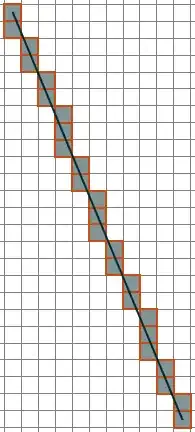
I'm sure you know that a line will almost never run through exact pixel positions. Therefore, you have two choices. First, you interpolate your image matrix and then you can sample as many points along the line as you like. In this case, I probably wouldn't recommend it because the values depend on the interpolation itself. Another, very easy way is to use an algorithm which is used draw an approximate line in a pixel grid.
Lucky for you we already had a post about his. Therefore, you can read in this answer how it is done and with the provided function, you will get the pixel coordinates along a line between points $p_0$ and $p_1$.
bresenham[p0_, p1_] :=
 Module[{dx, dy, sx, sy, err, newp}, {dx, dy} = Abs[p1 - p0];
  {sx, sy} = Sign[p1 - p0];
  err = dx - dy;
  newp[{x_, y_}] :=
   With[{e2 = 2 err}, {If[e2 > -dy, err -= dy; x + sx, x],
     If[e2 < dx, err += dx; y + sy, y]}];
  NestWhileList[newp, p0, # =!= p1 &, 1]]
and then you take your image and use ImageData to get the pixel matrix. The extraction of the diagonal image is as simple as
img = Import["https://i.stack.imgur.com/FQthc.png"];
Extract[ImageData[img], bresenham[{1, 1}, ImageDimensions[img]]]
Final note: pay attention that the image matrix is reversed to what you see in the image. I guess you can do the transformation of a line in two-point form and yours by yourself.


datis missing. I could not create any output graphics. – halirutan Oct 14 '14 at 14:57Image[10 RotateRight[...instead ofImage[RotateRight[.... However, in this case the image is just being used for display purposes, and it sounds like you're interested in taking a line-shaped subset of the arrayRe[Fourier[mask]]itself. Is that what you're trying to do? – DumpsterDoofus Oct 14 '14 at 15:02