5

I have the following code

plot = ListPlot3D[mydata5, DataRange -> {{0, 6}, {0, 6}}, PerformanceGoal -> "Quality", 
                 BoxRatios -> {1, 1, .7}, 
                 AxesLabel -> {Style[Subscript[t, l], FontSize -> 21], 
                   Style[Subscript[t, u], FontSize -> 21], 
                   Style[Subsuperscript[Subscript["E", Subscript[N, 0]], m, a]/
                         Subsuperscript[Subscript["E", Subscript[N, 0]], m, m], FontSize -> 21]}, 
                 BaseStyle -> 18]

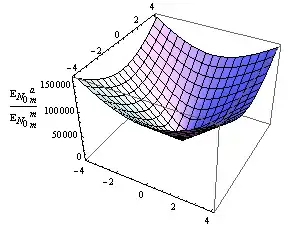
For plotting a 3D $60\times 60$ data. Here is the outputenter image description here

Obviously the problem is at the axes label at left up side. It overlaps with the numbers. I am just using rotate sign and do the rotation and scaling manually. This view was the nicest view but I cannot play with increasing or decreasing the indent of the axeslabels. Is it possible to add it inside ListPlot3D?

I am sorry, but I dont know how to load the data here but I think it might not be a crucial issue.

EDIT:(29.10.2014)

I checked the following questions and the answers therein:

Collision of axes labels and ticks

AxesLabel in Histogram3D unreadable

These answer also don't help me because they don't have Subscript notations in the Style, instead they have "".

Seyhmus Güngören
  • 2,465
  • 1
  • 18
  • 19

3 Answers3

4
ClearAll[pF];
pF[l_: 0, r_: 5] := Pane[Style[#, FontSize -> Large],FrameMargins -> {{l, r}, {0, 0}}] &;

{xl, yl, zl} = {Style[Subscript[t, l], FontSize -> 21], 
   Style[Subscript[t, u], FontSize -> 21], 
   Style[Subsuperscript[Subscript["E", Subscript[N, 0]], m, a]/
     Subsuperscript[Subscript["E", Subscript[N, 0]], m, m], 
    FontSize -> 21]};

mydata5 = Table[Sin[j^2 + i], {i, 0, Pi, Pi/5}, {j, 0, Pi, Pi/5}];
Row[ListPlot3D[mydata5, DataRange -> {{0, 6}, {0, 6}}, BaseStyle -> 18,
    PerformanceGoal -> "Quality", ImageSize -> 300, BoxRatios -> {1, 1, .7}, 
    AxesLabel -> {xl, yl, pF[0, #]@zl} ] & /@ {0, 20, 40}, Spacer[10]]

enter image description here

You can also use Framed instead of Pane:

ClearAll[pF2];
pF2[l_: 0, r_: 5] := Framed[Style[#, FontSize -> Large], FrameStyle->None,
                     FrameMargins -> {{l, r}, {0, 0}}] &;
kglr
  • 394,356
  • 18
  • 477
  • 896
  • woow! thats working really great. Once again thank you very much for your help. I was really struggling for a very easy looking problem, which turned out to be really non-trivial. I also find it strange because this is really something basic and mathematica shouldnt have such a problem. – Seyhmus Güngören Oct 29 '14 at 21:43
  • seyhmus, thanks for the Accept. – kglr Oct 29 '14 at 22:05
1

A quick fix is to add several white spaces i.e. use something like AxesLabel -> "a ". You can use Manipulate to adjust the number of white spaces:

With[{p = Plot3D[Abs[x + I y], {x, -4, 4}, {y, -4, 4}]}, 
 Manipulate[Show[p, AxesLabel -> "|z|" <> ConstantArray[" ", n]], {n, 0, 10, 1}]]

enter image description here


As suggested by Alexey Popkov in the comment below, we can achieve exact positioning with Spacers:

With[{p = Plot3D[Abs[x + I y], {x, -4, 4}, {y, -4, 4}]}, 
 Manipulate[Show[p, AxesLabel -> Row[{"|z|", Spacer[s]}]], {s, 0, 100}]]
xzczd
  • 65,995
  • 9
  • 163
  • 468
  • 1
    Instead of ConstantArray[" ", n] you could use Spacer[w] for exact positioning. – Alexey Popkov Oct 28 '14 at 07:28
  • @AlexeyPopkov Oh, I didn't know this function! Added. – xzczd Oct 28 '14 at 08:11
  • I have a problem with spacer. It is spacing not only $z$ axis but also $x$ and $y$ axeses, which must normally not happen. – Seyhmus Güngören Oct 28 '14 at 16:07
  • I have checked in v.8.0.4 and v.10.0.1: with Spacer the behavior is exactly as shown in the animation, but more smooth. – Alexey Popkov Oct 30 '14 at 05:25
  • @SeyhmusGüngören Sorry, I can't understand what you mean, I just checked my approach with kguler's data, the behavior is exactly the same at least in my computer. Can you elaborate a little? – xzczd Nov 01 '14 at 03:01
1
Plot3D[29000.0 Abs[x + I y], {x, -4, 4}, {y, -4, 4},
 BoxRatios -> {1, 1, .7},
 ImageSize -> 300,
 AxesLabel -> Row[{Spacer[30], 
    Style[ Subsuperscript[Subscript["E", Subscript[N, 0]], m, a]/Subsuperscript[
    Subscript["E", Subscript[N, 0]], m, m]], Spacer[30]}]
]

Blockquote

Junho Lee
  • 5,155
  • 1
  • 15
  • 33