I have 6894 polygons describing zones in a state plane (i.e., cartesian) coordinate system. Most are not very complex, and I believe none have holes. A random example is
Polygon[{{351633., 564236.}, {351681., 562612.}, {351663., 562555.}, {351699., 561341.}, {348792., 561268.}, {348733., 564168.}, {351633., 564236.}}]
How can I test whether these polygons have holes?
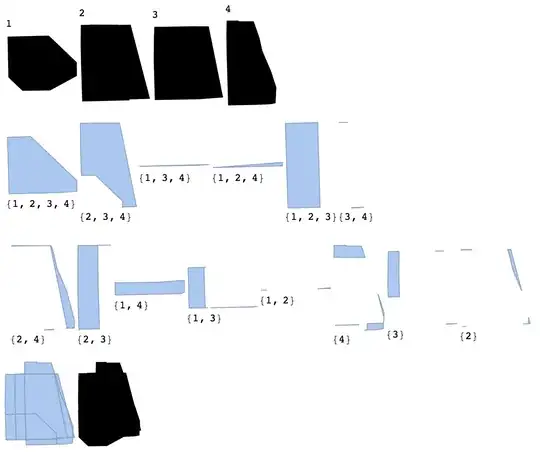
I want a new set of polygons that describe all areas in which one or more of these polygons intersect, and I need to know which polygons cover each of these regions. So, in the new set the region where polygon A is unintersected is one region, the region where A and B intersect is another region, the region where A, B, and C intersect is another, and so on. Any of these "regions" in the new set is not necessarily connected; for example, one could imagine a wide polygon being split in half by a thin one, producing two unintersected regions. In such cases I need a list of closed polygons (associated, as the other polygons, with the appropriate members of the domain set).
I have no idea how to do this mathematically, and it would be very cool to see a solution if someone has one. But on a more practical level I suspect that I can do this at high precision using image processing.
Here is an example of what is going on:
polygons = Get["https://s3.amazonaws.com/tblackburn/stack_exchange/polygons-sample"];
(* my polygons are benign, but beware what you "Get" from the internet! *)
n = 100;
Riffle[ColorData["Rainbow"] /@ Rescale[Range[n + 1]], RandomChoice[polygons, n]];
Graphics[Prepend[%, Opacity@.5], ImageSize -> Large]

Is there a way to scale a set of colors such that I can calculate what color each intersection would be, and such that the color is guaranteed to be unique? And then use the morphology suite of functions on a rasterized image to generate new polygons? I need the new polygons expressed in the same coordinate system, and I need the vertices to be as accurate as possible -- so the rasters would have to be quite large I think.
Or, is there some other way to obtain the result I am after?
I have 32 CPUs and 244 GB of memory to throw at this.



ImageAdd. But you can only distinguish up to 24 shapes. – Nov 19 '14 at 06:40Row[Graphics /@ Map[{Opacity[0.5], #, Disk[]} & {{Red, Yellow, Blue}, {Yellow, Blue, Red}}, {2}]]and you'll see what I mean. A way out would be toGatherBycolor and thenSorting and look at the colour spectrum you get and whether it matches the topological properties you are after. The colour issue has been observed in this question – gpap Nov 19 '14 at 12:11polygons[[9]]includes each perimeter point twice, so it is all hole. – Simon Woods Nov 22 '14 at 11:43