5

This code: (by @kguler, can be found here, as an answer to "How to shade a plotted region in specific direction?")

Row[RegionPlot[x1 + x2 <= 10 && x1 <= 6 && x2 <= 9 && x1 >= 0 && x2 >= 0,
              {x1, 0, 10}, {x2, 0, 10},
              ColorFunction -> (#), PlotLabel -> Style[#, "Panel", 16]] & /@  
     {Blend[{White, Red}, (5 # + 50 #2)/55] &, 
      Blend[{White, Red}, (275 # + 275 #2)/550] &, 
      Blend[{White, Red}, (50 # + 5 #2)/55] &}, Spacer[5]]

will produce this:

enter image description here

However, I would like to produce filling of the area with some sort of cushion effect, like individual cells in following examples:

enter image description here

or:

enter image description here

How to do this?

Adrian
  • 411
  • 4
  • 14

2 Answers2

7

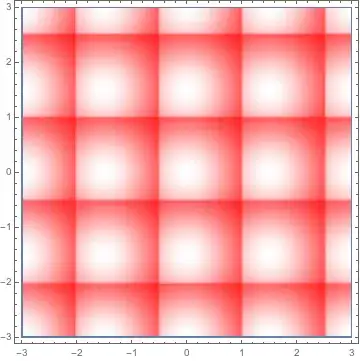
First attempt:

RegionPlot[1 == 1, {x, -3, 3}, {y, -3, 3}, 
 ColorFunction -> (Hue[1, 
     1 - Exp[-(Mod[#, 1.5, -0.5]^2 + Mod[#2, 1.5, -0.5]^2)], 1] &), 
 ColorFunctionScaling -> False, PlotPoints -> 120]

which produces this:

enter image description here

Second variation:

RegionPlot[1 == 1, {x, -3, 3}, {y, -3, 3}, 
 ColorFunction -> (Piecewise[{{Hue[1, 
        1 - Exp[-12 (Mod[#1 + 0.6, 1.5, -0.5]^2 + 
             Mod[#2 + 0.6, 1.5, -0.5]^2)], 1], 
       Mod[#1 + 0.5, 1.5, -0.5]^2 + Mod[#2 + 0.5, 1.5, -0.5]^2 < 
        0.1}, {Hue[1, 
        1 - Exp[-(Mod[#1, 1.5, -0.5]^2 + Mod[#2, 1.5, -0.5]^2)], 1], 
       True}}] &), ColorFunctionScaling -> False, PlotPoints -> 360]

which produces this:

enter image description here

This requires a disgustingly-large number of PlotPoints; hopefully someone knows a workaround. Incorporating antialiasing would be a plus. Here's an antialiased version produced using Image:

enter image description here

DumpsterDoofus
  • 11,857
  • 1
  • 29
  • 49
4

One way would be to crop a GaussianMatrix:

f = GaussianMatrix[{{#1, #2}, Max[#1, #2]/2}][[#1 ;;, #2 ;;]] &

then

ColorNegate@(ArrayPlot@ArrayFlatten@ConstantArray[f[40, 40], {10, 10}])

pillows

gpap
  • 9,707
  • 3
  • 24
  • 66