6

I know how to construct the Koch snowflake:

f[{a:{x1_,y1_},b:{x2_,y2_}}] :=
  Partition[{a,(2a+b)/3,{3(x1+x2)+√3(y1-y2),√3(x2-x1)+3 (y1+y2)}/6,(a+2b)/3,b},2,1];
pts=Join@@Nest[Join@@f/@#&,.5{{{0,0},{2,0}},{{2,0},{1,-√3}},{{1,-√3},{0,0}}},5];
Graphics[Polygon @ pts]

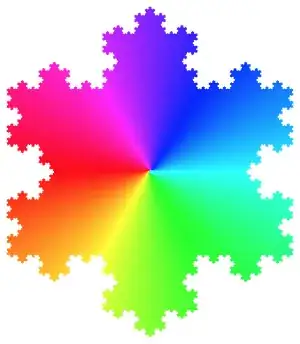
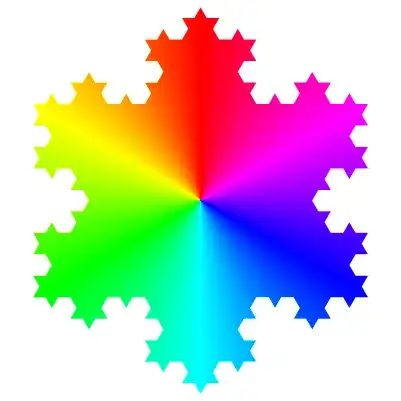
and draw a hue disk (How do I draw a Circular Graph colored like this in Mathematica?), but how do I draw a Koch snowflake with hue-based coloring like this? Vector diagrams are better than images.

color wheel on Koch snowflake

Syed
  • 52,495
  • 4
  • 30
  • 85
matrix42
  • 6,996
  • 2
  • 26
  • 62

5 Answers5

10

With a hue disk as you suggested (but slightly tweaked to get the colours in the right spot):

hueDisk = With[{sectors = 360}, angle = 2 Pi/sectors;
  Table[{Hue[1 - i/sectors], EdgeForm[{Thick, Hue[1 - i/sectors]}], 
    Disk[{0, 0}, 0.6, {\[Pi]/2 + i angle, \[Pi]/2 + (i + 1) angle}]}, {i, 0, sectors - 1}]];

Then we can use the FilledCurve technique to draw the snowflake over the top:

Graphics[{hueDisk,
  FaceForm[White], EdgeForm[Black],
  FilledCurve[{
    {Line[{ImageScaled[{-2, -2}], ImageScaled[{2, -2}], 
       ImageScaled[{2, 2}], ImageScaled[{-2, 2}]}]},
    {Line@With[{m = Mean@pts}, # - m & /@ pts]}}]}]

hueflake

wxffles
  • 14,246
  • 1
  • 43
  • 75
7

One way is to use your code for the snowflake, and turn it into an image. Then use the code for the colored circle and turn it into an image. Then multiply:

f[{a : {x1_, y1_}, b : {x2_, y2_}}] := 
  Partition[{a, (2 a + b)/3, {3 (x1 + x2) + \[Sqrt]3 (y1 - y2), \[Sqrt]3 (x2 - x1) + 
       3 (y1 + y2)}/6, (a + 2 b)/3, b}, 2, 1];
pts = Join @@ Nest[Join @@ f /@ # &, .5 
     {{{0, 0}, {2, 0}}, {{2, 0}, {1, -\[Sqrt]3}}, {{1, -\[Sqrt]3}, {0, 0}}}, 5];
flake = ColorNegate[Image[Graphics[Polygon@pts], ImageSize -> 400]];
circle = Image[With[{sectors = 360}, angle = 2 Pi/sectors;
    Graphics[Table[{Hue[i/sectors], EdgeForm[{Thick, Hue[i/sectors]}], 
       Disk[{0, 0}, 1, {i angle, (i + 1) angle}]}, {i, 0,  sectors - 1}]]], ImageSize -> 400];
ColorNegate[ImageMultiply[flake, circle]]

enter image description here

bill s
  • 68,936
  • 4
  • 101
  • 191
3
Clear["`*"]
f[{a_,b_}]:={3a,2a+b,3/2(a+b)+√3/2(b-a).RotationMatrix[-Pi/2],a+2b,3b}/3;
pts=Nest[Join@@f/@Partition[#,2,1]&,.5{{0,0},{2,0},{1,-√3},{0,0}},3];
img=Colorize[Image@Rescale@Table[ArcTan[x,y+1.*^-6],{x,-200,200},{y,-200,200}],ColorFunction->Hue];
ImageAdd[img,Graphics[Polygon@pts]]

pts = # - Mean@pts & /@ pts;
Graphics[{Texture@img,Polygon[pts,VertexTextureCoordinates->Rescale@pts]}]

enter image description here

chyanog
  • 15,542
  • 3
  • 40
  • 78
2

Using the Koch snowflake generator from here, and the current ability of Mathematica to plot over polygons, here is one more possibility:

kochinsert[pts_?MatrixQ] :=
           Insert[#, Composition[TranslationTransform[#[[2]] - #[[1]]], 
                                 RotationTransform[-π/3, #[[1]]]][#[[2]]], 3] &[
                     Transpose[{1 - #, #}] &[Subdivide[3]].pts]

koch[pts_?MatrixQ] := 
     Apply[Join, Prepend[Rest /@ Rest[#], First[#]]] &[kochinsert /@ Partition[pts, 2, 1]]

ks = Polygon[Nest[koch, Append[#, First[#]] & @ N[CirclePoints[3]], 4]];
DensityPlot[ArcTan[-y, -x], {x, y} ∈ ks, BoundaryStyle -> Black, ColorFunction -> Hue,
            Exclusions -> None, Frame -> False, PlotPoints -> 95]

color wheel on Koch snowflake

J. M.'s missing motivation
  • 124,525
  • 11
  • 401
  • 574
2

Using:

  • KochCurve: (introduced Mar 16, 2017)

  • ConicGradientFilling (introduced Dec 16, 2020)


Clear["Global`*"];
cols = (Hue /@ Subdivide[1, 13]) // ColorConvert[#, RGBColor] & // 
    Reverse // RotateRight[#, 4] &;

reg = TransformedRegion[KochCurve[4] , #] & /@ {RotationTransform[Pi, {1/2, 0}] , RotationTransform[-Pi/3, {1, 0}] , RotationTransform[Pi/3, {0, 0}]};

ks = reg /. Line -> Sequence // Flatten[#, 2] & // DeleteDuplicates // CanonicalizePolygon@*Polygon;

Graphics[{ConicGradientFilling[cols], ks}]

enter image description here

Syed
  • 52,495
  • 4
  • 30
  • 85