I must plot some data in radians and would like to use this image as a background to that graph. Although it looks good, the lines are degraded in image form; thus, the reason for this question. Can something like this be drawn in Mathematica? 
Asked
Active
Viewed 5,070 times
30

J. M.'s missing motivation
- 124,525
- 11
- 401
- 574

Nothingtoseehere
- 4,518
- 2
- 30
- 58
7 Answers
35
Here's a start. I'll leave the labeling and fine tuning the details to you:
With[{thin = {Thin, Opacity[0.4]}},
    RegionPlot[x^2 + y^2 <= 1, {x, -1, 1}, {y, -1, 1},
        ColorFunction -> (Hue[ArcTan[#, #2]/(2 π)] &),
        ColorFunctionScaling -> False, PlotPoints -> 100, Frame -> False,
        Mesh -> {21, 21, 10, 7, 47}, MeshStyle -> {thin, thin, thin, thin, thin},
        MeshFunctions -> {# &, #2 &, Norm[{#1, #2}] &, ArcTan[# , #2] &, ArcTan[# , #2] &}
    ]
]


rm -rf
- 88,781
- 21
- 293
- 472
14
It is of course possible to draw everything manually.

Manipulate[
 With[{
   colArea =
    Polygon[#2, VertexColors -> ConstantArray[Hue[#1/(2 Pi)], 3]] & @@@
    Table[{phi, {{0, 0}, {Cos[phi], Sin[phi]}, {Cos[phi + 2 Pi/colors],
       Sin[phi + 2 Pi/colors]}}}, {phi, 0, 2 Pi - 2 Pi/colors, 2 Pi/colors}],
   gridLines =
    Table[{{x, -#}, {x, #}} &[Sqrt[1 - x^2]], {x, -1, 1,
      2/(grid - 1)}],
   radLines = Table[{{0, 0}, {Cos[phi], Sin[phi]}},
      {phi, 0, 2 Pi - 2 Pi/radiants, 2 Pi/radiants}],
   cirLines = With[{
     circle = Table[{Cos[phi], Sin[phi]}, {phi, 0, 2 Pi, Pi/20}]},
     Table[r*circle, {r, 0, 1, 1/circles}]
   ]},
   Graphics[{
    colArea, Black, Thin, Line[gridLines],
    Line[Map[Reverse, gridLines, {2}]], Darker@Gray, Line@radLines,
    Line /@ cirLines}]],
 {circles, 3, 10, 1},
 {radiants, 4, 20, 1},
 {grid, 5, 20, 1},
 {{colors, 20}, 4, 120, 1}
 ]
Update
By the way, it is not required to create a new coordinate list for all graphics primitives. This was only done to make the code verbose enough. The color disk, the radial lines and the circles can all be created easily using the same underlying data. Here the Span operator (;;) becomes handy, to achieve high resolution in the color disk, but have only some radial grid lines.
With[{pts = Append[#, First[#]] &@ Table[{r {Cos[phi], Sin[phi]}, phi/(2 Pi)},
  {phi, 0, 2 Pi, .1}, {r, 0, 1, .1}]},
Graphics[{Polygon[{{0, 0}, First[#1], First[#2]},
  VertexColors -> (Hue /@ {{0, 0, 1}, Last[#1], Last[#2]})] & @@@
    Partition[pts[[All, -1, {1, 2}]], 2, 1],
  Black, Opacity[.5], Line[pts[[;; ;; 3, All, 1]]], Line[Transpose[pts[[All, All, 1]]]],
  Opacity[.2], {Line[#], Line[Map[Reverse, #, {2}]]} &@
    Table[{{x, #}, {x, -#}} &@Sqrt[1 - x^2], {x, -1, 1, .1}]
  }]]


halirutan
- 112,764
- 7
- 263
- 474
-
Since I'm usually the one suggesting drawing from Graphics primitives I must vote for this. :-) – Mr.Wizard May 26 '13 at 03:19
-
@halirutan +1 Very Nicely done! I too am curious what the colors slider will do. Is that hue angle? Thanks! – Nothingtoseehere May 26 '13 at 03:34
-
@Mr.Wizard The colorslider wasn't so spectacular as I excpected, so I removed it ;-) – halirutan May 26 '13 at 11:17
-
@Mr.Wizard Then here per request the original color-slider-included version. – halirutan May 26 '13 at 11:26
14
Just for fun, only the color wheel drawing part done with Disk sectors:
With[{sectors = 360},
 angle = 2 Pi/sectors;
 Graphics[
  Table[{Hue[i/sectors], EdgeForm[{Thick, Hue[i/sectors]}],
    Disk[{0, 0}, 1, {i angle, (i + 1) angle}]}, {i, 0, sectors - 1}]]]
I had to use a thick EdgeForm because without it I was getting a moiré pattern in the rendering.

J. M.'s missing motivation
- 124,525
- 11
- 401
- 574

Aky
- 2,719
- 12
- 19
-
-
Just add a fixed offset to the angle calculation:
With[{offset = Pi/6, sectors = 360}, angle = 2 Pi/sectors; Graphics[ Table[{Hue[i/sectors], EdgeForm[{Thick, Hue[i/sectors]}], Disk[{0, 0}, 1, {i angle + offset, (i + 1) angle + offset}]}, {i, 0, sectors - 1}]]]– Aky May 26 '13 at 13:49 -
1Performance can be improved and the code simplified by turning off anti-aliasing and omitting
EdgeForm:With[{sectors = 360}, angle = 2 Pi/sectors; Graphics[Table[{Antialiasing -> False, Hue[i/sectors - 1/12], Disk[{0, 0}, 1, {i angle, (i + 1) angle}]}, {i, 0, sectors - 1}]]]-- note also that the very center of the graphic is cleaner this way. – Mr.Wizard May 26 '13 at 19:10 -
-
Removing the moiré pattern,
With[{sectors = 360}, With[{offset = 0, angle = 2 Pi/sectors}, Graphics[Table[{Hue[i/sectors], Disk[{0, 0}, 1, {i angle + offset, (i + 1.8) angle + offset}]}, {i, 0, sectors - 1}]]]]– chyanog Jun 08 '13 at 17:34
13
I set out to do this differently from R.M, but I ended up with something very similar. Nevertheless, I think there is a certain simplicity that results from my using ParametricPlot, so here it is:
ParametricPlot[
 r {Cos[t], Sin[t]}, {t, 0, 2 Pi}, {r, 0, 1},
 Axes -> False, Frame -> False,
 Mesh -> {47, 11, {0}, 8, 27, 27},
 MeshFunctions -> {#3 &, #3 &, #3 &, #4 &, # &, #2 &},
 MeshStyle -> ({#, #2, #2, #, #, #} &[Opacity[0.5], Thick]),
 ColorFunction -> (Hue[#3 - 1/12] &)
]
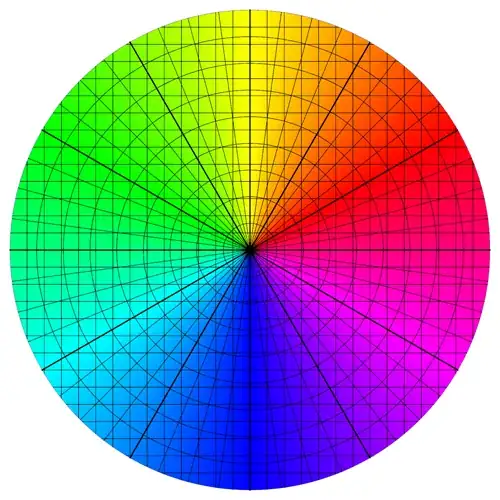
A complication that arose with this method is that I needed to specifically add the line at zero (that is, east), as I could not get Mesh to do this automatically.
J. M.'s missing motivation
- 124,525
- 11
- 401
- 574

Mr.Wizard
- 271,378
- 34
- 587
- 1,371
-
@MrWizard +1 for a cool solution! The hue angle is off a bit from the example though.
Hue[#3 - (2 Pi/5.8)]will fix it. Thanks! – Nothingtoseehere May 26 '13 at 03:32 -
@R Hall, better to use
Hue[#3 - 1/12], as rm suggested in his answer. That way, red exactly corresponds to $\pi/6$. – J. M.'s missing motivation May 26 '13 at 03:48 -
-
@J.M. Thanks, I forgot what I was subtracting from and confused myself. Corrected. – Mr.Wizard May 26 '13 at 17:12
9
Here is another method based on RegionPlot[], similar to rm's solution. There are a few wrinkles in this version, however:
I use
PolarPlot[]to generate the ticks for me. (I know about the hidden functions behind the generation of the polar ticks, but I couldn't figure how to use them directly.)I use the saturation and brightness arguments of
Hue[]to generate the meshes as part of the color function. The idea wasstolenadapted from the solutions of Heike and Simon in this answer, but I did change a few things around.
Now, on to the routine:
hueWithMesh[x_, y_, hx_: 1/10, hr_: 1/8, ht_: 1/24, r1_: 2/5, r2_: 1/2, g_: 1/5] :=
  Block[{ph = Arg[x + I y]/π, s, b},
        s = r1 + (1 - r1) Abs[(Mod[2 Abs[x + I y]/hr, 2, 1] - 2) (Mod[ph/ht, 2, 1] - 2)]^g;
        b = r2 + (1 - r2) Abs[(Mod[2 x/hx, 2, 1] - 2) (Mod[2 y/hx, 2, 1] - 2)]^g;
        Hue[ph/2 - 1/12, s, Max[1 - s^2, b]]]

 Show[PolarPlot[1/Sqrt[2], {t, -π, π}, MaxRecursion -> 0, PlotPoints -> 6,
                PlotRange -> 1, PlotStyle -> None, PolarAxes -> Automatic],
      RegionPlot[Abs[x + I y] <= 1, {x, -1, 1}, {y, -1, 1}, BoundaryStyle -> None,
                 ColorFunction -> (hueWithMesh[#1, #2] &), ColorFunctionScaling -> False,
                 Frame -> False, PlotPoints -> 200], PlotRange -> All]
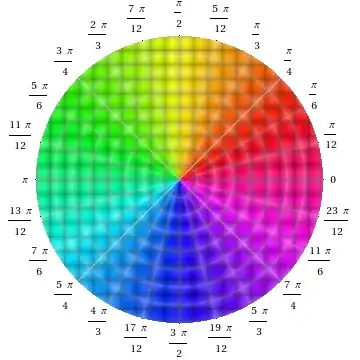
As you might notice from the implementation of hueWithMesh[], the parameters hr, ht, and hx all control the spacing in the rectangular and polar meshes, while r1, r2, and g all control the saturation/brightness for the meshes. You can tweak these parameters to your taste.

J. M.'s missing motivation
- 124,525
- 11
- 401
- 574
-
+1 for extreme cool factor! I will have to go to school on this code. Thanks again for your help! – Nothingtoseehere May 27 '13 at 16:32
-
-
Simon's answer is the first thing I thought about as well, when I saw the question, but I couldn't get the highlights working in time and couldn't be arsed to dig deeper :) – rm -rf Jun 08 '13 at 16:30
-
@rm, at this juncture, I should confess that I had to stare at Simon's routines for a full hour before figuring how to take it apart for this question. – J. M.'s missing motivation Jun 08 '13 at 16:35
-
1Ok, I'm relieved then... If you had to spend an hour on it, I'm very certain that taking the lazy route was the best course of action for me =) – rm -rf Jun 08 '13 at 16:37
7
Since you've already gotten a bunch of fine answers, I'll just quietly post this variation:
DensityPlot[ArcTan[x, y], {x, -1, 1}, {y, -1, 1},
            ColorFunction -> (Hue[# - 7/12] &), Frame -> False, Mesh -> {30, 30, 8, 49},
            MeshFunctions -> {#1 &, #2 &, Abs[#1 + I #2] &, Arg[#1 + I #2] &},
            MeshStyle -> {Opacity[1/3, GrayLevel[1/5]], Opacity[1/3, GrayLevel[1/5]],
                          Opacity[1/3, GrayLevel[1/2]], Opacity[1/3, GrayLevel[1/2]]},
            PlotPoints -> 45, RegionFunction -> (Norm[{#1, #2}] < 1 &)]
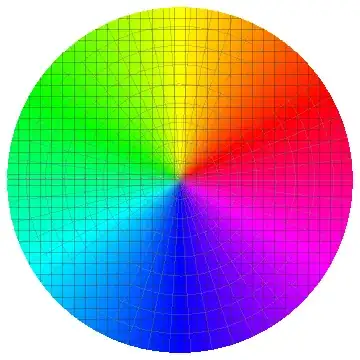
Tick addition is left for as an exercise for less lazy readers.
J. M.'s missing motivation
- 124,525
- 11
- 401
- 574
-
-
1(I've got another variation in the works, but I'll post it much later.) – J. M.'s missing motivation May 26 '13 at 18:15
2
Using Polygon:
With[{d = 2 Pi/360},
 Graphics[Table[{Hue[t/( 2 Pi)], EdgeForm@Hue[t/( 2 Pi)],
    Polygon@{{0, 0}, {Cos[t], Sin[t]}, {Cos[t + d], Sin[t + d]}}}, {t, d, 2 Pi, d}]]
 ]

chyanog
- 15,542
- 3
- 40
- 78
HuehasRedat zero, whereas your image has red at $\pi/6$. So all you need to do would be to change the numerator insideHue[...]toArcTan[#, #2] - π/6. – rm -rf May 26 '13 at 01:32