I have a polygon, says, Polygon[{0,0},{10,0},{10,10}{0,10}]. I would like to cut it by a line (through two points) and take one half of it. Could you please suggest me the functions I should use? (I am very new to Mathematica).
Asked
Active
Viewed 742 times
6

-
Which points? Two vertices? – Dr. belisarius Dec 12 '14 at 05:09
-
a general line that goes through 2 points. Thus the line may or may not cut the polygon – N.T.C Dec 12 '14 at 06:26
-
1Take a look at this http://mathematica.stackexchange.com/questions/66152/how-to-check-if-a-line-segment-intersects-with-a-polygon – Dr. belisarius Dec 12 '14 at 06:30
3 Answers
8
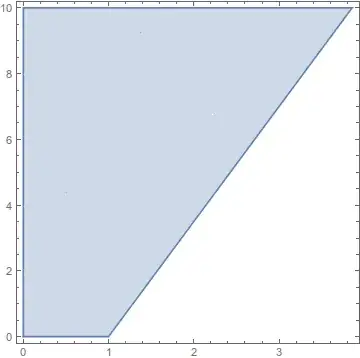
I guess a pretty easy approach is to use HalfPlane with your two points that define your line. RegionDifference should do the rest.
RegionDifference[
 Polygon[{{0, 0}, {10, 0}, {10, 10}, {0, 10}}],
 HalfPlane[{{1, 0}, {3, 7}}, {1, 1}]];
RegionPlot[%]

halirutan
- 112,764
- 7
- 263
- 474
-
+1.
RegionMember[reg][{x, y}]gives an algebraic representation of the region, which might be useful in certain cases. I can't immediately see an easy way to get aPolygon.BoundaryDiscretizeRegion[reg]["BoundaryPolygons"]is unsatisfying. – Michael E2 Dec 12 '14 at 13:37 -
2
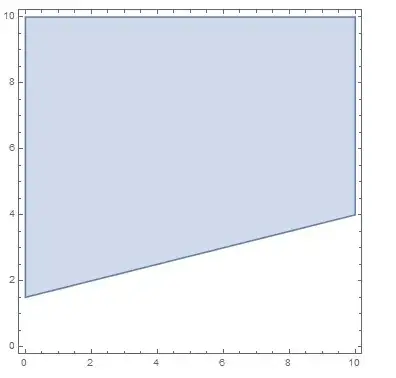
in MMA v10 (although it is slow) you can use:
Clear[r];
r[point1_, point2_] :=
 ImplicitRegion[{x, y} \[Element]
    Polygon[{{0, 0}, {10, 0}, {10, 10}, {0, 10}}] &&
   y >= point2[[2]] + (point2[[2]] - point1[[2]])/(
      point2[[1]] - point1[[1]]) (x - point2[[1]]), {x, y}]

RegionPlot[r[{2, 2}, {6, 3}]]

Basheer Algohi
- 19,917
- 1
- 31
- 78
2
It seems to me there are a few sorts of answers to the question, like
- a numeric visualization, e.g. a
RegionPlot - a system of algebraic conditions,
- a geometric one, i.e. the resulting polygon(s)
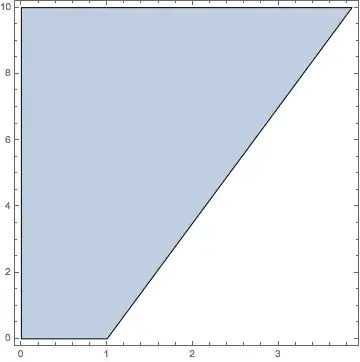
Here is a variation on halirutan's use of the geometric computation functionality:
reg = RegionIntersection[
   Polygon[{{0, 0}, {10, 0}, {10, 10}, {0, 10}}],
   HalfPlane[{{1, 0}, {3, 7}}, -{1, 1}]];
It is easy to plot with RegionPlot[reg] and to get an algebraic system with RegionMember[reg][{x, y}], but some programming seems necessary to get a geometric solution in elementary terms.
The algebraic system is
RegionMember[reg][{x, y}]
(*
  (x | y) ∈ Reals && -7 + 7 x - 2 y <= 0 &&
   10 y >= 0 && -10 (-10 + x) >= 0 && -10 (-10 + y) >= 0 && 10 x >= 0
*)
We can find boundary polygons of the region by discretizing the region. Unfortunately, the breaks the edges into smaller line segments. These can be eliminated by removing points of the polygon that are collinear with its adjacent points.
noncollinear[m : {p1_, p2_, p3_}] :=
  MatrixRank[Transpose[m]~Append~{1., 1., 1.}, Tolerance -> 0.00001] == 3;

polys = BoundaryDiscretizeRegion[reg]["BoundaryPolygons"] /.
  Polygon[pts_] :> Polygon[Pick[pts, noncollinear /@ RotateRight@Partition[pts, 3, 1, 1]]]
Graphics[{EdgeForm[Opacity[1]], Opacity[0.4], ColorData[97, 1], polys},
  Frame -> True, AspectRatio -> 1]
(*
  {Polygon[{{1.14952*10^-7, 2.98023*10^-7}, {1., 2.98023*10^-7},
            {3.85714, 10.}, {1.14952*10^-7, 10.}}]}
*)


Michael E2
- 235,386
- 17
- 334
- 747