10

Back in the day, I read the Mathematica Book cover-to-cover, and I found it to be an enlightening experience. I realize that the Documentation Center is now an order of magnitude larger than the Mathematica Book was, but suppose I wanted to undertake the quixotic task of reading through the complete Documentation Center anyway. What would be a way of navigating through it that would not:

  1. be unnecessarily convoluted;
  2. result in material being skipped;
  3. result in material being encountered repeatedly;
  4. result in material being encountered before its prerequisite material is encountered?

There are 21 colored tiles at the top level. Can I read completely through the material hidden under one tile before moving onto another tile, or are things too intertwined below the surface to make that feasible?

If there is no navigational strategy meeting the 4 criteria above, what are the best Mathematica 10 learning resources available for linear learners?

Updated to Add: I apparently should have stated specifically that I'm interested in the Documentation Center for Mathematica 10. I'm not interested in reading outdated documentation.

Chris Grant
  • 101
  • 3
  • 1
    Type "virtual book" in the help search box. It will bring up a table of contents. You can use this table of contents as a linear organization of the material. There used to be a button for this in v9, I don't know where it went. – Szabolcs Jan 19 '15 at 21:51
  • It appears to me that the Virtual Book doesn't contain all of the information in the Documentation Center. Where, for example, is anything on Computation with Structured Datasets? Has the Virtual Book been updated for v.10 at all? – Chris Grant Jan 19 '15 at 22:03
  • 1
  • That's essentially the same thing recommended by Szabolcs, so I'll ask you the same questions I asked him. Does the Virtual Book contain everything in the Documentation Center? Has it even been updated for v.10? – Chris Grant Jan 19 '15 at 22:12
  • 3
    Not even the part of the documentation that talks about the Virtual Book and Function Navigator has been updated. Thing seem to be in a flux at the moment ... For functionality added before v10 the Virtual Book is your best bet. – Szabolcs Jan 19 '15 at 22:13
  • @Chris We're just users like you, our comments are just observations. You might ask WRI for a definitive answer. Also, on this website answers are supposed to be complete. As you noticed, no one yet could give a full answer, that's why we just posted comments (not answers): it means that we understand that these comments don't give you a full solution. But we hope they can be helpful. – Szabolcs Jan 19 '15 at 22:16
  • Seriously: going through guide/AlphabeticalListing will meet most of your criteria. – Rolf Mertig Jan 19 '15 at 22:25
  • @Rolf. Yes, 3 out of 4. But it doesn't address criterion 4, I don't think. Is order unimportant? Is it good to learn about AASTriangle before learning about Graphics? – Chris Grant Jan 19 '15 at 22:30
  • Maybe a good book, like the one by Paul Wellin, helps. Also just reading some questions and answers at this site and at the community.wolfram.com site could help. – Rolf Mertig Jan 19 '15 at 22:34
  • I'm not hoping to learn how to program with Mathematica. I already know that, more or less. I'm hoping to learn in detail about all of the features of Mathematica that I'm not using because I don't know about them because they were introduced since the last time I had a chance to systematically read through the documentation. I think I'm now persuaded that such a systematic reading of the documentation cannot be done, which is worth knowing, I guess. Thanks for your input. – Chris Grant Jan 19 '15 at 22:51
  • @ChrisGrant Actually going through the coloured tiles is not a bad approach for that. Reading this site is also useful, there's always something new that pops up. And then there are those semi-hidden features like using Boole to integrate over a region or the fact that Sum would be able to handle Prime. Most of these (not all!) are mentioned somewhere in the documentation, sometimes buried in examples, but going through every documentation page to find them is practically impossible. Even if you find a linear order. – Szabolcs Jan 20 '15 at 00:04
  • @ChrisGrant I learned most interesting and useful things by actually using Mathematica and by participating in the community (the old MathGroup, this site, Wolfram Community). – Szabolcs Jan 20 '15 at 00:05
  • A linear learner ought to seek out a book instead, imo: http://mathematica.stackexchange.com/questions/5059/what-mathematica-book-to-buy – Michael E2 Jan 20 '15 at 00:29

1 Answers1

14

First of all, in my opinion your criteria 4 cannot be achieved easily because there are a lot of cycles in the documentation and you find a lot of references and back-references in help-pages.

Otherwise, I agree that it is very helpful to have a linear way to go through all of the material of Mathematica. When you study the literature about how to read books and speed-reading, you often find that starting to really read the book is not the best option. A better way is to carefully study the index and afterwards skim through the material to get an overview because this helps the brain to classify the information.

What I like is to just read through the list of all Mathematica functions and if I encounter something that I didn't know yet (and which sounds interesting), to read through its documentation. If you want to do this, then there is an easy way to create an alphabetical list of all system functions and their link to the documentation directly within Mathematica:

docPath = FileNameJoin[{$InstallationDirectory, "Documentation", "English", "System"}];
Column[
 OpenerView [{Style[#1, "Item"], Column[Function[sym,
        Button[sym, Documentation`HelpLookup[sym], 
         Appearance -> "Frameless"]] /@ #2]}] & @@@ ({#, 
      Names["System`" <> # <> "*"]} & /@ 
    Prepend[CharacterRange["A", "Z"], "$"])
 ]

This gives you read through all function names and have their documentation by just clicking on them
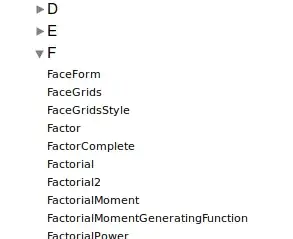
enter image description here

Additionally, and this might be of equal importance, there is a way to display all guide pages, tutorials and how-to's in the same manner:

{guides, tutorials, howtos} = Map[FileBaseName, 
  FileNames["*.nb", {FileNameJoin[{docPath, #}]}]] & /@ {"Guides", "Tutorials", "HowTos"};
Column[OpenerView [{Style[#3, "Item"], 
     Column[Function[page, 
        Button[page, Documentation`HelpLookup[#1 <> page], 
         Appearance -> "Frameless"]] /@ #2]}] & @@@ {{"guide/", 
    guides, "All Guides"}, {"tutorial/", tutorials, 
    "All Tutorials"}, {"howto/", howtos, "All Howto's"}}
 ]

This is a lot to read and I recommend that you really skim through the lists first and not just start reading. For instance, I see about 50 tutorial about DSolve alone... To answer your questions with regard to my code:

  1. Going through the lists should not be convoluted at all.
  2. The reference pages are not complete, because I have only included everything from the system context which starts with a letter or with $. Therefore, you will skip for instance \[FormalS]. The tutorials, the guides and how-to's are extracted from the installation and should be complete (although it does not include add on packages).
  3. If you read from start to end, you should not see any page twice
  4. You will see functions in the documentation pages that you haven't see yet.

I hope you find this helpful.

halirutan
  • 112,764
  • 7
  • 263
  • 474