3

Is there a quick way to search all built-in Mathematica functions by name? Say I want to find all functions whose name contains "Graph", such as GraphPlot, NeighborhoodGraph, Subgraph, and so forth. When I enter "Graph" into Mathematica's documentation system, I get some, but not all of the functions whose names contain "Graph". I also get a lot of names which are not functions, as well as other material of varying relevance.

I just want to search for functions by name or partial name. Also, I don't want to see functions from optional packages -- only the basic ones that load when Mathematica starts up.

Ralph Dratman
  • 1,250
  • 12
  • 20
  • @b.gatessucks - Slow, as it searches half the internet. Also returns more than the built-in functions; the first entry is "cryptographic number theory". – stevenvh Jul 30 '12 at 15:11
  • @stevenvh On my system it is very fast and I only get the System` context. – b.gates.you.know.what Jul 30 '12 at 15:20
  • @b.gatessucks - Are we talking about the help window? "graph" finds 714 results in < 1 second, "graph" finds 2192 results in 26(!) seconds. Searching half the internet may be incorrect, but that's the impression you get. The "cryptographic number theory" refers to the Mathematica Guide, but so do some entries in the "graph" search result. – stevenvh Jul 30 '12 at 15:29
  • @stevenvh No, you can type the command in a notebook. Thanks for the clarification. – b.gates.you.know.what Jul 30 '12 at 15:30
  • @b.gatessucks - Yes, that's what I tried first, but that only returns "DegreeLexicographic, ParagraphSpacing, DegreeReverseLexicographic, Subgraph, Lexicographic, TextParagraph". Strange. ParagraphIndent – stevenvh Jul 30 '12 at 15:33
  • @b.gatessucks I hadn't noticed the comments; please add an answer and I shall remove my answer, as you were earlier – acl Jul 30 '12 at 16:04
  • @acl It's all good. – b.gates.you.know.what Jul 30 '12 at 16:05
  • @stevenvh, note that it is case sensitive. I often find it better to miss out the first letter entirely ?*raph* as this will pick up both cases. – Simon Woods Jul 30 '12 at 21:37
  • Thank you, b.gatessucks. I knew about the question mark, but I didn't know it would accept a wildcard. I guess Mathematica has a lot of these hidden features. – Ralph Dratman Jul 31 '12 at 01:16

2 Answers2

10
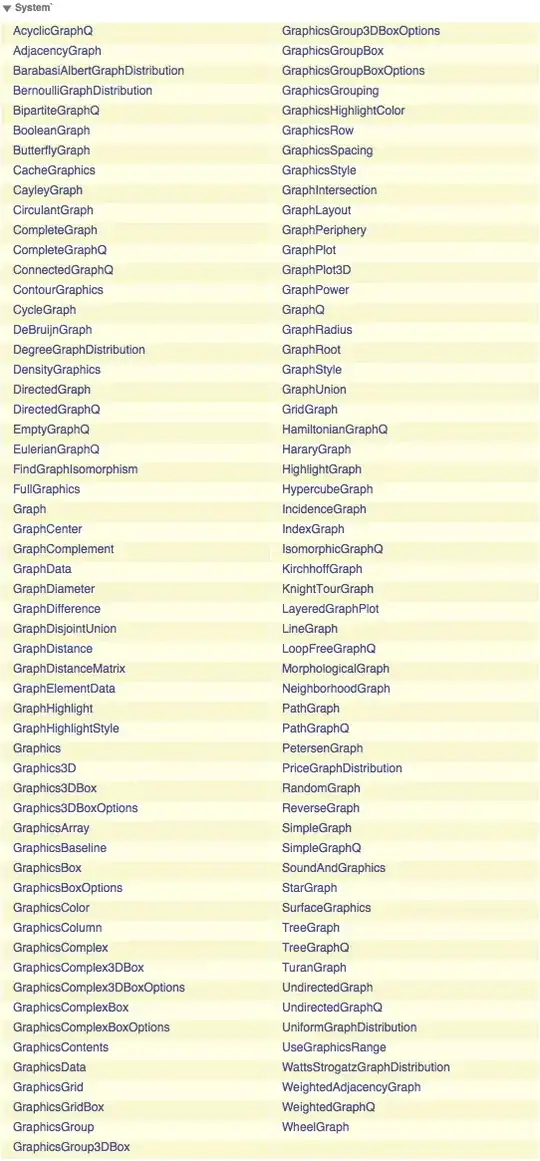
Names["*Graph*"]

(*
{"AcyclicGraphQ", 
.....
, "WheelGraph"}
*)

or

Information["*Graph*"]

Mathematica graphics

acl
  • 19,834
  • 3
  • 66
  • 91
5

In the Documentation Center, you can use the wildcard * as well, as in *Graph*. The difference between doing this in documentation or in the notebook interface (by typing ?*Graph*) is:

  • The notebook will give you a concise list of all matching names
  • However, the above list will also contain names that are not built-in but have been defined by the user or in packages. The listings fortunately make it easy to tell which are the built-in definitions: they are under the `System`context.
  • Sometimes you may be interested in finding functions that aren't in the system context but that are still part of Mathematica's standard add-on packages. For example, the Laplacian is in in the vector analysis package which isn't loaded automatically but is part of Mathematica. This won't show up when you type ?Laplacian* while the packages hasn't been loaded.
  • In this case, doing the search Laplacian* in the Documentation Center may be the best way to look up that function.
Jens
  • 97,245
  • 7
  • 213
  • 499