Here is my original suggestion using ImagePadding:
p = Plot[Cos[x], {x, 0, 2}, AxesStyle -> Arrowheads[.1],
  PlotRange -> {0, 1}, TicksStyle -> Large, RotateLabel -> False,
  ImagePadding -> 70]
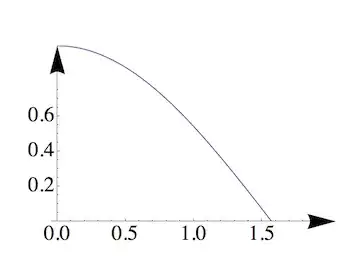
And here is an example of how to use ImageMargins in the plot command:
p = Plot[Cos[x], {x, 0, 2}, AxesStyle -> Arrowheads[.1],
  PlotRange -> {0, 1}, TicksStyle -> Large, RotateLabel -> False,
  ImageMargins -> 70]
Both methods work to give you extra space around the image. But I see Mr. Wizard just now explained this already.
Edit: a note for completeness
In a related question, one can see that neither ImagePadding nor ImageMargins work in some situations. Here is an example where Epilog is used to place a text below a plot:
Plot[Sin[x], {x, 0, 2 Pi},
 Epilog -> {Text["Show me the text", {Pi, -1.3}]}]
The text is not shown because it falls outside the PlotRange. When this happens, you can fix the problem by using PlotRangePadding:
Plot[Sin[x], {x, 0, 2 Pi},
 Epilog -> {Text["Show me the text", {Pi, -1.3}]},
 PlotRangePadding -> .5]



PlotoptionImagePadding -> 70(or use a larger number). – Jens Jun 22 '12 at 17:20