1

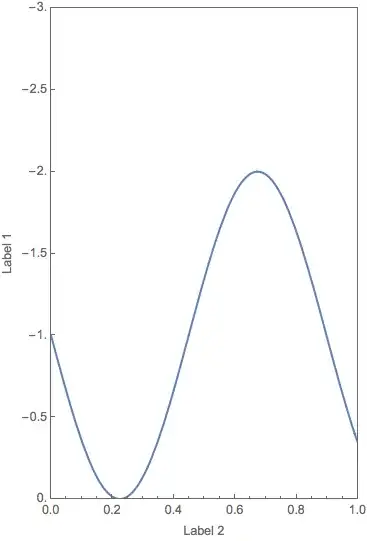
Basically, I'm trying to "rotate" a plot clockwise so that the former x-axis is pointing down, and the former y-axis is pointing to the right. From reading some answers on here, I gathered that I can get axes in the right general orientations using ParametricPlot:

ParametricPlot[{Sin[7 x] - 1,x}, {x, 0, 1}, 
  PlotRange -> {{-3, 0}, {0, 1}}, 
  Frame -> True, 
  AspectRatio -> 5/8, 
  FrameLabel -> {"Label 1", "Label 2"}]

plot

But the problem is that the vertical axis still points up, and I need it to be going the other direction: I need it to be 0 at the top and 1 at the bottom.

Does anyone have any solution to this? ScalingFunctions would have worked beautifully from what I've been reading, but this seems to have been "fixed" years ago without a similar functionality put in to replace it.

Any help is appreciated!

m_goldberg
  • 107,779
  • 16
  • 103
  • 257
Steve
  • 13
  • 4
  • If I understand correctly, try ParametricPlot[{Sin[7x]-1, -x}, {x,0,1}] i.e. flip the new "y" by adding a minus sign. – Bill Feb 16 '15 at 04:51
  • That does seem to work, but the frame labels are now wrong, as in the labels are negative. Is there a way to fix that? – Steve Feb 16 '15 at 04:57
  • 1
    does Rotate[plot,-Pi/2] work? – Basheer Algohi Feb 16 '15 at 05:05
  • Welcome to Mathematica.SE! I suggest that: 1) You take the introductory Tour now! 2) When you see good questions and answers, vote them up by clicking the gray triangles, because the credibility of the system is based on the reputation gained by users sharing their knowledge. Also, please remember to accept the answer, if any, that solves your problem, by clicking the checkmark sign! 3) As you receive help, try to give it too, by answering questions in your area of expertise. – bbgodfrey Feb 16 '15 at 05:14
  • @Algohi. Your approach has an issue -- it also rotates the frame labels and the tick labels, which I think is not wanted. – m_goldberg Feb 16 '15 at 05:20
  • Yup, I want the frame labels and tick labels to have proper orientations. Oh, and thanks for fixing the code block, m_goldberg. – Steve Feb 16 '15 at 05:22
  • I have marked this as a duplicate. I believe what you want is accomplished through FrameTicks. Does this not give the correct output?: ParametricPlot[{Sin[7 x] - 1, -x}, {x, 0, 1}, Frame -> True, FrameTicks -> {Automatic, {-#, #} & /@ Range[0, 1, 0.2]}] – Mr.Wizard Feb 16 '15 at 13:51
  • In Mathematica 10 ScalingFunctions does work too: ParametricPlot[{Sin[7 x] - 1, x}, {x, 0, 1}, Frame -> True, ScalingFunctions -> {Identity, "Reverse"}] – Mr.Wizard Feb 16 '15 at 13:54
  • @Mr.Wizard. To get what the OP wants, you have to invert the aspect ratio and swap the frame labels as in my answer. – m_goldberg Feb 16 '15 at 14:27
  • @m_goldberg Sorry, I should have left those out entirely; such parameters were immaterial to the underlying method. – Mr.Wizard Feb 16 '15 at 14:31

2 Answers2

1

Perhaps this is what you are looking for.

ParametricPlot[{t, - (Sin[7 t] - 1)}, {t, 0, 1}, 
  PlotRange -> {{0, 1}, {0, 3}},
  AspectRatio -> 8/5,
  FrameTicks -> {{Table[{i, -i}, {i, 0., 3., .5}], None}, {Automatic, None}},
  Frame -> True,
  FrameLabel -> {"Label 2", "Label 1"}]

plot

m_goldberg
  • 107,779
  • 16
  • 103
  • 257
1

Just for fun (but somewhat ridiculous to me):

With[{r = RotationMatrix[-Pi/2]}, 
 ParametricPlot[r.{Sin[7 x] - 1, x}, {x, 0, 1}, 
  PlotRange -> (r.{{-3, 0}, {0, 1}}), Frame -> True, 
  AspectRatio -> 5/8, FrameLabel -> {"Label 1", "Label 2"}]]

enter image description here

ubpdqn
  • 60,617
  • 3
  • 59
  • 148