20

I have a relatively simple operation I'd like to perform on a plot: I would like to reflect the plot across the x-axis. I do not have any tick labels, so making sure that the labels are not themselves reflected is not a concern.

Rotating the plot works as expected:

Rotate[ListPlot[{{0,0},{1,1}},Joined->True],90\[Degree]]

...but there does not appear to be a "Reflect" command or equivalent that performs a reflection operation. I've tried using GeometricTransformation and Scale, but both of those don't seem to work on plot objects. How should I go about doing this?

kglr
  • 394,356
  • 18
  • 477
  • 896
Guillochon
  • 6,117
  • 2
  • 31
  • 57
  • 1
    Can't you just change all y values into -y? Just do {#[[1]],-#[[2]]}& /@ pointList, with pointList the set of points to be plotted. – Sjoerd C. de Vries Jul 03 '12 at 22:21
  • I have filling in my plot, and I'm also doing a rotation (essentially I'm flipping about the y = x axis), so while what you suggest would work for the simple example I provided, it doesn't work in general for more complicated operations. – Guillochon Jul 03 '12 at 22:24
  • If you only need to flip a 2D image, then you can use ImageReflect – rm -rf Jul 04 '12 at 02:36

4 Answers4

23

Few examples from the docs on ReflectionTransform used in combination with GeometricTransformation

  gr = Plot[ E^x, {x, -3, 2}]; 
  Row[{Show[gr, Plot[x, {x, -3, 7}, PlotStyle -> Black], 
   gr /. L_Line :> {Red, GeometricTransformation[L, ReflectionTransform[{-1, 1}]]}, 
   PlotRange -> All, ImageSize -> 200], 
   Show[gr, gr /. L_Line :> {Red, GeometricTransformation[L, ReflectionTransform[{-1, 0}]]}, PlotRange -> All, ImageSize -> 200], 
  Show[gr, gr /. L_Line :> {Red, GeometricTransformation[L, ReflectionTransform[{0, -1}]]}, PlotRange -> All, ImageSize -> 200]}, Spacer[15]]

enter image description here

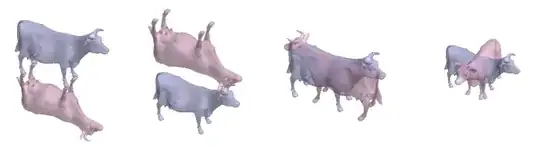
 cow = ExampleData[{"Geometry3D", "Cow"}, "GraphicsComplex"];
 p1 = {0, 0, -0.25161901116371155`};
 p2 = {0, 0, 0.25161901116371155`};
 Row[{Graphics3D[{EdgeForm[None], Opacity[0.5], 
 Lighter[ColorData[1, 1], 0.5], cow, Lighter[ColorData[1, 2], 0.5], 
 GeometricTransformation[cow, #]}, Lighting -> "Neutral", 
 ImageSize -> Small, Boxed -> False] & /@
{ReflectionTransform[{0, 0, 1}, p1], 
 ReflectionTransform[{0, 0, 1}, p2],
 ReflectionTransform[{1, 0, 0}, p1], 
 ReflectionTransform[{1, 1, 0}, p1]}}, Spacer[15]]

enter image description here

kglr
  • 394,356
  • 18
  • 477
  • 896
16

How about something like this (example shamelessly stolen from the docs)

f[n_, x_] := 
 Abs[((1/Pi)^(1/4) HermiteH[n, x])/(E^(x^2/2) Sqrt[2^n n!])]^2
lp = Plot[Evaluate@
     Append[Table[f[n, x] + n + 1/2, {n, 0, 7}], x^2/2], {x, 0, 4}, 
  Filling -> Table[n -> n - 1/2, {n, 1, 8}]]

Graphics[FullGraphics[
    lp][[1]] /. {x_Real, 
    y_Real} :> {-x, y}, 
    AspectRatio -> .42*2.380952380952381]

Mathematica graphics

(you said ticks aren't important so I ignored them). This is similar to Sjoerd's suggestion in the comments but for the whole plot.

acl
  • 19,834
  • 3
  • 66
  • 91
11

You can actually use Scale for this by doing something like

MapAt[Scale[#, {-1, 1}] &, Plot[Sin[x], {x, 0, 2 Pi}] , {1}]

Mathematica graphics

Heike
  • 35,858
  • 3
  • 108
  • 157
1

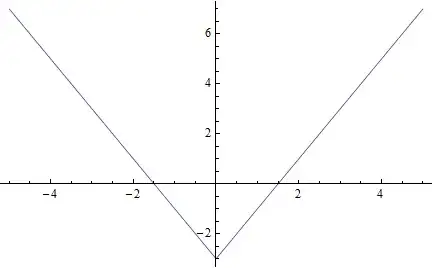
There is a very simple way to "mirror" a function in the y-axis.

Just write $f[-x]$, where you need.

Example:

f[x_] = 2 x - 3;
Plot[Which[x > 0, f[x], x < 0, f[-x]], {x, -5, 5}, PlotRange -> All]

mirror in y-axis

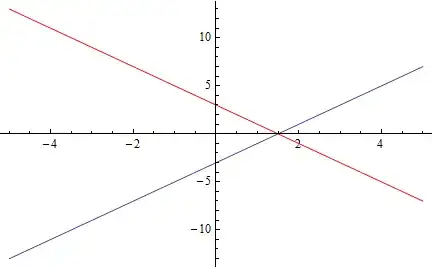
To mirror a function in the x-axis you can place $-f[x]$, where you need.

Example:

f[x_] = 2 x - 3;
P1 =  Plot[f[x], {x, -5, 5}, PlotRange -> All];
P2 =  Plot[-f[x], {x, -5, 5}, PlotRange -> All, PlotStyle -> Red];
Show[P1, P2]

mirror in x-axis