Suppose I have a 2D array im of real values between 0 and 1, representing a grayscale image. I can turn im into an image very efficiently with Image[im] (in fact, on my machine, AbsoluteTiming@Image[im] returns 0. for a 1920 by 1080 array). I would like to colorize im by applying a ColorDataFunction, for example, ColorData["AvocadoColors"], to each entry of im. My first thought was to use Image@Map[ColorData["AvocadoColors"], im, {2}], but this is unreasonably expensive, taking nearly a minute for a 1920 by 1080 array. What is a more efficient way to produce the same output?
Asked
Active
Viewed 1,005 times
3

David Zhang
- 2,316
- 15
- 25
2 Answers
3
im = ExampleData[{"TestImage", "Aerial"}];

Colorize[im, ColorFunction -> "AvocadoColors"] // Timing // First
(* 0.093750 *)
versus
ImageApply[List @@ ColorData["AvocadoColors"][#] &, im] // Timing // First
(* 0.265625 *)

ImageApply[List @@ Blend["AvocadoColors", #] &, im] // Timing // First (thanks: @Kuba *)
(* 0.109375 *)
For a larger image:
imlarge = Image[ RandomReal[1, {1080, 1920}]];

f1 = Colorize[#, ColorFunction -> "AvocadoColors"] &;
f2 = Image@Raster[ImageData[#, DataReversed -> True], ColorFunction -> "AvocadoColors"] &;
f3 = ImageApply[List @@ Blend["AvocadoColors", #] &, #] &;

First[Timing@#[imlarge]] & /@ {f1, f2, f3}
{2.234375, 2.140625, 3.093750}

kglr
- 394,356
- 18
- 477
- 896
-
Is this really the fastest it can be done? I was hoping, since
Image[im]is so fast, that I might be able to apply aColorDataFunctionin a comparable amount of time. For me, these all take several seconds for a 1920 by 1080 image. – David Zhang Feb 17 '15 at 19:22 -
@DavidZhang, i am sure answers with faster methods will trickle in if you wait a few hours/days. – kglr Feb 17 '15 at 20:18
2
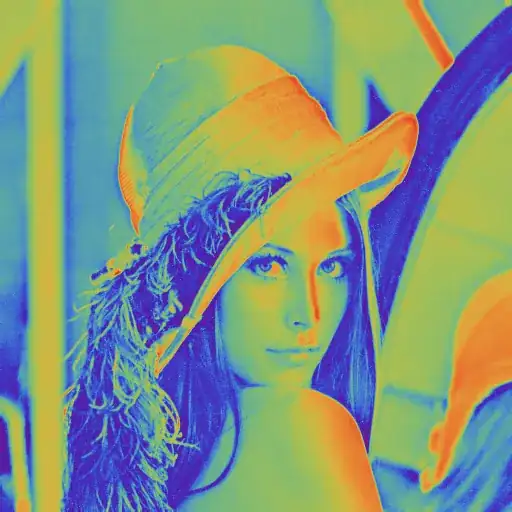
Raster will be helpful, as it has the ColorFunction option and it can be directly converted back to an Image.
Let img be a grayscale image:
img = ColorConvert[ExampleData[{"TestImage", "Lena"}], "Grayscale"]

Image@Raster[ImageData[img, DataReversed -> True], ColorFunction -> "Rainbow"]

Szabolcs
- 234,956
- 30
- 623
- 1,263
-
Note: this is just an idea that has the advantage of brevity and simplicity. I haven't tested performance. – Szabolcs Feb 17 '15 at 18:05
-
Colorize[im, ColorFunction->"AvocadoColors"]? – kglr Feb 17 '15 at 18:08ColorFunctionScaling -> False. – Kuba Feb 17 '15 at 18:11Colorize[Image[im], ColorFunction -> "AvocadoColors"]? When I execute your code, I'm told thatColorizeisExpecting an integer matrix or an image instead of {<<1>>}. – David Zhang Feb 17 '15 at 18:17Imageobject. The duplicate doesn't show this. – Szabolcs Feb 17 '15 at 20:27