Edit (23/02/15) : V10 & V9
V10
It seems that the new (v10) option ImageFormattingWidth is what you are looking for.
In your case, I get the same graphic whatever the size of the window is if I write :
Rasterize[
 TraditionalForm[
  Log[Sqrt[x^2]] (x - x^3)/(y + y^2) + 1/(y - y^2)], "Image",
 RasterSize -> 800, ImageFormattingWidth -> Infinity]
As I understand from the docs, ImageFormattingWidth seems to play the same role than PageWidth which controls linebreaking. In order to prevent any linebreaking in the expression you want to Rasterize, it seems reasonable to set the option to Ìnfinity.
V9
There is no ImageFormattingWidth option in Rasterize : linebreaking is done according the current WindowSize of the notebook. The workaround is then to Rasterize the object automatically in another notebook where WindowSize or PageWidth have been carefully chosen.
Here, I directly adapted the approach/code given by @szabolcs,@halirutan for a similar problem (see this post.)
In particular, instead of defining a WindowSize for the invisible Notebook where the expression will be rasterized, I just set PageWidth->Infinity to prevent any non expected linebreaking (like in v10, see above).
Then, as @halirutan, I use Rasterize to rasterize directly the invisible notebook where was sent the object to be rasterized (i did not know it was possible to rasterize a notebook, see the applications section in the Rasterize docs.)
rasterize[myexpr_, mysize_, pad_: 0] :=
 Module[{nb, mg},
  nb = CreateDocument[ExpressionCell[myexpr, FontWeight -> Plain],
    Visible -> False, PageWidth -> Infinity];
  mg = Rasterize[nb, "Image",
    RasterSize -> Switch[pad, 1, {mysize, {mysize}}, _, mysize]];
  NotebookClose[nb];
  Return@mg]
(the optional pad argument is to try to force Rasterize to get an image with the exact width size as requested. Actually I noticed that it will actually try do so by padding the image with extra space. See the example below)
Tests
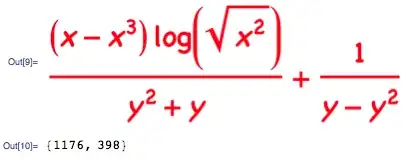
expr = Log[Sqrt[x^2]] (x - x^3)/(y + y^2) + 1/(y - y^2);
stylexpr = TraditionalForm[expr];
I get the same images whatever the size of my working notebook window is.
rasterize[stylexpr, 1200]
ImageDimensions@%

rasterize[stylexpr, 1200, 1]
ImageDimensions@%

stylexpr =
  TraditionalForm[
   Style[expr, Bold, FontFamily -> "Chalkboard", Red]];
rasterize[stylexpr, 1200]
ImageDimensions@%


ImageSize -> 800. – Greg Hurst Feb 20 '15 at 21:19