39

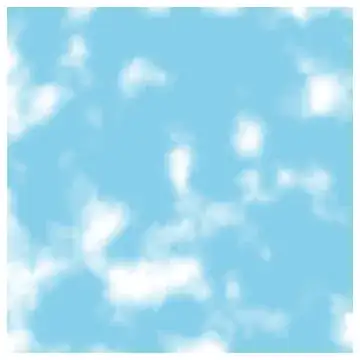
I'd like to generate some visually-pleasing animations of clouds, fog or smoke with Mathematica. My idea of "visually-pleasing" is along the lines of one of the images on the Wikipedia article for random Perlin noise.

enter image description here

Image description: "Perlin noise rescaled and added into itself to create fractal noise."

Based on the example MATLAB code found here, I wrote the following function in Mathematica:

perlin3D[n_, t_, r_] := Module[{s, w, i, d},
  s = ConstantArray[0., {t, n, n}];
  w = n;
  i = 0;
  While[w > 3,
   i++;
   d = GaussianFilter[RandomReal[{0, 1}, {t, n, n}], r*i];
   s = s + i*d;
   w = w - Ceiling[w/2 - 1];
   ];
  s = (s - Min@s)/(Max@s - Min@s)
  ]

The results are OK, but not as good as I'd like. It's not as smooth as the example image above, nor is the image contrast as strong.

(* Generate 100 frames of 128*128 pixels *)
res = perlin3D[128, 100, 4];
imgres = Image@# &/@ res;
ListAnimate[imgres, 16]

enter image description here

How can I improve the quality of the generation using Mathematica, and is there anyway to speed it up for larger and/or longer animations?

Update

The contrast can be improved a little, as pointed out by N.J.Evans in a comment, by removing the first and last few frames before scaling, namely s = s[[r*i ;; -r*i]]. However it's still not as "fog-like" as the Wikipedia example.

enter image description here

J. M.'s missing motivation
  • 124,525
  • 11
  • 401
  • 574
dr.blochwave
  • 8,768
  • 3
  • 42
  • 76
  • 3
    I think your Gaussian filter is being applied along the t dimensions, so your dynamic range is dominated by the the first and last frames, where fewer terms have been included in the filtering. That cleans up if you take only parts s=s[[r*i;;-r*i]]. Of course make sure that t is bigger than 2ri. – N.J.Evans Apr 21 '15 at 16:50
  • That does indeed improve the contrast, well spotted! – dr.blochwave Apr 21 '15 at 17:00
  • 5
    related: http://mathematica.stackexchange.com/q/4829/5478 – Kuba Apr 21 '15 at 18:29

2 Answers2

45

This is a 2D Gaussian random field with a $1/k^2$ spectrum and linear dispersion $\omega \propto k$. I clip the field to positive values and square root it to give an edge to the "clouds".

n = 256;
k2 = Outer[Plus, #, #] &[RotateRight[N@Range[-n, n - 1, 2]/n, n/2]^2];

spectrum = With[{d := RandomReal[NormalDistribution[], {n, n}]},
   (1/n) (d + I d)/(0.000001 + k2)]; 
spectrum[[1, 1]] *= 0;

im[p_] := Clip[Re[InverseFourier[spectrum Exp[I p]]], {0, ∞}]^0.5

p0 = p = Sqrt[k2];

Dynamic @ Image @ im[p0 += p]

enter image description here

Simon Woods
  • 84,945
  • 8
  • 175
  • 324
15

Nice cloud-like images can be generated by summing "octaves" of any of a number of continuous noise functions. Perlin noise is one possibility, as mentioned in the OP; here, I'll present a slightly simpler noise function termed lattice convolution noise. The following implementation is adapted from Ebert et al.'s book, with a few of my own tweaks:

lcnoise = With[{perm = Mod[(112 # + 185) # + 111, 256, 1] &, 
                mncub = Compile[{{r, _Real}}, 
                                Which[0 <= r < 1, 16 + r^2 (21 r - 36),
                                      1 <= r < 2, 32 + r (-60 + (36 - 7 r) r),
                                      True, 0]/18, 
                                RuntimeAttributes -> {Listable}], n = 256, 
                vals = RandomReal[{-1, 1}, 256]},
               Compile[{{x, _Real}, {y, _Real}, {z, _Real}},
                       Module[{s = 0., fx, fy, fz, ix, iy, iz},
                              ix = Floor[x]; iy = Floor[y]; iz = Floor[z];
                              fx = x - ix + 1.; fy = y - iy + 1.; fz = z - iz + 1.;
                              Do[s += vals[[Fold[perm[Mod[#1 + #2, n, 1]] &, 0,
                                                 {iz + k, iy + j, ix + i}]]]
                                      mncub[Norm[{i - fx, j - fy, k - fz}]],
                                 {i, 0, 3}, {j, 0, 3}, {k, 0, 3}]; s], 
                       CompilationOptions -> {"InlineCompiledFunctions" -> True}, 
                       RuntimeAttributes -> {Listable}]];

To get clouds, we can do this:

clouds =
    Table[DensityPlot[Clip[Sum[lcnoise[2^k x, 2^k t, 2^k y]/2^k, {k, 0, 3}], {0, 1}],
                      {x, -5, 5}, {y, -5, 5}, 
                      ColorFunction -> (Lighter[RGBColor[0.53, 0.81, 0.92], #] &),
                      Frame -> False], {t, 0, 5, 1/4}];

ListAnimate[clouds]

clouds

J. M.'s missing motivation
  • 124,525
  • 11
  • 401
  • 574