In past versions of Mathematica one could use a terse syntax for FrameTicks:
{bottom, left, top, right}
In 10.1 this syntax is no longer recognized requiring the addition of two sets of brackets:
{{left, right}, {bottom, top}}
However it seems that the flat form is still supported by Frame and FrameStyle.* As a fan of terse code I prefer the flat form and I cannot think of a good reason for its removal from FrameTicks. Is this a bug?
An example rendered in 10.0:
Plot[x, {x, 0, 15},
 Frame -> {True, False, True, True},
 FrameTicks -> {All, None, None, None},
 FrameStyle -> {Red, Green, Blue, Magenta}]

And rendered in 10.1:
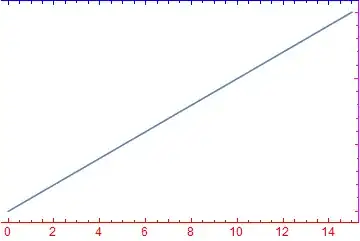
Note that the top and right frame edges have tick marks despite the None specification; FrameTicks -> {All, None, None, None} is effectively ignored.
* It seemed that in initial experimentation Frame and FrameStyle also did not work. After using PlotTheme->"Classic" as suggested by kguler these were observed to work even without the PlotTheme option. kguler seems to have observed something similar so it's possible this actually happened and I'm not just fooling myself.


PlotThemeis conflicting with the user-provided frame specs:Plot[2 Sin[x] + x, {x, 0, 15}, Frame -> {True, True, False, True}, PlotTheme->"Classic"]works as expected. – kglr May 05 '15 at 08:32PlotTheme->"Classic", not it works with or without it. (Version 10.1.0 for Linux x86 (64-bit) (March 24, 2015), on Wolfram Programming Cloud) – kglr May 05 '15 at 08:49FrameTicks. I updated my question accordingly. Hopefully this remains stable now. – Mr.Wizard May 05 '15 at 08:52Frame -> {Bottom, Top, Right}works in V9, not in V10.1. – kglr May 05 '15 at 08:57