On my system, Mathematica 10.1.0 under Windows, none of these FrameTicks documentation examples work correctly:
(* Draw frame ticks at the specified positions with the specific labels: *)

Plot[Sin[x], {x, 0, 10}, Frame -> True,
 FrameTicks -> {{{0, 0 °}, {Pi, 180 °}, {2 Pi, 360 °}, {3 Pi,
     540 °}}, {-1/2, 1/2}}]


(* Specify frame ticks with scaled lengths: *)

Plot[Cos[x], {x, 0, 10}, Frame -> True,
 FrameTicks -> {{{Pi, 180 °, {.4, .05}, Red}, {2 Pi, 360 °, {.4, .05},
     Thick}, {3 Pi, 540 °, {.4, .05}, Directive[Red, Dashed]}}, {-1, 1}}]


(* Specify frame ticks with scaled lengths in positive and negative directions: *)

Plot[Cos[x], {x, 0, 10}, Frame -> True,
 FrameTicks -> {{{0, 0 °, {.4, .05}}, {Pi, 180 °, {.4, .05}}, {2 Pi,
     360 °, {.4, .05}}, {3 Pi, 540 °, {.4, 0.05}}}, {-1/2, 1/2}}]


(* Specify the style of each frame tick: *)

Plot[Cos[x], {x, 0, 10}, Frame -> True,
 FrameTicks -> {{{Pi, 180 °, {.4, .05}, Red}, {2 Pi, 360 °, {.4, .05},
     Thick}, {3 Pi, 540 °, {.4, .05}, Directive[Red, Dashed]}}, {-1, 1}}]
All produce a pink error box with a Tooltip message
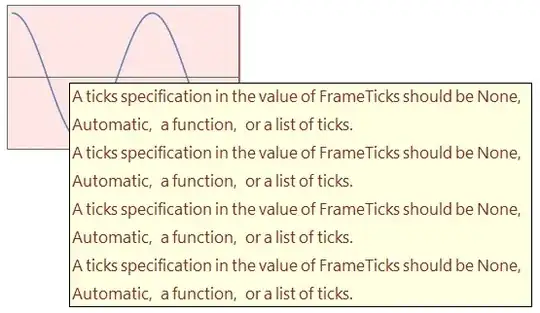
Is this indeed a bug or have a broken something in my configuration?
Does it affect other versions and platforms or only 10.1.0 under Windows?
Related:


{bottomAndTop, leftAndRight}does work, except for the cases where at least one of them has two ticks. – Karsten7 Jun 23 '15 at 19:28{bottomAndTop, leftAndRight}does work, if neither has two ticks specified. There it interferes with the documented form, so blows up. – rcollyer Jun 23 '15 at 19:39FameTicksdocumentation and evaluate that notebook or use the link you provided in your answer, where btw you'll see that your solution doesn't match the output shown for that specific example, as there should be ticks on all sides.) – Karsten7 Jun 23 '15 at 19:53