You can also use the function Graphics`Mesh`GenerateUniformPointsInTriangle
gupiTriF = Graphics`Mesh`GenerateUniformPointsInTriangle;

Graphics[{Polygon[{{0, 0}, {0, 1}, {1, 0}}], White, Point[gupiTriF@500]}]

For an arbitrary triangle tri you can use FindGeometricTransform to map the random points in the unit right triangle to points in tri:
fgt2DF = FindGeometricTransform[#, {{0, 0}, {1, 0}, {0, 1}}][[2]] &;

SeedRandom[1]
Row[Table[coords = RandomReal[{0, 5}, {3, 2}];
  Graphics[{Hue[RandomReal[]], Polygon@coords,
      RGBColor[RandomReal[1, {3}]], Point[fgt2DF[coords]/@
         gupiTriF[RandomInteger[{100, 500}]]]},
      ImageSize -> 200], {5}]]
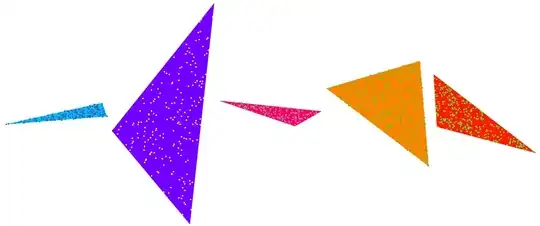
Similarly, in 3D, Graphics`Mesh`GenerateUniformPointsInTetrahedron does what its name says:
gupiTetF = Graphics`Mesh`GenerateUniformPointsInTetrahedron;
Graphics3D[{Opacity[.5], EdgeForm[],
  Tetrahedron[{{0, 0, 0}, {1, 0, 0}, {0, 0, 1}, {0, 1, 0}}], Red,
  Point[gupiTetF@1000]}]
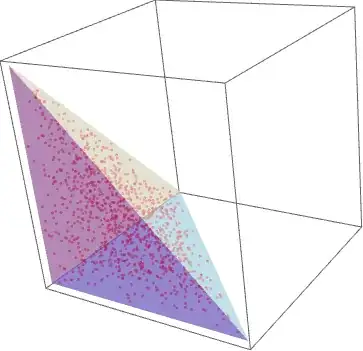
For a random tetrahedron, you can use a geometric transformation similar to the 2D case:
fgt3DF = FindGeometricTransform[#, {{0, 0, 0}, {1, 0, 0}, {0, 0, 1}, {0, 1, 0}}][[2]]&;

SeedRandom[111]
Row[Table[coords = RandomReal[{5, 10}, {4, 3}];
  Graphics3D[{Hue[RandomReal[]], FaceForm[Opacity[.25]],
    Tetrahedron@coords, RGBColor[RandomReal[1, {3}]],
    Point[fgt3DF[coords] /@ gupiTetF[RandomInteger[{100, 500}]]]},
   ImageSize -> 300, Boxed -> False], {3}]]


FindInstanceand find many points all at once. Then use these one by one. – bill s May 09 '15 at 16:02RandomChoice[]with the triangle areas as weights), then use the triangle point picking strategy. – J. M.'s missing motivation May 09 '15 at 16:05Graphics`Mesh`context;PolygonTriangulate[]andPolygonArea[]are particularly relevant. – J. M.'s missing motivation May 09 '15 at 16:46