9

I know similar questions have been asked here before, but i can't figure out this specific problem.

I have a lot of plots that i'd like to bring to a publishable form, but in my current customization the ticks are barley visible, therefore i'd like to make them a little bit longer, without having to specify the tick positions itself.

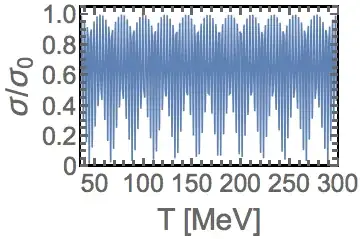
An example would a be a plot like this

ListPlot[Abs@Sin[N[#]] & /@ Range[350],
Frame -> True,
Joined -> True,
PlotRange -> {{35, 300}, {0, 1.05}},
FrameLabel -> 
Evaluate[Style[#, 30] & /@ {"T [MeV]", "\[Sigma]/\!\(\*SubscriptBox[\(\[Sigma]\), \(0\)]\)"}],
FrameStyle -> Thick,
LabelStyle -> Directive[25, Thick],
ImageSize -> {720*GoldenRatio, 720}
]

I know i can customize the ticks by adding the following option

FrameTicks -> {
{
{#, If[Chop[Mod[#, 0.25]] == 0, Chop@#, ""], {If[Chop[Mod[#, 0.25]] == 0, 0.015, 0.008], 0}}&/@Range[0, 1.05, 0.05]
,
{#, "", {If[Chop[Mod[#, 0.25]] == 0, 0.015, 0.008], 0}}&/@Range[0,1.05,0.05]
}, {
{#, If[Chop[Mod[#, 50]] == 0, Floor@#,""], {If[Chop[Mod[#, 50]] == 0, 0.015,0.008], 0}}&/@Range[0, 350, 10]
,
{#, "", {If[Chop[Mod[#, 50]] == 0, 0.015, 0.008], 0}}&/@Range[0, 350, 10]
}}

which i adopted from some code i found here.

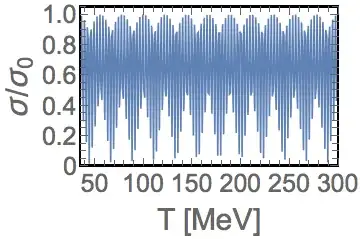
So basiclly what i'd like are slightly longer ticks on all sides, with numbers on the left and bottom.

NicolasW
  • 393
  • 1
  • 8

2 Answers2

5

In V10, you can use the "TicksLength" option of Charting`ScaledTicks to do this. There is a bug/restriction, discussed in Thickness of logarithmic tick marks, that Charting`ScaledTicks will override tick styling. So myTicks below will override the override and replace the default styling with the style passed to it. There is another difficulty in that Charting`ScaledFrameTicks does not have a "TicksLength" option, so to get unlabeled frame ticks of a desired length, I included that capability in myTicks.

Options[myTicks] = $myTicksOptions = 
   Join[Options[Charting`ScaledTicks], {TicksStyle -> Automatic}];
myTicks[type_, opts : OptionsPattern[]] := 
 With[{stOpts = 
         FilterRules[Flatten[{opts, Options[myTicks]}], Options[Charting`ScaledTicks]],
       tstyle = OptionValue[TicksStyle]},
  Module[{ticks = Charting`ScaledTicks[{Identity, Identity}, stOpts][##]},
    If[type === "Frame", ticks[[All, 2]] = Spacer[{0, 0}]];
    If[tstyle =!= Automatic, ticks[[All, 4]] = tstyle];
    ticks] &]

A few notes on the code: If the type is "Frame", frame-style ticks with no labels will be generated; other values for type result in tick labels (I used Automatic below). Since we're returning a Function, we have to evaluate and inject the current options settings (with With) for them to have effect. ScaledTicks generates a list of ticks of the form {x, label, length, style}. Minor ticks come with Spacer[{0, 0}] as a label, so one could restyle ticks in all sorts of ways

Since we will have to specify all four FrameTicks functions, it is easier to deal with passing the options to myTicks with SetOptions.

SetOptions[myTicks, {"TicksLength" -> {0.03, 0.02}}];
ListPlot[
 Abs@Sin[N[#]] & /@ Range[350], Frame -> True, Joined -> True, 
 PlotRange -> {{35, 300}, {0, 1.05}}, 
 FrameLabel -> 
  (Style[#, 30] & /@ {"T [MeV]", "σ/\!\(\*SubscriptBox[\(σ\), \(0\)]\)"}), 
 FrameStyle -> Thick, 
 FrameTicks -> 
   {{myTicks[Automatic], myTicks["Frame"]}, {myTicks[Automatic], myTicks["Frame"]}}, 
 LabelStyle -> Directive[25, Thick]]
SetOptions[myTicks, $myTicksOptions];

Mathematica graphics

You may want thick ticks:

SetOptions[myTicks, {"TicksLength" -> {0.03, 0.02}, TicksStyle -> Thick}];
ListPlot[Abs@Sin[N[#]] & /@ Range[10], 
 Frame -> True, Joined -> True, PlotRange -> {{1, 10}, {0, 1.05}}, 
 FrameLabel -> 
  (Style[#, 30] & /@ {"T [MeV]", "σ/\!\(\*SubscriptBox[\(σ\), \(0\)]\)"}), 
 FrameStyle -> Thick, LabelStyle -> Directive[25, Thick], 
 FrameTicks ->
   {{myTicks[Automatic], myTicks["Frame"]}, {myTicks[Automatic], myTicks["Frame"]}}]
SetOptions[myTicks, $myTicksOptions];

Mathematica graphics

Michael E2
  • 235,386
  • 17
  • 334
  • 747
5

As pointed out by Virgil in the comments, the CustomTicks package resolved the issue.

NicolasW
  • 393
  • 1
  • 8