Bug introduced in 8.0 or earlier and persisting through 13.2 or later. Fixed in 13.3.1 on Windows 10
I have the following mapping on the complex plane: $$ z \mapsto \tau \mu z-1, $$ where $\mu$ is complex, $\tau$ is real number. I want to draw the image of left unit semidisk and play with $\tau$.
μ = 0.16255558520216132` + 0.1849493244071408` I;
pic[τ_] := Block[{d, ds},
   d = Disk[{0, 0}, 1, {π/2, 3 π/2}];
   ds =
    Fold[GeometricTransformation, d,
       {RotationTransform[Arg@#, {0, 0}],
        ScalingTransform[τ Abs@# {1, 1}],
        TranslationTransform[{-1, 0}]
        }] & @ μ;
   Graphics@{Gray, d, Red, Opacity[.5], ds}
   ];
Manipulate[
 Dynamic@Show[pic[τ], Frame -> True, Axes -> True,
   AxesOrigin -> {0, 0}, PlotRange -> zz {{-100, 100}, {-100, 100}},
   ImageSize -> 400
   ],
 {τ, 0.01, 1000, 0.01},
 {zz, 0.01, 10, 0.01}
 ]
Here zz is introduced to control zooming. The problem is that I get different (wrong) images for different zooms. It is clearly seen for big $\tau$'s.
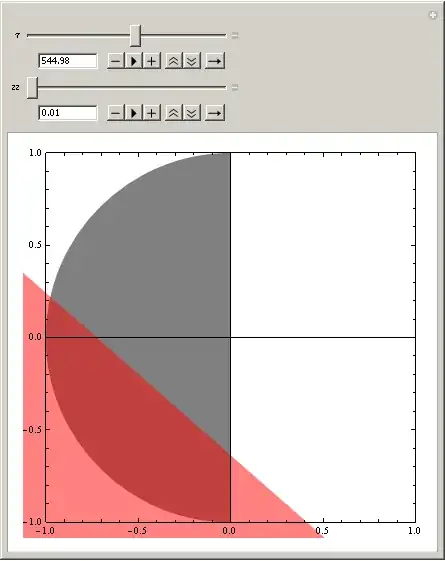
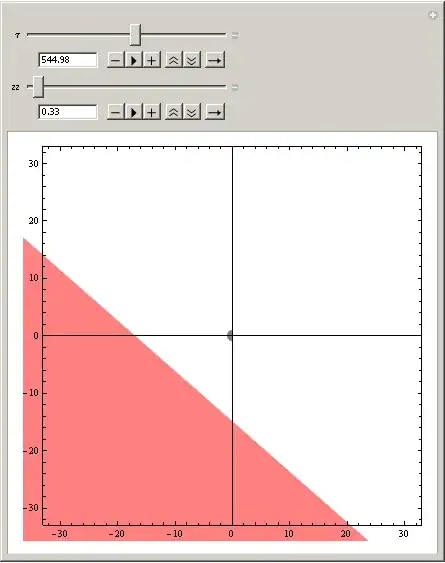
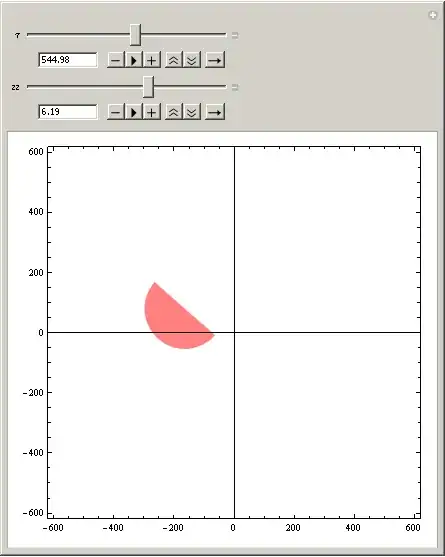
It looks very like a bug, but I can not rule out that I'm making some silly mistake (Mathematica 8.0.4). So, what is the problem here and what is the best way of doing the job (I have several mappings for different $\mu$ actually)?


pic[]this way:pic[τ_] := Block[{d, ds}, d = Disk[{0, 0}, 1, {π/2, 3 π/2}]; ds = GeometricTransformation[d, Composition[TranslationTransform[{-1, 0}], ScalingTransform[τ Abs[μ] {1, 1}], RotationTransform[Arg[μ], {0, 0}]]]; Graphics @ {Gray, d, Red, Opacity[.5], ds}]– J. M.'s missing motivation Aug 17 '12 at 17:24ParametricPlot[Through[{Re, Im}[τ μ r Exp[I θ] - 1]], {r, 0, 1}, {θ, π/2, 3 π/2}]]– J. M.'s missing motivation Aug 17 '12 at 17:38Compositionproduces the same erroneous result.ParametricPlotis a viable alternative. Still the problem with compositeGeometricTransformations remains. – faleichik Aug 17 '12 at 20:18Graphics@GeometricTransformation[Disk[],Composition[ScalingTransform[{800,800}],RotationTransform[0.1,{0,0}]]]and resize the graphic with the mouse. – Simon Woods Aug 17 '12 at 21:41Compositionproduces the same erroneous result." - I suppose so; all I did was to shorten the code you used for producing the transformed diskds. – J. M.'s missing motivation Aug 18 '12 at 00:41Disk[{0, 0}, 1, {0, a}], if non-emptyEdgeFormis used, ifais close enough to2*Pi, the edge and the filled body "jump" together, ifais far away from2*Pi, say3*Pi/2, the edge alone seems working right. – Silvia Aug 18 '12 at 17:35Disk[{0, 0}, 1, {α, β}]toDisk[{-1, 0}, τ Abs[μ], {α, β} + Arg[μ]]. This explicit form will work fine withGraphics. – Silvia Aug 18 '12 at 17:57