I always work on a non-administrator account on my Windows computer. Sometimes I need to install programs which requires administrator access. As I mostly use the Windows command prompt, is there a Windows command to escalate privileges, similar to the Linux terminal command sudo?
Asked
Active
Viewed 8.7e+01k times
509


19 Answers
297
The runas command.
runas [{/profile|/noprofile}] [/env] [/netonly] [/smartcard] [/showtrustlevels] [/trustlevel] /user:UserAccountName program
Just run:
runas /noprofile /user:Administrator cmd
to start a command shell as a administrator

patricktokeeffe
- 293

Davy Landman
- 4,542
-
23You might find you want the profile loaded (e.g. including environment variables) for any extended use. In which case drop the
/noprofile. – Richard Sep 17 '09 at 09:38 -
3You also have to make sure that the Administrator account has a password. Otherwise you get an error 1327, "user account restriction. Possible reasons are blank passwords not allowed,..." – lilbyrdie Nov 06 '10 at 14:35
-
6This is not working for me. After I typed my password the command prompt is closed. – Jonas Dec 09 '10 at 13:44
-
1The "Account is disabled" checkbox on the user properties must be unchecked for this command to work. – Mike Glenn Dec 14 '10 at 05:05
-
2@Jonas, you might have a renamed Admin account. I had the same issue – JP Hellemons Oct 11 '11 at 14:23
-
64isn't this asking for the Administrator's password? sudo is asking for *your* password! – n611x007 Sep 18 '12 at 08:42
-
20Unfortunately, this is seriously outdated.
Runasmerely runs commands under a different set of credentials. Even though your credentials have admin permissions, it doesn't mean all processes under your credentials run as admin. – surfasb Jan 25 '14 at 00:59 -
-
3@naxa Yeah, it's not exactly sudo. But you can change
/user:Administratorto/user:YourLoginNameand do the same thing as sudo, of course. Don't quite understand @surfasb 's comment. When would this bite you? I've successfully used this trick to edit files that are only editable by an admin (egrunas /noprofile /user:myUserName "C:\path\to\Vim\vim73\gvim.exe C:\some\file.cfg") – ruffin Nov 05 '14 at 15:22 -
1Doesn't work for me. It just asks for password (whether MyLoginName or the Administrator) and just runs the command normally. I've tested it by running
taskmgrand even after entering password it says "740: The requested operation requires elevation.". Runningcalcworks as it doesn't require elevation. – laggingreflex Jan 13 '15 at 04:31 -
@surfasb what if you launch whatever program you want from cmd, after doing runas /user:Administrator? – barlop Jan 17 '16 at 14:25
-
19+1 for "outdated" since runas can't bypass UAC. Instead, press Windows button, type cmd, and press Ctrl+Shift+Enter. – mellow-yellow Jan 22 '16 at 12:06
-
3@barlop: You should look up how UAC works. The Administrator account, by default, auto elevates process to Admin permissions. It's a coincidence that it works with the Administrator account. Use any other account in the Administators group with runas and your program won't get Admin permissions by default. – surfasb Jan 22 '16 at 16:46
-
2
-
This is elevation of a user account in Administrators; sudo is another thing. – Massimo Jan 13 '20 at 10:11
145
Elevate - "executes a command with UAC privilege elevation. This is useful for working inside command prompts or with batch files." It's not the same as sudo, it changes the executing user to Administrator, but its syntax is a lot more straightforward to use than runas, and it can keep the current directory, enabling the use of relative paths.
Synopsis:
  elevate [(-c | -k) [-n] [-u]] [-w] command

Options:
  -c  Launches a terminating command processor; equivalent to "cmd /c command".
  -k  Launches a persistent command processor; equivalent to "cmd /k command".
  -n  When using -c or -k, do not pushd the current directory before execution.
  -u  When using -c or -k, use Unicode; equivalent to "cmd /u".
  -w  Waits for termination; equivalent to "start /wait command".
Elevate's purpose isn't to work around or bypass UAC (User Account Control), but to work with it. As long as UAC is enabled there has to be some kind of prompt at some point in the process. If you need to get rid of prompting altogether you have to disable UAC.
The pain point Elevate alleviates is escalating a particular process from a non-privileged shell and then carrying on as normal. Without this you need to start a privileged command prompt with right-click > "Run as Administrator" before attempting the privileged command, which can't be easily scripted.
This works well with "Elevate without prompting" in secpol.msc. Together, they do the same as %wheel ALL=(ALL) NOPASSWD: ALL in sudo
A known limitation is that it does not return the error code from the program it is elevating.
If your muscle memory is stuck on sudo, create an alias using Doskey:
doskey sudo=elevate -w
or batchfile in PATH:
@elevate -w %*
Elevate is 3rd party tool written by Johannes Passing. It's an 11kb download and portable (no install needed): http://code.kliu.org/misc/elevate/

matt wilkie
- 5,143
-
6This goes perfect with "Elevate without prompting" in secpol.msc. Together, they do the same as
%wheel ALL=(ALL) NOPASSWD: ALLin sudo. – sayap Feb 20 '12 at 09:40 -
2@sayap, just to be clear, do you mean this: http://ss64.com/nt/syntax-uac.html? – matt wilkie Feb 20 '12 at 18:45
-
Yes, that's the one. From my limited testing, it works straight away without having to restart Windows. – sayap Feb 21 '12 at 00:19
-
there's a similar program with the same name here: http://wintellect.com/cs/blogs/jrobbins/archive/2007/03/27/elevate-a-process-at-the-command-line-in-vista.aspx – Janus Troelsen Feb 06 '13 at 01:21
-
8The only trouble I find with elevate (v1.3.0) is that it does not return the error code from the program it is elevating. – Ken Aug 14 '13 at 18:41
-
4
-
-1 this requires elaboration. I just tried
C:\>elevate dirand it caused a popup prompting me if I want to elevate. That isn't very useful in a script. – barlop Mar 15 '14 at 12:30 -
3@barlop: elevate's purpose isn't to work around or bypass UAC (User Account Control), but to work with it. As long as UAC is enabled there has to be some kind of prompt at some point in the process. If you need to get rid of prompting altogether you have to disable UAC (see 2nd comment). The problem elevate solves is escalating a particular process from a non-privileged shell, and then carrying on as normal. Without this you need to start a privileged command prompt with right-click "Run as Administrator", which can't be scripted, before attempting the privileged command. – matt wilkie Mar 19 '14 at 22:40
-
@barlop, ok. I see I don't understand the nature of your complaint, and don't know how else to attempt to address it. – matt wilkie Mar 20 '14 at 18:31
-
-
-
1@Kiquenet that's the same approach as
runasin other answers, with similar results and differences to elevate, isn't it? – matt wilkie Feb 10 '15 at 17:38 -
17Would be nice to mention that it's an external utility, missing OOTB. – Hi-Angel Dec 27 '16 at 16:18
-
This is elevation of a user account in Administrators; sudo is another thing. – Massimo Jan 13 '20 at 10:11
-
Bowing to the wisdom of the crowd: post edited to declare it's a download (and credit the maker by name); Also incorporated other comment info. – matt wilkie Jan 14 '20 at 22:44
-
-
'elevate' is not recognized as an internal or external command, operable program or batch file. Trying on Win10 – Adam Bajger Aug 25 '22 at 09:37
-
1@AdamBajger you need to download it first, see last sentence in answer. If you've done that it needs to be put in [tag:path] – matt wilkie Aug 30 '22 at 05:36
69
You can use the runas command which is kind of similar, or you can check out the sudo for Windows project over at SourceForge which adds a sudo command.
The difference is subtle:
Let's say you have two users. Bob is a normal user and James is an administrator.
If you log in as Bob and use "runas james acommand" the command is run as if it was run by James, so it accesses James' user settings and any user changes go into James My Documents & settings folders, etc. So if you are installing an application, say, it will be installed as James, not as Bob.
If on the other hand Bob does "sudo acommand" the command is still run as Bob, but with elevated permissions - just like the Linux sudo command. To prevent any user from being able to sudo you have to define a sudoers user group that contains the list of the normal users that have permission to elevate using sudo. The users still have to provide credentials before elevation.
Sometimes the difference isn't important, sometimes it is, and I find that both commands can be useful.

Peter Mortensen
- 12,190

Simon P Stevens
- 5,203
-
2Are you sure? When I run sudo in ubuntu, if my current theme is in
~/.themesthen the sudo-ed application will not be able to access that theme, because it's not in/home/root/.themes, and will use the default ugly gtk theme. – hasen Nov 19 '09 at 22:28 -
5@hasen j - your issue is just because ~/.themes evaluates before the command is run (and thus before it switches over to root). – Jared Dec 15 '11 at 18:52
-
2Another solution, except hosted on GitHub, is windosu: https://github.com/tehsenaus/windosu I just found it, and it seems to work great. Favorite thing is it's super easy to install. Just "npm install -g windosu". – Venryx Jun 06 '17 at 07:52
-
This is elevation of a user account in Administrators; sudo is another thing. – Massimo Jan 13 '20 at 10:12
-
42
You can also use the Script Elevation PowerToys.


-
Awesome - exactly what I was looking for. I didn't want to run as a command has a different user, only to run it with elevated privileges. – orip Mar 14 '10 at 12:55
-
Exactly the right solution for this problem! Who wants Runas with its messy syntax? – Stabledog Mar 29 '10 at 14:14
-
1I've often wished the elevate command were built into windows. It's a fantastic tool. – nhinkle Nov 11 '10 at 23:43
-
there's now an Elevation PowerToys collection by the same author from which Creating a Self-Elevating Script is particularly relevant. – matt wilkie Sep 07 '11 at 23:22
-
@nhinkle can you do elevate command such that it suppresses the popup asking if you want to elevate it? – barlop Mar 15 '14 at 12:31
-
1
-
@nhinkle limiting the techie user in efficiency / demanding his attention for the meanial task of confirmation to run elevated, isn't exactly its goal(its goal is to prevent malicious attack, not elongate the process for legit things), but obviously it's something that it could be argued it must unfortunately do. Now though, if any program could run elevated in an automated way(no permission required), would you want it destroyed, for it hath defeated "the purpose of UAC"? – barlop Mar 15 '14 at 18:31
-
@barlop the whole point of UAC is that you can't run elevated without getting the user's permission. If you could just type
elevate whatever.exeand have it run elevated, then it would be trivial for an attacker to runelevate nasty-virus.exe. It's an inherent requirement of UAC that confirmation occur somehow. It can't ask for confirmation in the command window, because the confirmation must run on an isolated secure desktop to prevent other software from injecting keystrokes. – nhinkle Mar 15 '14 at 18:51 -
@nhinkle i'm aware of that and am not disputing that. you didn't quite answer the question I asked you at the end of my comment but it doesn't matter, not important! ;-) – barlop Mar 15 '14 at 19:32
-
It seems @barlop does not understand UAC. If you want your script to stop prompting you need to switch UAC off temporarily--which requires at least one prompt at the start of the script. Though I think in newer Windows versions even that became harder. Or maybe run every process from an elevated cmd. – jiggunjer Jan 17 '16 at 13:34
-
To only ask once, the script must have a separate component that would then do the administrative actions. – Paul Stelian Mar 01 '18 at 17:46
-
@nhinkle "because the confirmation must run on an isolated secure desktop to prevent other software from injecting keystrokes"? What??? how is every other OS on the planet able to do this securely? – gman Jun 11 '20 at 06:22
32
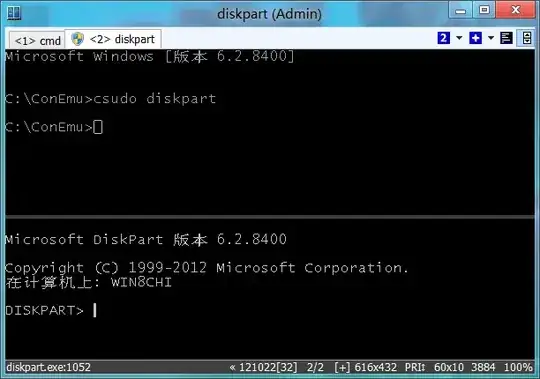
If you are ready to switch to alternative consoles, there is ConEmu (I'm the author). One of its features - the ability to run both elevated and non-elevated tabs in the one ConEmu window. Tabs may be started with different credentials too.
For user comfort, there is batch-file csudo.cmd (which may be easily adopted to bash). Read full description in project's wiki. In brief, when you run some command from existing non-elevated tab, for example
csudo dism /online /enable-feature /featurename:NetFX3 /All /Source:D:\sources\sxs /LimitAccess
ConEmu will starts dism in the new elevated console/tab (with preceding UAC prompt in Vista or Login box in XP).
By default csudo starts new console in a split (may be changes via editing of csudo.cmd contents).
And of course you may rename it to sudo.cmd if you like "classic" sudo word.

Maximus
- 20,745
-
1csudo long ago was included in the ConEmu distribution. No link is needed at all. – Maximus Mar 12 '14 at 08:16
-
problem here is the new console tab becomes unusable after the sudo'd command. So you can't continue working in the elevated tab, just get a
press enter or esc to exitmessage. – jiggunjer Jan 17 '16 at 15:25 -
1Of course you cant. Even on Unix you are back to non-elevated terminal after
sudocommand is done its work! You are going wrong way. – Maximus Jan 17 '16 at 17:45 -
1
- if you're gonna open a new window or tab you might as well keep it, let the user choose if they want to continue. 2) On my ubuntu I don't have to sudo every time, elevation lasts a few minutes I think. 3) this application has a million options, yet nothing for this? Maybe I'm spoiled.
– jiggunjer Jan 18 '16 at 02:31
29
Quick method:
Three steps to add sudo.
Open PowerShell.
Copy the following script (Ctrl+C) and paste it in PowerShell (Alt+Space+E+P):
$script_path="$HOME\Documents\Scripts"; if (!(test-path $script_path)) {New-Item -ItemType directory $script_path} if (!(test-path $profile)) { new-item -path $profile -itemtype file -force }". $script_path\sudo.ps1" | Out-File $profile -append; "function sudo(){if (`$args.Length -eq 1){start-process `$args[0] -verb `"runAs`"} if (`$args.Length -gt 1){start-process `$args[0] -ArgumentList `$args[1..`$args.Length] -verb `"runAs`"}}" | Out-File $script_path\sudo.ps1; powershell
- Hit Enter.
It will permanently enable sudo command in PowerShell.
Usage:
sudo <process-name> [param1 [param2 [param3]]]
Examples:
sudo explorer
sudo notepad
sudo powershell
sudo cmd
sudo taskmgr
sudo tasklist
sudo taskkill /IM Skype.exe /PID 8496
Long method for learning:
- Read this article.
- Read the comments.
- Take a look at Stephen's git repository and the readme file.
Note: I mixed the script from both articles to create the aforementioned script. Rather manually pasting the script in notepad I added the Out-File statements to save ps1 and $profile files from the script.
Tip: If you are not a very big fan of UAC popups (like me), save the following in *.reg file and run it:
Windows Registry Editor Version 5.00
[HKEY_LOCAL_MACHINE\SOFTWARE\Microsoft\Windows\CurrentVersion\Policies\System]
"ConsentPromptBehaviorAdmin"=dword:00000000

phuclv
- 27,773

vulcan raven
- 439
-
1I love the powershell solution for this question. This has to be the easiest way to elevate something. Existing .bat files can easily be converted to POSH – Mitchell Skurnik Feb 14 '13 at 18:05
-
Got this error on windows 10:
. : File C:\Users\User\Documents\WindowsPowerShell\Microsoft.PowerShell_profile.ps1 cannot be loaded because running scripts is disabled on this system.– sowrov Nov 19 '15 at 09:51 -
@sowrov, see this article. By default PowerShell scripts are disabled on any Windows installation. You need to enable it with this command
set-executionpolicy remotesigned. Other options besidesremotesignedare described in official docs. – vulcan raven Nov 22 '15 at 09:54 -
Readers note this ps script is a wrapper for the
powershell -c start -verb runas program.exefunctionality. Also note you can't elevate like this with the cmd prompt (natively). Powershell is the best native option. – jiggunjer Jan 17 '16 at 13:58 -
can the same be done in cmd.exe instead of powershell env? powershell does not compute with clink and without clink windows does not compute at all... – PJJ Feb 26 '19 at 07:39
-
This is elevation of a user account in Administrators; sudo is another thing. – Massimo Jan 13 '20 at 10:12
19
If you're doing this on Windows, then in addition to the Run As command as mentioned in a couple of other answers, there are also ways to do this with the mouse.
If you hold down the Shift key as you right-click on most executable files in Windows you should notice a few more advanced options. One of these is the "Run As..." option (I think it's called "Run As Administrator" from Vista onwards).
You can also download a more advanced version of RunAs from Microsoft, called ShellRunAs, this has enhancements over the built-in RunAs command, both in command line and graphical modes, including letting you save account credentials

GAThrawn
- 4,346
-
This is elevation of a user account in Administrators; sudo is another thing. – Massimo Jan 13 '20 at 10:11
-
The question was about elevating with command! F.e. from a batch file, when detected that certain operation requires elevation. – AnrDaemon Mar 24 '20 at 17:26
-
@AnrDaemon I'm surprised to be admonished about the relevance of an answer that I left here a decade ago! – GAThrawn Mar 30 '20 at 16:23
8
I wrote gsudo, a sudo for windows that feels like *nix sudo and has a few killer features:
- Run within the current console (attached) without breaking tab-key auto-complete. Or add
-nto launch in a new window. - Handles all scenarios reliably to be used on scripts. (ExitCodes, StdIn/Out/Err Redirection/Capture)
- Supports Cmd/PowerShell/PowerShell Core
- Credentials cache: If
gsudois invoked several times within minutes it only shows the UAC pop-up once.
Usage
gsudo Opens an elevated shell in the current console.
gsudo [options] {command} [arguments]
Executes the specified command with elevated permissions.
Most relevant [options]:
-n | --newStarts the command in a new console with elevated rights (and returns immediately).-w | --waitForce wait for the process to end (and return the exitcode).-s | --systemRun As Local System account ("NT AUTHORITY\SYSTEM").
Installation
- Using Scoop:
scoop install gsudo - Using Chocolatey:
choco install gsudo - Using Winget:
winget install gsudo - Or check the docs and latest release

Gerardo Grignoli
- 364
- 1
- 4
- 12
-
This looks great, but does it rely on the UAC graphical prompt? I am logging in via SSH and wants something that works purely in a command line mode. – oligofren Mar 30 '20 at 12:09
-
4
Surun is free, open-source application that allows certain programs to run with administrative rights, without providing a password without changing the user registry or modify environment variables.
When I was using Windows XP this app helps me a lot. Beta works under Windows 7.

diimdeep
- 822
-
surun does a great job. However sometimes under Windows 8 and 8.1 its defaults aren't ideal. Because it replaces Windows's run as function, you are not able to start a command prompt with right click on the start screen. – Wolf Jan 15 '15 at 11:15
-
This is the best answer and should be the accepted one. Most of the other answers are about elevation of a user account in Administrators: not sudo. – Massimo Jan 13 '20 at 10:13
3
The simplest solution in my view is to leverage powershell to do the work, which is portable and will prompt the user using the UAC.
You can just run this in any shell (cmd or powershell)
powershell Start-Process -verb runAs path-to-your.exe "-all -args -in -quotes"

twall
- 273
3
There is a chocolatey package for it with the convenient name sudo. You can install the package with chocolatey using this command:
choco install -y sudo
Then in whatever Windows/MS shell you have to use, you can use sudo as expected.

ypid
- 363
-
This is elevation of a user account in Administrators; sudo is another thing. – Massimo Jan 13 '20 at 10:11
3
As you've probably discovered, runas will let you run as another user but it cannot do elevation and it doesn't pass current directories, environment variables or long command lines.
Hamilton C shell solves that with a genuine su and sudo. su lets you run a command as another user; sudo (actually an alias to su) lets you run a command elevated. You can also do both, running elevated as a different user. Current directories, environment variables and long command lines are passed by way of a shared memory handshake between su running in the caller's context and a copy of itself running as an interlude with the new credentials that then starts the child. Full disclosure: I'm the author.

Destroy666
- 6,771

Nicole Hamilton
- 10,023
2
There is now an official Sudo for Windows. It allows users to run elevated commands directly from unelevated terminal windows.
Sudo is available for Windows 11 builds 26045 and later. If you're on an Insiders build with sudo, you can enable it in the Windows Settings app, on the "Developer Features" page.

1
A while ago I created wsudo, an open-source sudo-like CLI tool for Windows to run programs or commands with elevated rights, in the context of the current directory. It's freely available as a Chocolatey package.
I use it a lot for things like configuring build agents, admin stuff like sfc /scannow, dism /online /cleanup-image /restorehealth or simply for installing/updating my local Chocolatey packages (e.g., wasudo cup all -y). Use at your own risk.
Installation
choco install wsudo
Chocolatey must be already installed.
Purpose
wsudo is a Linux sudo-like tool for Windows to invoke a program with elevated rights (as Administrator) from a non-admin shell command prompt and keeping its current directory.
This implementation doesn't depend on the legacy Windows Script Host (CScript). Instead, it uses a helper PowerShell 5.1 script that invokes "Start-Process -Wait -Verb runAs ..." cmdlet. Your system most likely already has PowerShell 5.x installed, otherwise you'll be offered to install it as a dependency.
Usage
wsudo runs a program or an inline command with elevated rights in the current directory. Examples:
wsudo .\myAdminScript.bat
wsudox "del C:\Windows\Temp\*.* && pause"
wasudo cup all -y
wasudox start notepad C:\Windows\System32\drivers\etc\hosts
I often invoke it from the Windows Run box (Win+R), or by typing wasudo Enter in the Windows Explorer address bar (Alt+D). The latter opens an admin command prompt in the Explorer's current folder.
For more details, visit the GitHub repro.

noseratio
- 2,753
0
This script does the job:
@echo Set objShell = CreateObject("Shell.Application") > %temp%\sudo.tmp.vbs
@echo args = Right("%*", (Len("%*") - Len("%1"))) >> %temp%\sudo.tmp.vbs
@echo objShell.ShellExecute "%1", args, "", "runas" >> %temp%\sudo.tmp.vbs
@cscript //NoLogo %temp%\sudo.tmp.vbs
Save it as sudo.cmd then add it to your PATH
Note: the runas means in this context "Run as administrator" and not "Run as other user"
Taken from here and slightly edited to remove cscript.exe header from output

Charles Milette
- 190
-
1This creates a new console. The new window will disappear after the sudo'd command is completed--so you can't even read output. – jiggunjer Jan 17 '16 at 14:09
-
Sadly, yes. But it can be used for some basic commands (copy), GUI tools, or opening an admin cmd. – Charles Milette Jan 17 '16 at 18:04
-
This is elevation of a user account in Administrators; sudo is another thing. – Massimo Jan 13 '20 at 10:10
0
The following vbs script allows to launch a given command with arguments with elevation and mimics the behavior of the original unix sudo command for a limited set of used cases (it will not cache credentials nor it allows to truly execute commands with different credentials). I put it on C:\Windows\System32.
Set objArgs = WScript.Arguments
exe = objArgs(0)
args = ""
IF objArgs.Count >= 2 Then
   args = args & objArgs(1)
End If
For it = 2 to objArgs.Count - 1
   args = args & " " & objArgs(it)
Next
Set objShell = CreateObject( "WScript.Shell")
windir=objShell.ExpandEnvironmentStrings("%WINDIR%")
Set objShellApp = CreateObject("Shell.Application")
objShellApp.ShellExecute exe, args, "", "runas", 1
set objShellApp = nothing
Example use on a command prompt sudo net start service

ceztko
- 162
-
Downvoters: еxplain why and what is not working for you. The script is tested and working for me. – ceztko Nov 06 '19 at 19:56
-
This is elevation of a user account in Administrators; sudo is another thing. – Massimo Jan 13 '20 at 10:11
-
@Massimo of course calling this script
sudois a small naming abuse: it doesn't and it will not have the same features of originalsudo, but by default in unix will execute with super user (root) impersonification, providing this is allowed insudoers, so the mimic of the provided example it's perfectly clear to me. It's not possible to create a fullsudoreplacement in Windows without access to Windows internals and without defining a clear semantic of what can and what can't be done by the command. If this quick and dirty script doesn't work for you should find a different solution – ceztko Jan 13 '20 at 10:34
0
A working sudo replacement for Cygwin's mintty terminal would be to place the following script in user's PATH:
$!/bin/bash
cygstart --action=runas mintty -e `which bash` -lc \"$@\"
For me this is the only viable replacement to elevate privileges of programs like vim or cygrunsrv while working in a terminal on Windows.

karafior
- 137
-1
Another option is TakeCommand's START /ELEVATED … switch.
The noninteractive (TCC-RT) version of the suite is offered for free. The "sudo.btm" batch file would look like
@START "" /ELEVATED %*
which would also support the form sudo /wait <someprogram> /params

AnrDaemon
- 211
-1
The scoop creator has a simple CLI that works great.
Install with: scoop install sudo
As expected, you need to click UAC dialog to elevate the new process.
$ sudo mkdir 'C:\Program Files\whatever'
Directory: C:\Program Files


Mode                 LastWriteTime         Length Name

d----           3/11/2024  2:47 PM                whatever

Carl Walsh
- 431
doskey sudo= runas /user:Administrator "cmd /k cd \"%cd%\" & $*"– William Sep 10 '18 at 15:35