2

I am using visio 2013 right now. And I have some troubles with snapping on the grids. Is it possible to force snapping on grids? So it'll never go outline?

Thanks in advance!

Devid
  • 6,357
  • 13
  • 56
  • 75

1 Answers1

2

This can be done by amending the Snap strength.

Go to the View tab and click the little arrow at the bottom of Visual Aids, then go to the advanced tab. From here you can change what snaps, and by how much.

By changing the snap to rulers strength to full I was able for enforce snapping to ruler gridlines so that objects cannot sit between gridlines.
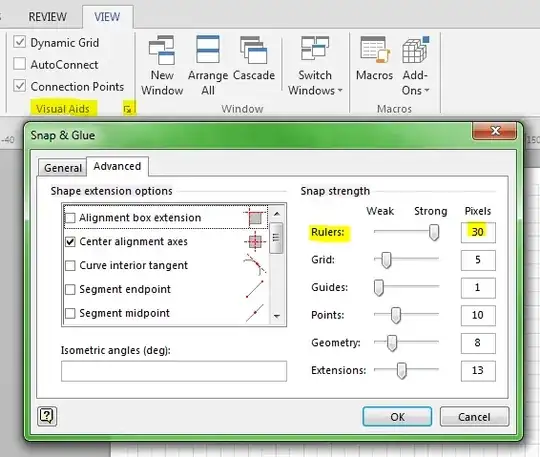

Snap strength

CLockeWork
  • 2,127
  • Thanks for your answer. It is working somewhat but it still doesn't always snap. However It is a lot easier to snap now. – Raymond the Developer Feb 26 '14 at 08:35
  • I've had my Visio uninstalled so I can't experiment, but if you play around with Grid and Guides strength, and perhaps tick alignment box extension it should fix the last vestigies of the problem. Let me know if that helps. – CLockeWork Feb 26 '14 at 10:04
  • Oke, I tried some of the other options. It's working better but only zoomed out. If zoomed in I am still able to unsnap it outside the grid line. But this will do. Thanks a lot. – Raymond the Developer Feb 27 '14 at 10:46
  • Also note the difference between what you can Snap 'to' (found on the General tab in the above image) and Snap strength (ie how many pixels does your mouse need to be from a point before it will be pulled in or snapped to that point). Snap 'to' settings are document specific, while Snap strength settings are held at Application / system level. This means that Sanp strength changes will be applied to all documents, but Snap 'to' setting will just be applied to the active document. – JohnGoldsmith Feb 16 '16 at 13:48