Questions tagged [microsoft-visio-2013]

Diagramming software for Windows and part of Microsoft's Office suite. Visio can be used to create documents such as flowcharts, organization charts, network topologies, and software architecture diagrams.

Questions with this tag should refer specifically to versions of Microsoft Visio 2013. Anything related in general (non-version specific) to Visio Software should be tagged with

Visio 2013 Product Logo

Version Relation:

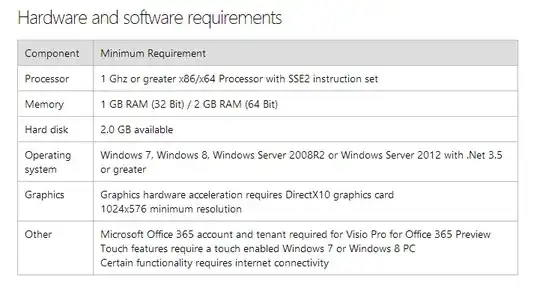
Visio 2013 Hardware and software requirements

127 questions
15
votes
5 answers

How can I change the text position of connector?

When I label a connector, the text appears at the midpoint. I can manually change its position. What I basically want to do, is either a) to place the text close to the end (arrow) or b) at its beginning. I do not want to move all labels manually.…
Horst Walter
  • 2,011
10
votes
1 answer

In Visio 2013, how do I remove bend points in connectors/lines?

If using curved connectors, the connectors have bend points. These make it very difficult to make the curved connectors look good, if you move them. How can you remove some of these bend points? I would think you hold down shift, alt or something,…
Kjensen
  • 6,644
7
votes
3 answers

How to add arrows to Visio Activity Diagram Connector?

How do you add arrows to the connectors in a Visio Activity Diagram? As per the picture, explicitly setting an arrow doesn't work. Unlike the "UML" Use Case Diagram, the Activity Diagram doesn't appear to have it's own custom connectors.
PeterX
  • 5,251
7
votes
2 answers

How to change the direction of the callout line/tail in Visio 2013?

I want a call-out to have the line on the top of the text box, but it always snaps below when attached to a shape. The callout will be inside the top of the shape in a white space area pointing to a line inside the shape above it.
6
votes
1 answer

Can I reverse the arrows in Visio 2013

The arrows are pointing down in my organisation chart. I want to keep the rectangles in same spot but the arrow end should be upwards. Is it possible to reverse the direction of the arrows automatically ?
Noitidart
  • 234
3
votes
2 answers

Visio 2013: Share a background page among multiple pages

I have a simple Visio 2013 Drawing (document), with a single page and a separate "background page." I have added a second (third, really) page to the Visio document. Instead of creating a new background page, I would like to share the background…
3
votes
2 answers

How to rotate the entire page in Visio 2013

I would like to rotate an entire page, including all of the shapes and text on it. I see here that you can supposedly hold down Ctrl and click-drag the corner of the page to do it like described here. ... however I can't get this to work. …
loneboat
  • 519
3
votes
1 answer

Visio 2013 Missing UML Shapes

In a freshly installed version of Visio 2013, all of the UML shapes are missing. When creating a new diagram, I see various UML diagrams available under 'Software' including UML State Machine, UML Class, UML Use Case, UML Sequence, etc. When I…
3
votes
2 answers

How to display callbacks in sequence diagrams Visio 2013?

I want to sketch a sequence diagram including callbacks. Poorly Visio 2013 transforms my arrows / messages in dashed return messages. How can I disable this behavior? Here is a minimal example. All Messages are inserted as Messages, two of them were…
gnod
  • 453
  • 5
  • 6
2
votes
0 answers

How do I enforce margins for a Visio 2013 diagram?

I have a Visio 2013 timeline that spans several pages in landscape view. When printing, I would like for the margins I set around the page to be observed; however, Visio is running the illustration to the edge of the paper regardless of whether I…
2
votes
1 answer

Force snapping on grids in Visio 2013

I am using visio 2013 right now. And I have some troubles with snapping on the grids. Is it possible to force snapping on grids? So it'll never go outline? Thanks in advance!
1
vote
0 answers

Can an Excel object reference the Visio page it's on?

I have an Excel table object that is on my Visio project. The table is on the first page and is an index of the following pages. I am trying to write a formula in the cells that will reference the names of each page in my Visio Project. That way I…
Andy
  • 11
1
vote
0 answers

Visio 2013 Looking for a way to have a title for each page

I can reference the Page.Name but I would also like to have a more specific and longer title than what I use in the Page.Name field. For Example Page.Name = DWG-0001 and Page.Title = "Boiler #2 Air Controllers" Any ideas on how to achieve this? I…
Mike
  • 11
1
vote
0 answers

How to place the Green snap/glue points on a visio symbol

I have created my own symbols in Visio 2013. How do I place the Green Snap/Glue points on the lower left and right of a symbol? I have tried to used the "X" command, seems to set two points but they do not snap/glue to an existing Visio Equipment…
Mike
  • 11
1
vote
0 answers

MS Visio 2013 swimlane issue

Hi This questions is about MS Visio 2013. Is there any way to split the first vertical separator so when I center the lane heading it is actually in the center? Also is there a way to equally separate vertical swimlanes? Thanks for your help
1
2