Is it possible to produce a PDF with un-copyable text? I mean, when you want to copy text from the PDF, you can't copy it or what you copy is nonsense characters.
Asked
Active
Viewed 6.5k times
87


12 Answers
51
Besides converting all texts to images, one method as I know, is to destroy the Cmaps of the fonts. We can use cmap package and a special cmap file for this purpose. This cmap file is generated inside the VerbatimOut environment.
(Warning: it does not make much sense to produce un-copyable PDF. OCR is very easy today.)
% pdflatex is required
\documentclass{article}
\usepackage[resetfonts]{cmap}
\usepackage{fancyvrb}
\begin{VerbatimOut}{ot1.cmap}
%!PS-Adobe-3.0 Resource-CMap
%%DocumentNeededResources: ProcSet (CIDInit)
%%IncludeResource: ProcSet (CIDInit)
%%BeginResource: CMap (TeX-OT1-0)
%%Title: (TeX-OT1-0 TeX OT1 0)
%%Version: 1.000
%%EndComments
/CIDInit /ProcSet findresource begin
12 dict begin
begincmap
/CIDSystemInfo
<< /Registry (TeX)
/Ordering (OT1)
/Supplement 0
>> def
/CMapName /TeX-OT1-0 def
/CMapType 2 def
1 begincodespacerange
<00> <7F>
endcodespacerange
8 beginbfrange
<00> <01> <0000>
<09> <0A> <0000>
<23> <26> <0000>
<28> <3B> <0000>
<3F> <5B> <0000>
<5D> <5E> <0000>
<61> <7A> <0000>
<7B> <7C> <0000>
endbfrange
40 beginbfchar
<02> <0000>
<03> <0000>
<04> <0000>
<05> <0000>
<06> <0000>
<07> <0000>
<08> <0000>
<0B> <0000>
<0C> <0000>
<0D> <0000>
<0E> <0000>
<0F> <0000>
<10> <0000>
<11> <0000>
<12> <0000>
<13> <0000>
<14> <0000>
<15> <0000>
<16> <0000>
<17> <0000>
<18> <0000>
<19> <0000>
<1A> <0000>
<1B> <0000>
<1C> <0000>
<1D> <0000>
<1E> <0000>
<1F> <0000>
<21> <0000>
<22> <0000>
<27> <0000>
<3C> <0000>
<3D> <0000>
<3E> <0000>
<5C> <0000>
<5F> <0000>
<60> <0000>
<7D> <0000>
<7E> <0000>
<7F> <0000>
endbfchar
endcmap
CMapName currentdict /CMap defineresource pop
end
end
%%EndResource
%%EOF
\end{VerbatimOut}

\usepackage{lipsum}

\begin{document}

\lipsum

\end{document}


-
your method worked. thank you. but if i change
\documentclass{article}to\documentclass[titlepage,a4paper,12pt]{article}, it didn't work. – warem Feb 18 '11 at 02:33 -
i just found if i didn't define
12ptat the beginning, then defined a newcommand to set the default font size later, your method worked now. i don't why. on the other hand, your method works for the whole text, is it possible to just work part of text? – warem Feb 18 '11 at 03:15 -
resetfontsdoesn't work for12pt. You can followcmap.styto undefine more predefined fonts. I have no much time. – Leo Liu Feb 18 '11 at 05:48 -
thank you for your instruction. i added some font size into the definition of
resetfonts, then it worked now. – warem Feb 18 '11 at 07:44 -
8That method does not work me. My evince allows me happily to copy and paste the text. Also
pdftotextextracts all the available text. So this method does not work. – Frederick Nord Feb 14 '13 at 20:51 -
About your comment on OCR,
"OCR is very easy today.": In languages other thanEnglish, it is not that easy. Moreover, latex is mostly used for mathematical type-setting, is a good OCR is good enough to understand mathematical symbols, subscripts etc? Hyper-links will not also work here. – hola Jul 25 '14 at 07:15 -
@pushpen.paul: AFAIK, Chinese OCR is quite easy today. For mathematical typesetting, usually you cannot copy/search the formulas in the PDF files -- you don't even need to do any trick for that. – Leo Liu Jul 25 '14 at 08:20
-
Actually, @LeoLiu, in my language,
Bengali, there are only a handful of discrete attempts to make an OCR; and non of them is at least moderate,to the best of my knowledge. You are right about mathematical things. – hola Jul 25 '14 at 09:06 -
This solution doesn't work for me: text can still be copied in Mac OS X Preview. – jub0bs Aug 08 '14 at 16:08
-
1
-
1@LeoLiu There is absolutely lots of value in doing this. For instance, I want to publicly post the PDF of my resume to LinkedIn, but I don't want spambots to harvest my email address or phone number. In this case, I want these bits to be unparseable by anyone other than humans. – Dr Krishnakumar Gopalakrishnan Feb 11 '19 at 21:12
-
Sometimes TeX already generate broken font for some reason, so knowledge about CMap can help recovering them more accurately than OCR (although unfortunately as far as I know there's no such program that does it yet). See also https://tex.stackexchange.com/a/41698/250119 – user202729 Dec 25 '21 at 08:32
32
Luatex allows manipulating fonts in the define_font callback.
Luaotfload facilitates this even more with an extra hook it installs
right after the font loader has finished its job: the
luaotfload.patch_font callback.
Normally it is used for serious and constructive tasks like setting a
couple font dimensions or ensuring backward compatibility in the data
structures.
Of course, it can also be abused for dirty hacks like disabling copy
and paste.
At the point where the patch_font callback is applied, the font is
already defined and ready to use.
All necessary tables are created and put in a place where Luatex
expects them.
Among these is the characters table that holds preprocessed
information about the glyphs.
In the below code we modify the tounicode field of each glyph so
that it maps to some random location within the printable ASCII range.
Note that this does not affect the shape and metrics of the glyph since
those are unrelated to the actual codepoint.
As a consequence, the PDF will contain legible text that cannot be
copied.
Package file obfuscate.lua:
packagedata = packagedata or { }

local mathrandom    = math.random
local stringformat  = string.format

--- this is the callback by means of which we will obfuscate
--- the tounicode values so they map to random characters of
--- the printable ascii range (between 0x21 / 33 and 0x7e / 126)

local obfuscate = function (tfmdata, _specification)
  if not tfmdata or type (tfmdata) ~= "table" then
    return
  end

  local characters = tfmdata.characters
  if characters then
    for codepoint, char in next, characters do
      char.tounicode = stringformat ([[%0.4X]], mathrandom (0x21, 0x7e))
    end
  end
end

--- we also need some functions to toggle the callback activation so
--- we can obfuscate fonts selectively

local active = false

packagedata.obfuscate_begin = function ()
  if not active then
    luatexbase.add_to_callback ("luaotfload.patch_font", obfuscate,
                                "user.obfuscate_font", 1)
    active = true
  end
end

packagedata.obfuscate_end = function ()
  if active then
    luatexbase.remove_from_callback ("luaotfload.patch_font",
                                     "user.obfuscate_font")
    active = false
  end
end
Usage demonstration:
%% we will need these packages
\input luatexbase.sty
\input luaotfload.sty

%% for inspecting the pdf with an ordinary editor
\pdfcompresslevel0
\pdfobjcompresslevel0

%% load obfuscation code
\RequireLuaModule {obfuscate}

%% convenience macro
\def \packagecmd #1{\directlua {packagedata.#1}}

%% the obfuscate environment, mapping to Lua functions that enable and
%% disable tounicode obfuscation
\def \beginobfuscate {\packagecmd {obfuscate_begin ()}}
\def \endobfuscate   {\packagecmd {obfuscate_end   ()}}

%%···································································%%
%% Demo
%%···································································%%

%% firstly, load some fonts. within the “obfuscate” environment all
%% fonts will get their cmaps scrambled ...

\beginobfuscate

  \font \mainfont   = "file:Iwona-Regular.otf:mode=base"
  \font \italicfont = "file:Iwona-Italic.otf:mode=base"

\endobfuscate

%% ... while fonts defined outside will have the mapping intact

\font \boldfont       = "file:Iwona-Bold.otf:mode=base"
\font \bolditalicfont = "file:Iwona-BoldItalic.otf:mode=base"

%% now we can use them in our document like any ordinary font

\mainfont
obfuscated text before {\italicfont     obfuscated too} and after \par
obfuscated text before {\boldfont       not obfuscated} and after \par
obfuscated text before {\bolditalicfont not obfuscated} and after \par

\bye
Result in PDF viewer:

Contrast this with the output of pdftotext:
\rf2yC'I_J I_dI r_f\{_ 9;H`bp<<L& <99 '5J 'fI_{
\rf2yC'I_J I_dI r_f\{_ not obfuscated '5J 'fI_{
\rf2yC'I_J I_dI r_f\{_ not obfuscated '5J 'fI_{
But please forget about all this immediately and never obfuscate a production text -- don’t be mean to your readers!
EDIT Because the generous karma donor specifically asked for a Context solution, I’ll throw that one in as a bonus. It is a good deal more elegant since it relies on the font goodies mechanism that allows applying postprocessors to specific fonts which can afterwards be used just like common font features.
\startluacode

local mathrandom    = math.random
local stringformat  = string.format

--- create a postprocessor

local obfuscate = function (tfmdata)
  fonts.goodies.registerpostprocessor (tfmdata, function (tfmdata)
    if not tfmdata or type (tfmdata) ~= "table" then
      return
    end

    local characters = tfmdata.characters
    if characters then
      for codepoint, char in next, characters do
        char.tounicode = stringformat ([[%0.4X]], mathrandom (0x21, 0x7e))
      end
    end
  end)
end

--- now register as a font feature

fonts.handlers.otf.features.register {
  name         = "obfuscate",
  description  = "treat the reader like a piece of garbage",
  default      = false,
  initializers = {
    base     = obfuscate,
    node     = obfuscate,
  }
}

\stopluacode

%%···································································%%
%% demonstration
%%···································································%%

%% we can now treat the obfuscation postprocessor like any other
%% font feature

\definefontfeature [obfuscate] [obfuscate=yes]

\definefont [mainfont]   [file:Iwona-Regular.otf*obfuscate]
\definefont [italicfont] [file:Iwona-Italic.otf*obfuscate]

\definefont [boldfont]       [file:Iwona-Bold.otf]
\definefont [bolditalicfont] [file:Iwona-BoldItalic.otf]


\starttext

  \mainfont
  obfuscated text before {\italicfont     obfuscated too} and after \par
  obfuscated text before {\boldfont       not obfuscated} and after \par
  obfuscated text before {\bolditalicfont not obfuscated} and after \par

\stoptext

doncherry
- 54,637

Philipp Gesang
- 7,533
-
4I'll see your obfuscator and raise you by some free OCR package :D – Mark K Cowan Nov 06 '13 at 15:20
-
3@Mark Never mind OCR, this is deterministic 1 to 1 character mapping: t=I, e=_, x=d, etc. A few minutes with a document could produce a
sedsubstitution expression for all the changed glyphs. Pipe yourpdftotextinto that and you have a 100% fix. All this does is waste both author (and reader) time without actually solving anything but making them feel like they have. Poor-mans-DRM is even worse than the real thing. – Caleb Dec 20 '14 at 15:49 -
2@Caleb I disagree with your view on this. There is absolutely value in doing this. For instance, I want to publicly post the PDF of my resume to LinkedIn, but I don't want spambots to harvest my email address or phone number. In this case, I want these bits to be unparseable by anyone other than humans. – Dr Krishnakumar Gopalakrishnan Feb 11 '19 at 21:13
-
Can you give a real-world demo of how to use this with lualatex and, e.g.,
articledocument class? I don't know how to use it :-( – bonanza May 08 '19 at 09:47 -
@bonanza Does https://tex.stackexchange.com/questions/485522/how-to-obfuscate-text-in-latex-class work for you? – CampanIgnis Sep 08 '20 at 00:11
-
1I see many complaints that there is no value in doing this and it should never be done, yet not all pdfs are created for production and distribution where they will be immediately hacked. For instance, I am programming instructor. I occasionally want to give my beginning students sample code that they have to type out in order to learn basic programming. Some of the code can be modified to answer homework problems. I do not want them simply copying and pasting the code, so I give obfuscated pdfs. If a student were to un-obfuscate it and I found out, great! I'd say good job and make a new one. – Kallaste Dec 10 '21 at 00:34
22
Remarks
I use a little script, which converts all my fonts to paths. The script uses the first parameter as input of a .pdf-file and writes the output to a file with the same name and the extension-rst.pdf
You need Ghostscript for my script to run.
Implementation
Runs on bash
#!/bin/sh
GS=/usr/bin/gs
$GS -sDEVICE=ps2write       -dNOCACHE -sOutputFile=-        -q -dBATCH -dNOPAUSE "$1"       -c quit | ps2pdf - > "${1%%.}-rst.pdf"
if [ $? -eq 0 ]; then
    echo "Output written to ${1%%.}-rst.pdf"
else
    echo "There were errors. See the output."
fi
use ps2write (instead of pswrite) these days as seen here.
Result


user202729
- 7,143

Henri Menke
- 109,596
-
-
7Well I guess, that there is no way to trick any OCR Software (without adding things, like striking/crossing the text out), because the OCR Software can read, what you can read. – Henri Menke Aug 12 '13 at 20:50
-
1Specialised OCR software can break some types of CAPTCHA too... You can use excessive striking/deforming/noise to harden your file against this, but then humans won't be able to read half of it either! – Mark K Cowan Aug 12 '13 at 23:52
-
1Your script works, but (at least on my files, which are slides produced with beamer) produces very pale and large files. It also takes a relatively long time to finish. – Anthony Labarre Oct 22 '13 at 08:46
-
Do I need to locate the file that I want to convert at the first line of the script. I tried with script command sudo bash .script_file_name It generate -rst.pdf file. Please suggest me. Thanks. – Nivir Nov 24 '13 at 01:44
-
1@Trickster You run it like
bash script_name "path/to/pdf/file". You don't needsudoas no additional privileges are needed for this script. – Henri Menke Nov 24 '13 at 09:30 -
What is the image supposed to show? I'm not sure the blank guarantees anything... – cfr Aug 25 '14 at 03:41
-
5Ghostscript has been improved and can do it on its own nowadays, gs -o file-with-outlines.pdf -dNoOutputFonts -sDEVICE=pdfwrite file.pdf. – arnt Nov 28 '19 at 08:28
-
Note that using the method in this answer will make it slightly rasterized, while using
-sDEVICE=pdfwritedoesn't. – user202729 Nov 18 '22 at 02:47 -
Can you remove only specific fonts? For example if you want to hide only some parts of the doc, you would use a specific font just for these parts. – PlasmaBinturong Sep 17 '23 at 16:23
21
You can disable the copying of text with the help of PDF encryption. With it you can also disable other things like printing.
You need to use an external PDF tool like pdftk or of course the full version of Adobe Acrobat to encrypt the PDF.

Martin Scharrer
- 262,582
-
11However, encryption doesn't work for (almost all as I know) non-Adobe PDF readers. – Leo Liu Feb 17 '11 at 15:14
-
1I often use a certain open-source reader (with just one line of code commented out) to bypass PDF protection and passwords. Anyone familiar with SourceForge, GIT and MAKE can easily roll their own in a matter of minutes too. – Mark K Cowan Aug 12 '13 at 23:54
-
@MarkKCowan I know of other, less sophisticated (if but also effective) ways than what you describe; out of sheer curiousity (though that curiousity is not that large that I'd try and patch it myself): Could you provide more verbose details or a link to a commented (indicating the commented-out line) GIT ? - sry about the overuse of (brackets); I'm drunk. – nutty about natty Aug 14 '13 at 20:22
-
It was a long time ago when I built it. I think it was a Java application, there was one particular line which was a const "final boolean
= – Mark K Cowan Aug 14 '13 at 23:27;" which related to password protection. Apparently, Ubuntu was the only distro where the password protection had been enabled, so I flipped that boolean and recompiled to produce a binary which didn't bother with the whole password fake-DRM stuff. Strictly speaking, I changed the value of a boolean constant, rather than commenting out a line. -
Okular has a user setting which determines whether it recognises DRM or not... – cfr Aug 25 '14 at 03:39
-
12
If content can be viewed, it can be copied. No matter what encryption and restrictions are used, at some point the content must be put out in plain view in order for it to be of any use. This is probably true of all digital content and most physical content larger than the nanoscale...
For example, a PDF:
- Rasterisation: Printscreen => OCR
- Any protection: Re-type it out
- Content protection: Modified build of an open-source reader
Web content:
- Right-click popup: Opera=>Prevent page receiving content menu events
- Right-click popup: "Menu" button on any modern keyboard
- Flash: Download the SWF file, decompile it using free software
- View page source, use Chrome/Opera/Firefox debugger to get URL of desired content
Audio (e.g. HDCP):
- Headphones socket on TV => line-in socket on PC
- Solder to tap into preamplifier => line-in socket on PC
Video (e.g. HDCP):
- Many, many options... A quick google search will show you.
Encrypted content on someone's laptop/pendrive:
- Digital brute force: brute-force cracking of the encryption key
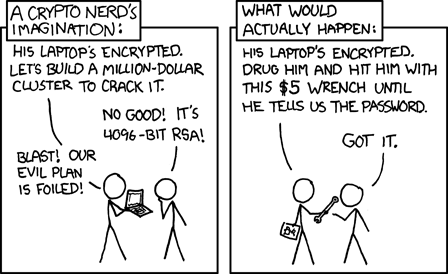
- Physical brute force: http://imgs.xkcd.com/comics/security.png

Mark K Cowan
- 303
-
One of these is not like the others. The last item is both wrong and a different scenario from your premise. – Caleb Dec 20 '14 at 15:54
-
A possible use case is to prevent e.g. the line numbers of a piece of code to be copied. – Trebor Feb 27 '23 at 05:02
5
The answer is: Yes. There is a way described here: http://spivey.oriel.ox.ac.uk/corner/Obfuscated_PDF
But it looks tedious and doesn't use pdflatex. The method, however, is described as being portable to PDF. It involves changing glyphs of a font and other dirty things that get you bad dreams.
I didn't find a method described for directly PDF let alone something automated for pdflatex. I'll happily buy you a beverage of your choice if you implement it :-)

Frederick Nord
- 1,230
4
You can use Ghostscript for that. Just create your PDF as usual and run
gs -o output.pdf -dNoOutputFonts -sDEVICE=pdfwrite input.pdf
Please note that you cannot prevent people from using OCR software like Tesseract on the output. I'm not even sure if making the PDF an image prevents todays search engines from indexing your PDF. The file size increases, people with eye problems will have a harder time. So think hard if you really want to harm your readers like that.

Martin Thoma
- 18,799
3
You can use ImageMagick to convert the pdf to an image pdf.
Running
convert file1.pdf file2.pdf
will create a pdf called file2.pdf which is about the same size as the input pdf but since its an image, the text cannot be selected. There is a notable decrease in quality though

Matt G
- 173
2
I am using gswin32 only make a pdf after change the format to ps:
"C:\Program Files (x86)\gs\gs9.09\bin\gswin32.exe" -sDEVICE=ps2write -r9000
-dNOPAUSE -sOutputFile=OUTPUT.ps input_insecure.pdf
Now translate to pdf with secure mode 4 (only read and print):
"C:\Program Files (x86)\gs\gs9.09\bin\gswin32.exe" -sDEVICE=pdfwrite -r9000
-dNOPAUSE -sPAPERSIZE=a4 -dPDFSETTINGS=/prepress -dMaxSubsetPct=100
-dSubsetFonts=true -dEmbedAllFonts=true -sOwnerPassword=null -dEncryptionR=3
-dKeyLength=40 -dPermissions=4 -sOutputFile=OUTPUT_secure.pdf output.ps
On a unix-based system, you can probably type gswin32 instead of "C:\Program Files (x86)\gs\gs9.09\bin\gswin32.exe".

Mico
- 506,678

-
I tried your solution and https://gist.github.com/MartinThoma/c268f5c356421a82ed31417837c27d03 - it seems like none of my PDF viewers respect this permission – Martin Thoma Mar 18 '23 at 17:34
1
Use XeTeX to at least get some "nonsense characters", see here and here.
Though this would obviously be just a nuisance for most cases/users (which can be avoided using LuaLaTeX instead), depending on what you are trying to achieve compiling with XeTeX may prove to add at least some value to your solution...


nutty about natty
- 2,609
1
I came up with the following solution:
I'm using ocrmypdf (https://github.com/jbarlow83/OCRmyPDF) which behind the scenes uses Tesseract, and I force it to OCR my pdf in a language with a very different alphabet (e.g. Korean). This will effectively replace my text content with none-sense, because of the differences in alphabets.
ocrmypdf --force-ocr -l kor input.pdf output.pdf

gvdenbro
- 11
-
Nice, the only thing, however, is that coloured texts is rendered as a dotted pattern (see https://imgur.com/wtdXk5A, where the text was dark blue). – NVaughan Aug 20 '19 at 22:39
0
I don't think anyone has mentioned you can use expensive paid for security to try and stop screen grabbing. (You use a dedicated coded viewer and that monitors the system for known applications)
However as I have seen that defeated both by above mentioned "Typist" technique and also seen it cannot detect some "freeware" screen OCR grabbers, It would be pointless for anyone else to have given this as a valid answer.
Especially if they have a camera phone with OCR app or can hit the alternative "PrintScreen" button.
Please buy more snake oil it keeps the PDF industry thriving.
XeTeXto at least get some "nonsense characters" http://tex.stackexchange.com/a/49794/27721 – nutty about natty Aug 14 '13 at 20:27